To access restricted YouTube videos in 2026, users can bypass network firewalls and geo-blocks by utilizing web proxies, VPNs, mobile hotspots, or alternative front-end platforms.
- Quick bypasses: Modifying DNS settings, forcing HTTPS, or using Google Translate as a temporary proxy can resolve basic local network restrictions without software installation.
- Advanced security: Bypassing Deep Packet Inspection (DPI) on institutional networks requires obfuscated servers, VPNs, or SOCKS5 residential proxies to effectively mask traffic patterns.
- Privacy considerations: While free web proxies provide immediate single-tab access, they carry data logging risks, making dedicated residential IPs the most secure option for continuous, high-definition streaming.
If you are frequently blocked from viewing specific clips, this guide details the mechanics behind network restrictions and provides actionable methods to restore access. Whether you need a temporary workaround for a single video or a stable, encrypted connection for long-term streaming, the solutions below are tested for the 2026 digital landscape.
Understanding YouTube Blocking: What Is It?
YouTube blocking is a network or regional restriction that prevents access to specific videos or the entire platform. It occurs when your device’s IP address matches a blacklist enforced by government firewalls, school networks, or geo-licensing agreements.
In most cases, blocking occurs at the network or regional level. YouTube identifies users through their IP address, a unique digital identifier that reveals location and network settings. If your IP matches a restricted list, the platform automatically denies access.

There are three main forms of restriction:
- Geo-blocking: Limits a video to certain countries based on copyright licensing.
- Network-level blocking: Stops YouTube traffic on public Wi-Fi, school, or workplace networks via firewall rules.
- Platform restrictions: Applies age limits or account-based censorship to specific channels.
10 Ways to Access YouTube Unblocked
The following methods range from quick, no-installation tricks to advanced routing setups. They are rated based on effectiveness, speed, and security.
Quick Access Methods (No Installation Required)
Switching from HTTP to HTTPS
If the standard HTTP protocol is blocked by a basic firewall, forcing an SSL connection by typing https://www.youtube.com can sometimes bypass rudimentary filters.
Effectiveness: Medium
How Google Translate Acts as a Temporary Proxy
Pasting a YouTube URL into Google Translate and clicking the translated link routes your request through Google’s servers, effectively masking your destination from local network filters.
Effectiveness: Medium
Using URL Shorteners to Bypass Basic Filters
Network administrators often blacklist the exact string “youtube.com”. Tools like TinyURL or Bitly generate an alternative domain that redirects to the video, occasionally slipping past basic text-based firewalls.
Effectiveness: Low-Medium

How to Use a Mobile Hotspot to Bypass Network Restrictions
Disconnecting from the restricted Wi-Fi and tethering your device to a cellular mobile hotspot shifts your traffic entirely off the monitored network.
Effectiveness: High
Modifying DNS Settings for Network-Level Bypasses
ISPs and local networks often use their own Domain Name System (DNS) to block sites. Switching to public DNS servers like 8.8.8.8 or 8.8.4.4 (Google DNS) resolves the domain independently.
Effectiveness: Medium-High
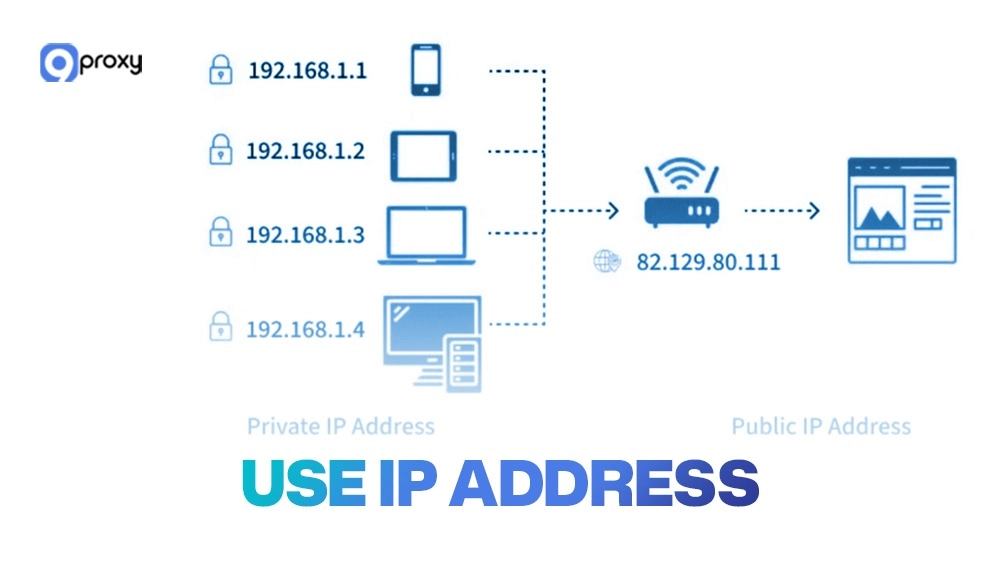
Accessing via Direct IP Address
Typing the direct IP address of YouTube into the browser bar instead of the domain name can bypass weak DNS-based blocking.
Effectiveness: Low
Best Free Unblocked YouTube Proxy Sites to Try in 2026
Proxy sites act as an intermediary, fetching the YouTube video on your behalf and sending it to your browser. This masks your IP and bypasses local network blocks.
For immediate viewing without altering system settings, third-party web proxies are highly effective. Here are top options utilizing SSL encryption to keep your streaming activity hidden from network admins:
- CroxyProxy: Specifically optimized for video streaming. Pros: Excellent HTML5 video support. Cons: Free version includes banner ads.
- Proxyium: Offers fast routing with no download limits. Pros: Allows you to choose between multiple server locations (US, EU). Cons: Can struggle with live streams.
- ProxFree: A highly customizable proxy. Pros: Lets you disable cookies and scripts for added privacy. Cons: Interface is dated and sometimes requires manual server switching.
While convenient, free proxies are often the first to be detected and blocked. For broader access, learning about a proxy for blocked sites helps establish more reliable long-term connections.
Web Proxy vs. VPN: Which is the Better Choice for YouTube?
A web proxy routes only the traffic from a specific browser tab, while a VPN encrypts your entire device’s internet connection.
Choosing between them depends on your specific needs:
- Web Proxies: Ideal for quick, targeted tasks. If you only want to unblock a single video without installing software, a proxy is faster and lighter. However, it lacks system-wide encryption.
- VPNs: Best for comprehensive privacy. A VPN secures all background apps and browser traffic. It is the superior choice if you are on unsecured public Wi-Fi, though it may reduce connection speeds due to heavy encryption protocols.
Advanced Browser-Based and Routing Solutions
How Browser Extensions Work for Media Streaming
Browser extensions inject proxy or VPN functionality directly into Chrome, Firefox, or Edge. They are popular for users who frequently switch between regional content on platforms like YouTube, or need a Spotify proxy server to maintain smooth music access across borders.
When selecting an extension, verify developer reputation and privacy policies. Extensions are also heavily used for social media management, such as integrating a tiktok proxy server. Proper configuration is essential; understanding proxy server chrome settings prevents IP leaks.
Alternative YouTube Front-End Platforms
If you want to bypass regional blocks while avoiding Google’s interface entirely, an Alternative Front-End is highly effective. Open-source platforms like Invidious or Piped extract YouTube content and display it on a clean, decentralized interface. These platforms support standard HLS and AVI codecs, ensuring high-quality playback without requiring a Google account or exposing you to targeted ads.
How to Watch YouTube Without Cookies or Tracking
Privacy-conscious users can utilize YouTube’s native “nocookie” domain. By changing the URL format from youtube.com/watch?v= to youtube-nocookie.com/embed/, you prevent the platform from dropping tracking algorithms onto your browser. This method is often combined with proxy networks to achieve complete anonymity.
Tor Browser: Privacy Over Speed
The Tor Browser routes traffic through a decentralized network of volunteer relays, masking your identity. According to the Electronic Frontier Foundation (EFF), using Tor is legal in most jurisdictions and serves as a vital tool for digital privacy. However, the multi-layer encryption significantly reduces bandwidth, making it less than ideal for HD video streaming.
How to Safely Access Unblocked YouTube Sites on School Wi-Fi
Accessing restricted content on institutional networks requires masking your traffic to avoid triggering firewall alerts or violating IT policies.
School and corporate networks utilize deep packet inspection (DPI) to monitor activity. To safely bypass these systems:
- Use Obfuscated Servers: Premium VPNs and SOCKS5 proxies offer obfuscation, which scrambles your traffic to look like standard HTTPS data rather than proxy traffic.
- Manage Your Browser Fingerprint: Network admins can track devices via hardware configurations. Utilizing Antidetect browsers helps alter your browser fingerprint, preventing the network from tying the bypass attempt to your specific machine.
- Avoid Free Executables: Never download unverified unblocking software onto a school computer, as this frequently triggers malware alerts. Stick to web-based proxies or mobile hotspots.
Security, Privacy, and Legal Considerations
Free unblocking tools carry inherent risks. Unverified proxies frequently inject adware, log browsing history, or utilize weak encryption that exposes your data to network administrators.
If you encounter connection errors like cant locate the internet server or proxy, it typically indicates a misconfigured port or an active firewall blocking the proxy IP. Always ensure your proxy supports HTTPS to encrypt the data packet payload.
Legally, bypassing geo-blocks is generally permissible for personal viewing, though it contradicts YouTube’s Terms of Service. In strict censorship regimes, utilizing circumvention tools may carry legal consequences. Always prioritize ethical access for research, education, or fair entertainment.
Comparison Guide: Choosing the Right Unblocking Method
The table below evaluates the primary methods based on setup complexity, performance, and security.
| Method | Setup Difficulty | Speed | Security | Works at School/Work | Free |
|---|---|---|---|---|---|
| HTTP → HTTPS | Very Easy | 4/5 | 2/5 | Yes | Yes |
| URL Shortener | Easy | 2/5 | 1/5 | Yes | Yes |
| DNS Change | Medium | 4/5 | 4/5 | Yes | Yes |
| Web Proxy | Easy | 3/5 | 2/5 | Yes | Yes |
| SOCKS5 Proxy | Medium | 5/5 | 5/5 | Yes | No |
| VPN | Medium | 4/5 | 5/5 | Yes | No |
| Tor Browser | Medium | 2/5 | 5/5 | Yes | Yes |
| Mobile Hotspot | Easy | 4/5 | 3/5 | Yes | Yes |
Beyond video streaming, mastering these routing techniques expands your capabilities in other areas. Understanding diverse proxy use cases allows you to apply these methods to market research, web scraping, and global account management.
Recommended Tool: Why Advanced Users Choose 9Proxy
For users who require consistent, high-speed access without the security risks of free tools, configuring a dedicated proxy network is the most stable solution. 9Proxy provides infrastructure designed for seamless media streaming and data protection.
- Authentic Residential IPs: Access a residential proxy pool covering 90+ countries, utilizing real ISP connections to bypass strict geo-blocks without triggering CAPTCHAs.
- Unmetered Bandwidth: Pricing is structured per IP rather than data consumption, allowing for unlimited HD video streaming.
- Advanced Protocol Support: Full compatibility with SOCKS5, HTTP, and HTTPS protocols ensures encrypted, high-speed routing.
- Custom Configurations: For developers, integrating a node unblocker with 9Proxy’s network provides absolute control over traffic routing.
Conclusion
Restoring access to restricted videos requires matching the right tool to the specific network barrier. While quick fixes like URL shorteners or DNS modifications work for basic firewalls, advanced restrictions demand encrypted proxies or alternative front-ends. By prioritizing secure, reputable infrastructure, you can maintain reliable and private access to global content.
Frequently Asked Questions (FAQ)
What is YouTube blocking and why does it happen?
YouTube blocking is a network or regional restriction that prevents access to specific videos or the entire platform. It happens when your device’s IP address matches a blacklist enforced by government firewalls, school or workplace networks, or regional geo-licensing agreements.
What are the main types of YouTube restrictions?
There are three primary forms of restrictions: geo-blocking, which limits video access based on country-specific copyright licensing; network-level blocking, which restricts traffic on public, school, or workplace Wi-Fi; and platform restrictions, which involve age limits or account-based censorship.
How can I quickly bypass YouTube blocks without installing software?
You can bypass basic local network filters without software by forcing an HTTPS connection, using URL shorteners to hide the exact “youtube.com” domain from network administrators, or pasting the video URL into Google Translate to temporarily use Google’s servers as a proxy.
What is the most secure way to access and stream restricted YouTube videos?
While free web proxies offer quick access, the most secure method for continuous, high-definition streaming involves using dedicated residential IPs, SOCKS5 proxies, or VPNs. These tools provide encrypted connections and can bypass advanced restrictions like Deep Packet Inspection (DPI) without the data logging risks associated with free proxies.