TikTok Proxy Server is a practical tool when TikTok is blocked by school Wi-Fi, office networks, or country limits, and it can also help you manage accounts with cleaner separation. At 9Proxy, we want to set expectations early: a proxy is not magic, and it does not guarantee you will avoid checks or bans.
This article is built for everyday users, creators, and social media managers who need to unblock TikTok, handle multiple profiles, or understand what a TikTok local proxy server setup really means. We will show you how to choose between residential and mobile IPs, set up your connection on Android, iPhone, Windows, and macOS, and fix common errors so you get a smoother, more reliable TikTok experience.

What Is a TikTok Proxy Server?
A TikTok Proxy Server is a middle connection between your device and TikTok. Instead of connecting to TikTok directly, your traffic goes to a proxy first, and the proxy communicates with TikTok using its own IP address. This means TikTok sees the proxy IP rather than your real home or office IP, which can help bypass network or location restrictions.
However, a proxy does not hide your TikTok account history, device behavior, or past actions. In simple terms, a TikTok Proxy Server changes how your connection is routed, not who your account is or how TikTok evaluates it.
Local TikTok Proxy Servers: When You Need Location-Based IPs
In social media, the term “local” means using proxy IP addresses from a specific country or region. A TikTok local proxy server is useful when you want your feed, videos, or account activity to match a certain audience. TikTok often ranks and delivers content based on IP location, so using a regional IP can help your content appear more relevant in that market.
We see strong demand for local IPs in these regions:
- United States: Access to the largest creator market and global trends
- Indonesia & Vietnam: Major centers for TikTok Shop and e-commerce activity
- United Kingdom & Germany: Key markets for European campaigns
- Brazil: A fast-growing region for viral content
These local IPs are usually available from premium providers with country or city-level targeting. When choosing one, make sure the provider offers a large IP pool in your target region to keep the connection stable.
Benefits of Using a Proxy Server for TikTok
Choosing to use a proxy server for TikTok offers several functional advantages for different types of users. Whether you are dealing with a strict office network or managing a business, these tools provide the flexibility needed to stay online.
Consider these common use cases where a proxy becomes necessary:
- Accessing Restricted Networks: Reaching the platform on school or workplace Wi-Fi, which usually limits social media. This type of restriction is common across entertainment platforms, which is why many users also look for solutions related to YouTube unblocked access when video services are limited on shared networks. Similar strategies are employed by users who manage a Facebook proxy or Instagram proxy to handle multiple accounts safely across various platforms.
- Managing Multiple Profiles: Keeping different business accounts on separate IPs to prevent them from being linked.
- Researching Global Trends: Viewing localized “For You” pages from different countries to study competitors.
- Stabilizing Connections: Using a dedicated IP to avoid issues caused by rotating public addresses.
These situations are similar to other restricted platforms where users rely on a proxy for blocked sites to regain access without changing devices or physical location, especially on controlled school or workplace networks. However, we must be honest: proxies are not a fix-all solution. They cannot help if your specific account has been permanently suspended for content violations. They also won’t work well if your device’s GPS or SIM card data heavily contradicts your proxy location.
How to Set Up a Proxy for TikTok on Mobile Devices
Setting up a connection on mobile can be tricky because the TikTok app is very sensitive to network changes. Unlike a desktop browser, mobile apps often check multiple data points to verify your location.
Android Proxy Setup
Android proxies usually apply to Wi-Fi only. That means if you switch to mobile data, the proxy may stop working. Here is a practical setup flow we recommend:
- Connect to Wi-Fi.
- Open Wi-Fi settings and edit the connected network.
- Set Proxy to Manual.
- Enter the proxy host (IP or hostname) and port.
- Save, then reconnect to Wi-Fi.
- Force close TikTok, then reopen it.
A few checks many people miss:
- Clear TikTok cache if content still looks like the old region.
- Avoid switching countries repeatedly in a short time.
- If videos do not load, try a closer proxy endpoint for better latency.
With a stable endpoint, a TikTok Proxy Server can help unblock access on restricted Wi-Fi networks.
iPhone Proxy Setup
On iPhone, proxy settings also apply to Wi-Fi, not mobile data. iOS setups fail most often due to incorrect formatting or missing authentication details. Use these steps:
- Go to Settings and open Wi-Fi.
- Tap the connected network.
- Scroll to HTTP Proxy and choose Manual.
- Enter Server and Port.
- If your proxy requires a login, enter your username and password exactly as given.
- Save, then reopen TikTok and test loading.
Common fixes:
- Double-check for extra spaces in username and password.
- If TikTok keeps loading slowly, switch to a nearer region.
- If nothing changes, disconnect and reconnect to Wi-Fi, then test again.
A consistent mobile setup is key to a stable TikTok Proxy Server experience.
How to Use a Proxy with TikTok on Desktop
Using TikTok on a computer is generally easier than on mobile because the web version is less aggressive with its tracking. You can choose to apply settings to your whole system or just one specific browser.
Windows Proxy Settings vs Browser Proxy Settings
On Windows, you usually choose between system-wide proxy settings and browser-only proxy settings. The correct option depends on how you use TikTok.
Here is a simple way to decide:
- If you access TikTok through a web browser, a browser proxy is often enough.
- If you use TikTok in an emulator or desktop app, system proxy settings are usually required.
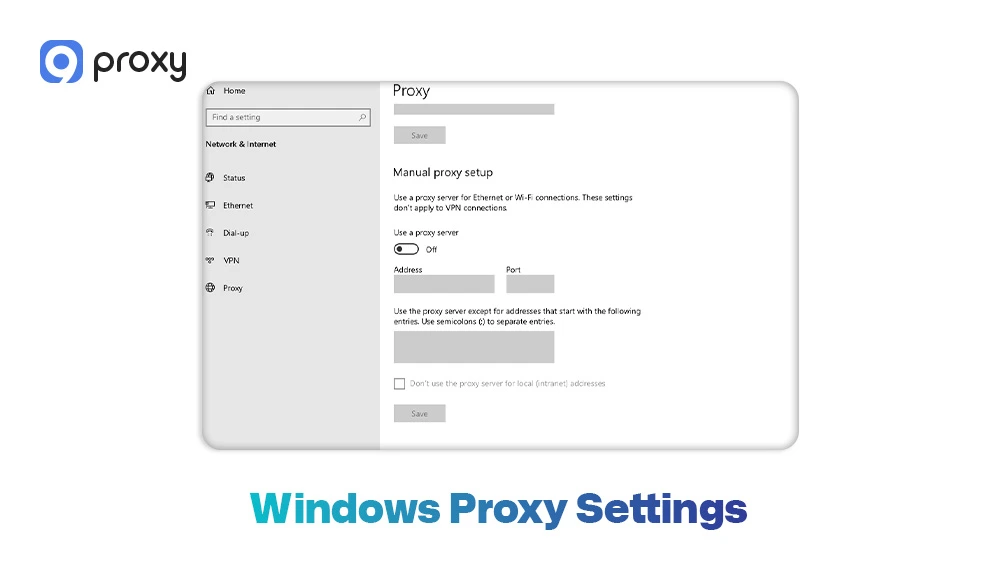
To set up a system proxy on Windows, follow these steps:
- Open Settings and go to Network & Internet
- Click Proxy
- Turn on Manual proxy setup
- Enter the proxy IP address and port, then save the settings
- Restart your browser or TikTok app
To avoid setup problems, do not use a VPN and a proxy at the same time unless you clearly understand how they route traffic. Running both together can cause unstable or inconsistent connections.
macOS Proxy Settings and HTTPS Proxy Confusion
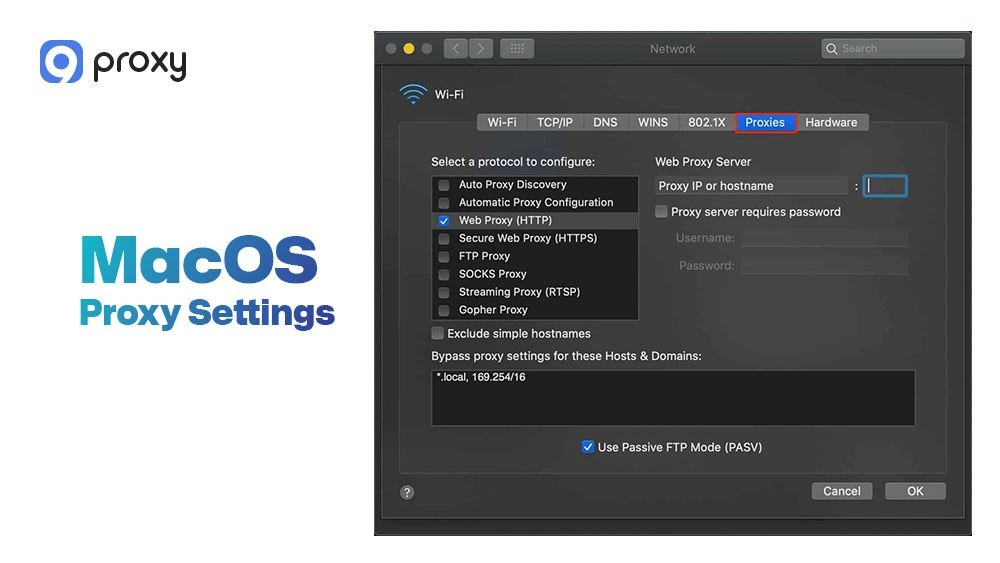
macOS proxy settings can feel confusing because you may see several options, such as HTTP and Secure Web Proxy (HTTPS). Choosing the wrong option can cause TikTok pages to load only partially or fail to play videos.
To set it up correctly, follow these steps:
- Open System Settings and go to Network
- Select your active internet connection and click Details
- Open the Proxies section
- Enable the proxy types supported by your provider, usually HTTP and HTTPS
- Enter the server address, port, and login details if required
- Save the settings and test TikTok in a new browser session
If TikTok loads but videos do not play, DNS issues may be the cause. Try switching to a different proxy endpoint or testing another browser to rule out cache-related problems.
Quick Decision Guide – Choosing the Right Proxy for TikTok
Many of the same principles apply across platforms.
- For Casual Browsing: A basic residential proxy is usually enough to bypass simple network filters.
- For Professional Creators: Mobile proxies are the gold standard because they look exactly like real phone users.
- For Market Research: Rotating residential proxies allows you to scrape data and view trends across many regions quickly.
Residential vs Mobile vs Datacenter Proxies for TikTok
Residential, mobile, and datacenter proxies behave differently on TikTok. The main differences are IP reputation, cost, and how often TikTok challenges the connection.
Before the comparison, here is the simplest way to read it: residential and mobile usually look more like real users, while datacenter is often faster but more likely to get flagged.
|
Proxy Type |
Speed |
Cost |
Detection Risk |
Best For |
|
Residential |
Medium to fast |
Medium |
Low to medium |
Stable browsing, creators, and multi-account separation |
|
Mobile |
Medium |
High |
Low |
Mobile-first TikTok behavior, higher trust signals |
|
Datacenter |
Fast |
Low |
Medium to high |
Testing, short sessions, low-risk browsing |
In most real-world cases, residential or mobile is the safer choice for a TikTok Proxy Server setup. Datacenter can work for light testing, but it may trigger more “suspicious” signals when used heavily.
Proxy Recommendations by Use Case
To make your decision simpler, we have grouped the most suitable options based on the activities users commonly perform on TikTok. Here is a clearer and more user-friendly breakdown of proxy choices based on common needs:
- Unblock TikTok at school or work: Use residential proxies or SOCKS5 with stable endpoints to bypass network restrictions smoothly.
- Creator posting and daily engagement: Choose residential proxies and stick to one region per session to avoid account checks.
- Managing multiple accounts: Use residential or mobile proxies, and assign a separate IP to each account. This approach is also effective when working with a social media proxy to manage presence across multiple platforms simultaneously without triggering security alerts.
- Trend research by country: Use a TikTok local proxy server in the target region and rotate IPs carefully to stay consistent.
- Quick testing: Datacenter proxies can work for short tests, but avoid logging into important accounts.
Following these guidelines helps keep your setup simple and reduces unexpected verification or security prompts.
Check If Your TikTok Proxy Is Actually Working
Testing matters before you log into TikTok. It helps you confirm that the IP changed, the connection is stable, and the content region behaves as expected.
We recommend these simple checks:
- IP check: Visit an IP-check site to confirm your visible IP matches the proxy.
- Region check: Open TikTok and see if “For You” content and trends match the proxy region.
- Stability check: Watch a few videos. If buffering is constant, try a closer endpoint.
Also, remember: TikTok’s behavior is influenced by more than IP. App cache, GPS, SIM, account region settings, and unusual actions can still trigger checks. A TikTok Proxy Server helps with routing, but your overall signals still matter.
Fix Common TikTok Proxy Issues That Stop Your Connection
Sometimes things don’t go as planned. If your connection feels “broken,” it is usually a simple configuration error or an overloaded server node rather than a permanent block.
TikTok Not Loading, Slow Videos, or Connection Errors
If videos are buffering or the app says “No Internet,” the proxy might be too far away or overloaded. Try switching to a different city or node within the same country to find a faster route.
To fix slow speeds:
- Switch from a Datacenter IP to a Residential one.
- Check if your local internet speed is healthy before blaming the proxy.
- Ensure you are using the SOCKS5 protocol if your provider supports it, as it is often faster for video streaming.
Captcha, Verification, or “Suspicious Activity” Warnings
Seeing frequent Captchas means TikTok has flagged your IP as “shared” or “suspicious.” This happens often with low-quality or free services where hundreds of people use the same address.
- Slow Down: Stop liking or commenting rapidly; this triggers security bots.
- Use Static IPs: Rotating IPs too quickly makes it look like you are traveling across the world in seconds.
- Upgrade Quality: Switch to a private residential pool where the IPs are not shared with thousands of others.
Can You Use Free Proxies for TikTok? Risks vs Rewards
It is tempting to look for a free proxy server for TikTok, especially browser-based tools like Node Unblocker, but we strongly advise against using them for anything beyond basic, short-term browsing.
The risks of free proxies include:
- Extremely Slow Speeds: Videos will buffer constantly, making the app unusable.
- Privacy Dangers: Your login credentials could be intercepted by the person running the free server.
- Instant Blocks: Because thousands of people use free IPs, TikTok usually blacklists them within hours.
- Malware: Some free “proxy apps” contain trackers that infect your mobile device.
If you are serious about your account’s safety, a low-cost paid service is a much better investment. It provides the speed and privacy required to enjoy the platform without constant headaches.
Many users who need reliable connections for messaging platforms also opt for a WhatsApp proxy or Omegle proxy to maintain secure and stable communication without the risks associated with free services.
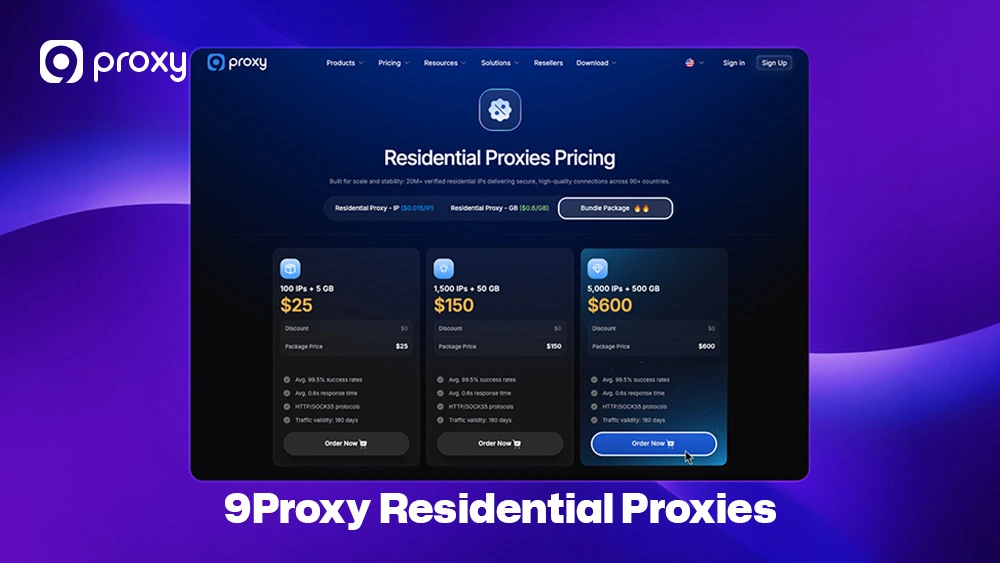
Access Blocked TikTok More Easily with 9Proxy Residential Proxies
9Proxy offers the most compatible and high-quality solutions for your networking needs. We provide a clean, elite residential pool with guaranteed performance, optimized specifically for users who need a reliable TikTok Proxy Server.
Key Advantages of 9Proxy:
- 100% Real Residential Proxies: IPs from real users across 90+ countries ensure you look like a genuine user.
- Private Proxy Pool: Our IPs are not shared with other major providers, significantly reducing the risk of security flags.
- Unlimited Bandwidth for IP-Based Packages: Ideal for data-heavy tasks like uploading high-definition videos or streaming for hours.
- Affordable Pricing: Get started for approximately ~$0.04/IP with no hidden bandwidth charges.
- Crypto-Friendly: Enjoy a 5% bonus on your IPs when you choose to pay with cryptocurrency.
FAQ
Why does TikTok still detect my location even when using a proxy?
A proxy only changes your IP address. TikTok also checks GPS, SIM data, app cache, and device behavior. If these signals conflict, your real location may still be detected.
How can I reduce verification or captcha issues when using a TikTok proxy server?
Use a high-quality residential or mobile proxy, avoid switching locations too fast, and keep one IP per account. Stable behavior helps reduce security checks.
Why do TikTok videos load slowly or fail when using a proxy?
This usually happens when the proxy server is too far away or overloaded. Switching to a closer region or a better proxy type like SOCKS5 can improve speed and stability.
Is it safe to manage multiple TikTok accounts with a proxy server?
Yes, but each account should use a separate IP. This prevents account linking and reduces the risk of flags from TikTok’s security system.
Conclusion
Using a TikTok Proxy Server is one of the most reliable ways to deal with network restrictions and manage your online activity more safely in 2026. By selecting high-quality residential or mobile IPs and following the correct setup steps for your device, you can enjoy smoother access and fewer interruptions.
It is important to prioritize connection stability and security instead of relying on “free” options, which often create risks for your accounts. We recommend starting with a trusted provider like 9Proxy so your connection stays stable and your data remains protected.
Ready to improve your experience? Choose the right TikTok Proxy Server and see how a premium setup makes a real difference. For more detailed guides and expert insights on proxy applications, visit Blog 9Proxy.