

Omegle Proxy Server is a term many users still search for when they want safer access to random video chat platforms, to protect their privacy, or to bypass local network blocks. Although Omegle officially shut down in 2023, the demand for tools that support similar chat sites has not disappeared.
Many people now use an Omegle Proxy Server to hide their IP address, access chat platforms from restricted networks, or test connections from different locations. In this article, 9Proxy will explain how these proxy servers work, how to set them up on different devices, and which proxy types are best for secure and stable chat experiences.
Can You Still Use a Proxy Server for Omegle?
The short answer is no for the original Omegle website because the platform officially shut down in 2023. An Omegle Proxy Server cannot reopen the service or restore access to a website that no longer exists.
However, the term Omegle Proxy Server is still commonly used today. Many people use it when referring to proxies for Omegle-style chat sites, random video chat platforms, or networks where chat services are blocked. In these cases, a proxy server Omegle setup can still help hide your IP address, improve privacy, and access similar platforms.
A proxy can redirect your internet traffic and change your visible IP, but it cannot bring back a closed website.
What an Omegle Proxy Server Actually Is
An Omegle Proxy Server is an intermediary server that sits between your device and the website you want to access. Instead of connecting to the chat platform directly, your internet traffic first passes through the proxy. The website then sees the proxy’s IP address instead of your real one.
Similar proxy tools are also widely used on social networks. Readers can also explore more proxy-related guides and platform-specific setups on Blog9Proxy when accessing communication platforms or testing how websites behave from different locations. However, an Omegle Proxy Server does not guarantee full anonymity or bypass every block, but it can be a useful tool for safer and more flexible connections.
Why Omegle or Similar Chat Sites Get Blocked
Random chat platforms are often among the first websites to be restricted on many networks. Understanding the reasons behind these blocks can help you decide whether tools like an Omegle Proxy Server are useful in your situation.
Most restrictions usually happen in the following cases:
- Educational institutions: Schools often block chat websites to reduce bandwidth usage and keep students focused on learning.
- Workplace policies: Many companies restrict social or adult-related websites to maintain productivity during work hours.
- ISP-level filtering: In some countries or regions, internet providers block certain chat platforms because of local regulations or safety concerns. In these situations, users sometimes rely on a proxy for blocked sites to restore access to restricted services.
- Automatic IP bans: Chat platforms may automatically block IP addresses if they detect unusual activity or receive repeated user reports.
Even though proxies can help in some cases, they are not always ideal for heavy tasks. If the proxy server is slow, video chat quality may drop significantly.
How to Set Up an Omegle Proxy Server
The setup process for an Omegle Proxy Server may vary depending on your device, browser, and the type of proxy you use. However, the basic steps are usually the same. First, choose a reliable proxy provider. Then enter the proxy address and port in your device or browser settings, save the configuration, and test the connection on the chat site to make sure it works properly.
Choose a Reliable Proxy Provider
The performance of an Omegle Proxy Server depends greatly on the provider you choose. Free or low-quality proxies are often slow, unstable, or already blocked by many chat websites. To ensure a smoother and more reliable connection, it is better to use a provider with clear policies and stable service.
Before choosing a proxy, we recommend checking the following factors:
- Large IP pool
- IP rotation options
- Good speed for video chat
- Multiple global locations
- Responsive customer support
- A clear privacy policy
A reliable proxy server Omegle setup should provide clean IP addresses, stable uptime, and enough speed for both text and video chat. This is especially important if you plan to change locations frequently or use chat platforms regularly.

Setting Up Omegle Proxy Server on Windows
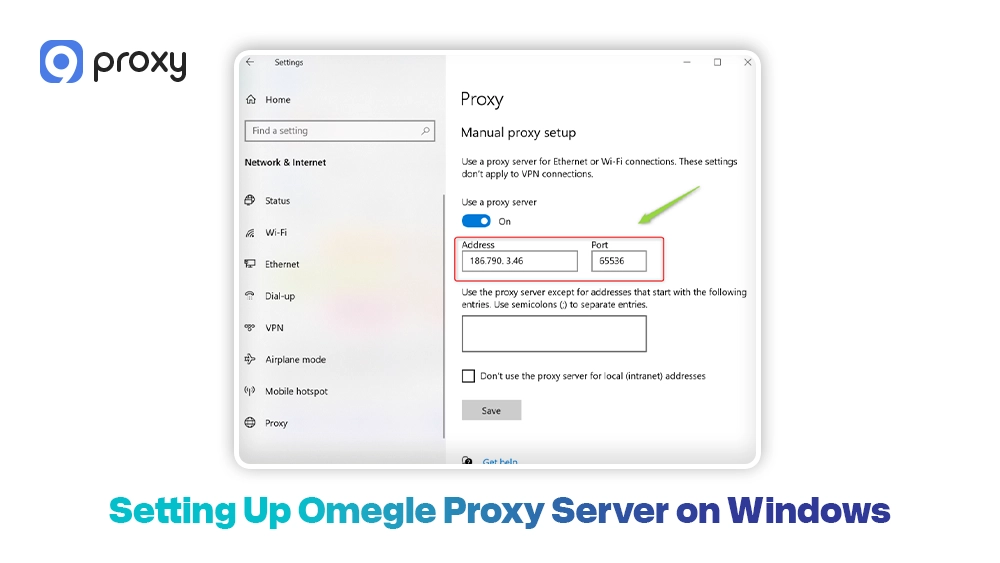
On Windows, you can set up an Omegle Proxy Server using the system’s built-in proxy settings. After the proxy is enabled, supported browsers and applications will automatically send their traffic through that proxy. Users who primarily browse through Chrome can also review detailed proxy server chrome settings to configure browser-level connections more efficiently. Follow these steps to configure it:
- Open Settings on your Windows device.
- Go to Network & Internet.
- Select Proxy.
- Turn on Use a proxy server.
- Enter the proxy IP address and port number provided by your service.
- Save the settings.
- Open your browser and try accessing the chat site to test the connection.
If your provider requires authentication, the browser may ask for a username and password. After setup, check that the site loads correctly and confirm that your visible IP address has changed.
Setting Up Omegle Proxy Server on macOS
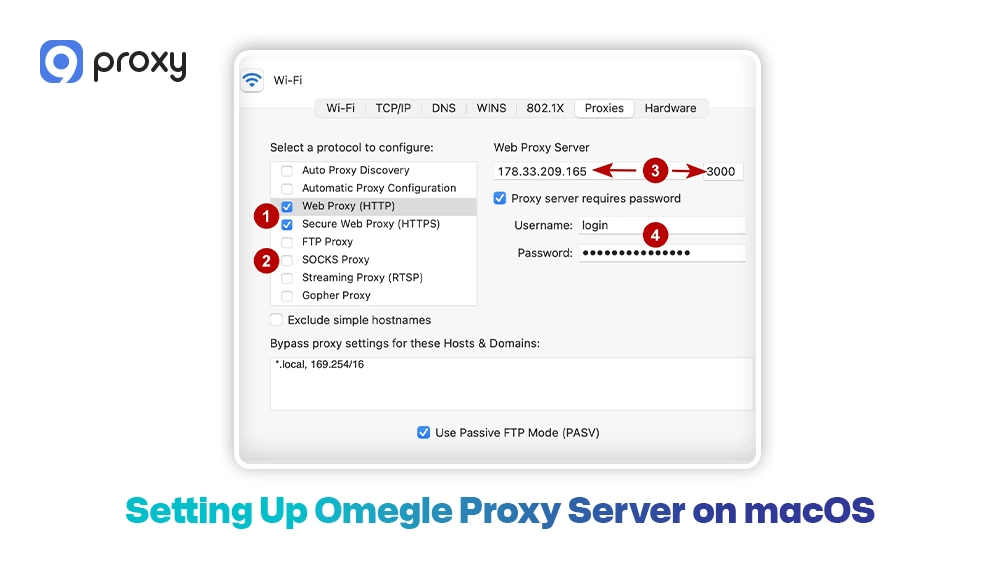
On macOS, you can set up an Omegle Proxy Server through the network settings of your active internet connection. The process is straightforward once you have the proxy server address and port. Follow these steps:
- Open System Settings or System Preferences.
- Click Network.
- Select your active connection, such as Wi-Fi.
- Click Details or Advanced.
- Go to the Proxies section.
- Choose the correct proxy protocol.
- Enter the server address and port number.
- Apply and save the settings.
After finishing the setup, open your browser and test the chat site. If the page loads slowly or does not load, double-check that you selected the correct proxy type and entered the details properly. In some cases, incorrect proxy server DNS configurations may also affect how the chat platform resolves network requests.
Setting Up Omegle Proxy Server on Mobile Devices
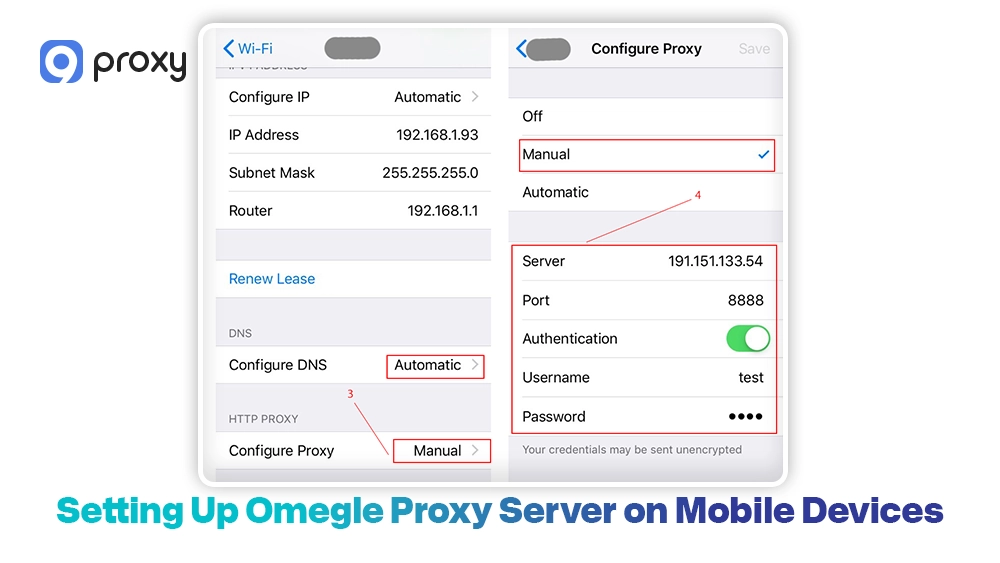
On mobile devices, an Omegle Proxy Server is usually set up through the Wi-Fi network settings. After you configure it, the browser will automatically route traffic through the proxy while you are connected to that Wi-Fi network. Here is the basic setup process:
- Open your phone’s Wi-Fi settings.
- Tap the Wi-Fi network you are currently using.
- Locate the Proxy settings.
- Select Manual.
- Enter the proxy hostname or IP address.
- Enter the port number.
- Save the settings.
- Reopen your browser and test the chat site.
This configuration works only for that specific Wi-Fi connection. If you switch to mobile data, the Omegle Proxy Server will not apply unless you configure another proxy method through an app or network tool.
Common Omegle Proxy Server Problems and How to Fix Them
Even a reliable Omegle Proxy Server can sometimes have issues. Most problems are caused by blocked IP addresses, slow connections, or browser permission settings. Below are some common problems and simple ways to fix them:
- The Site Still Says “Access Denied”: Try switching to another proxy IP or using a different proxy type. Residential proxies often work better than datacenter proxies for chat platforms.
- CAPTCHA Keeps Appearing: This usually happens when the IP address is shared by many users or flagged as suspicious. Use a cleaner IP pool or avoid refreshing the page too often.
- Slow Video Chat Connection: Choose a proxy server located closer to your actual location, or use a faster provider. Video chat requires stable bandwidth and low latency.
- Microphone or Camera Not Working: Check your browser’s permission settings. A proxy only changes the network route and does not automatically allow camera or microphone access.
If the issue continues, try accessing the site without the proxy. This can help you determine whether the problem is caused by the website, your browser, or the Omegle Proxy Server.
Types of Omegle Proxy Servers Used for Omegle-Style Chat Sites
Choosing the right proxy type can greatly affect your experience on chat platforms. A suitable proxy helps ensure smooth video and audio, while the wrong one may cause lag or connection problems.
The table below compares the most common proxy types used for modern chat websites.
| Proxy Type | Best For | Strengths | Limits |
| HTTP / HTTPS Proxy | Basic web browsing | Easy to use in browsers | Less ideal for real-time traffic |
| SOCKS5 Proxy | Video chat and real-time apps | Better protocol support | Quality varies by provider |
| Residential Proxy | Lower detection risk | Real home IPs, strong trust | Usually costs more |
| Datacenter Proxy | Speed and low cost | Fast and widely available | Easier for sites to detect |
| Mobile Proxy | Mobile network identity | Useful for strict filters | More expensive, limited supply |
The best proxy type depends on what you need. Different proxies offer different advantages for chat platforms. We usually recommend the following options:
- SOCKS5 Proxy: A strong choice for real-time applications because it can handle many types of internet traffic efficiently.
- Residential Proxy: Uses IP addresses from real home networks, which makes them harder for websites to detect.
- Mobile Proxy: Uses IPs from 4G or 5G mobile networks and often provides a very high level of trust on many platforms.
In general, datacenter proxies are fast, but residential proxies often provide a more natural or “human-like” IP presence on chat websites.
What an Omegle Proxy Server Can and Cannot Fix
An Omegle Proxy Server can help fix some connection or access issues, but it also has limitations. Many users think a proxy can bypass all restrictions, but that is not always the case. In reality, the result depends on the website’s rules, the quality of the proxy, and the type of block being used.
Issues a Proxy Server Can Help Solve
A proxy is useful for overcoming technical restrictions that depend on your network identity or IP address. For example, it can help in the following situations:
- IP-Based Blocks: If your home IP address has been blocked, a proxy can provide a different IP so you can try accessing the site again.
- Network Restrictions: A proxy can route your traffic through another server, which may allow you to bypass certain school or office network blocks.
- Geographic Filtering: Some chat platforms are only available in specific countries. A proxy can help you appear as if you are connecting from a different location.
The same approach is commonly used for large online platforms. Some users also depend on an unblock Facebook proxy when social platforms are restricted on school, office, or regional networks.
Problems a Proxy Server Usually Cannot Fix
There are also situations where even a high-quality proxy cannot solve the issue. A proxy can change your IP address and bypass some network restrictions, but it cannot overcome every type of limitation or platform rule.
- Site Shutdowns: If a platform has permanently closed, such as the original Omegle, a proxy cannot restore access to it.
- Account-Level Bans: If your account has been banned, changing your IP address will not remove the ban from that account.
- Device Fingerprinting: Some advanced security systems can identify your device through browser or device fingerprints, even if your IP address changes.
Alternatives to Omegle That People Use Today
Since Omegle shut down, many users still search for an Omegle Proxy Server because they want similar random chat experiences on other platforms. The interest in online chat did not disappear. Instead, users moved to other video chat services and online communities.
The table below shows some common types of platforms people use today.
| Platform Type | What It Offers | Safety Notes |
| Moderated random video chat platforms | Quick matching with other users | Safer when moderation is active |
| Interest-based chat communities | Conversations based on shared topics | Helps users find more relevant discussions |
| Language exchange platforms | Practice languages with people worldwide | Often structured and moderated |
| Social chat apps | Messaging, voice, and video calls | Always review privacy settings |
These options are usually better than trying outdated access methods. In many cases, choosing a safer platform is more important than simply using another Omegle Proxy Server. Some users also interact with chat communities through social apps or short-form video platforms.
In these situations, tools like a TikTok proxy server or WhatsApp proxy may be used to maintain privacy, manage connections from different regions, or test platform access in restricted networks.
We recommend selecting services that provide clear moderation, reporting systems, and strong privacy policies. A proxy can help protect your IP and improve access, but the safety of the platform itself is just as important.
Why 9Proxy Residential Proxies Work Well for Omegle-Style Platforms
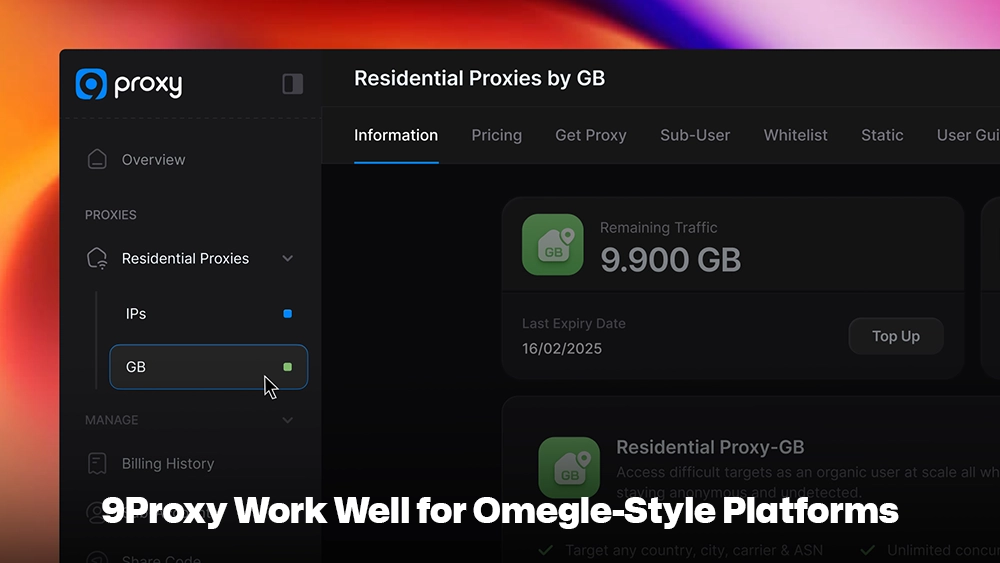
9Proxy provides reliable and high-quality proxy solutions that work well with modern chat platforms. Our large pool of residential proxies helps users maintain privacy and bypass strict network filters more easily.
Key advantages of 9Proxy include:
- 20M+ real residential proxies: Access IP addresses from real users across 90+ countries, making your connection appear more natural.
- High anonymity: Our clean and private proxy pool helps reduce the risk of IP blocks or blacklisting on chat websites.
- Precise targeting: Select IPs by country, state, city, or ISP for better regional performance.
- Affordable pricing: Plans start from $0.015 per IP or $0.68 per GB, with a 5% bonus on IPs when paying with cryptocurrency.
FAQs
Are free Omegle proxy servers safe?
Many free proxies are unreliable and may log your browsing data, display intrusive ads, or even collect personal information. Some free services are also set up by malicious actors. For better security and stability, it is safer to use a trusted paid proxy provider.
What proxy type works best for video chat?
For video chat platforms, SOCKS5 proxies are generally the best option. They support multiple types of internet traffic and can handle the large amount of real-time data used in video and audio communication. This makes them more stable for live chats compared to simple HTTP proxies. With a good SOCKS5 proxy, users can experience smoother connections and fewer interruptions during video conversations.
Does a proxy hide my real location completely?
A proxy hides your IP address, which is the main way websites estimate your location. When you use a proxy, the website sees the proxy server’s IP instead of your real IP address. However, a proxy alone may not guarantee complete anonymity. Websites can sometimes gather location clues from browser settings, cookies, or device information. For better privacy, you should also disable browser location services and avoid sharing personal details while chatting online.
Proxy vs VPN for chat websites: which is better?
Both proxies and VPNs can change your visible IP address, but they work in different ways. A VPN encrypts all internet traffic on your device, which provides stronger privacy and security across all apps. A proxy, on the other hand, usually works only for specific applications, such as a browser. Because of this, proxies are often faster and easier to configure for simple chat website access. Many users choose proxies when they only need IP masking for a specific platform, while VPNs are better for full-device protection.
Conclusion
An Omegle Proxy Server can still help users access Omegle-style chat platforms by hiding their IP address and bypassing simple network restrictions. However, it cannot restore a closed site or bypass strict platform bans.
For better speed, privacy, and stability, choosing a reliable provider like 9Proxy and the right proxy type can make your chat experience safer and more consistent.