

In some countries, WhatsApp may be disabled or limited, making it difficult to stay connected with family, friends, or clients. A WhatsApp Proxy Server provides a safe and dependable way to keep your conversations flowing by sending your messages through secure private servers.
9Proxy knows how important it is to maintain stable access and protect your privacy when facing restrictions. This guide will show you what a proxy server for WhatsApp is, how it works, the main types available, and how to set it up easily on any device. By using a WhatsApp Proxy Server correctly, you can strengthen your connection, enhance online security, and continue chatting without interruptions even when the network is restricted.
What Is a WhatsApp Proxy Server?
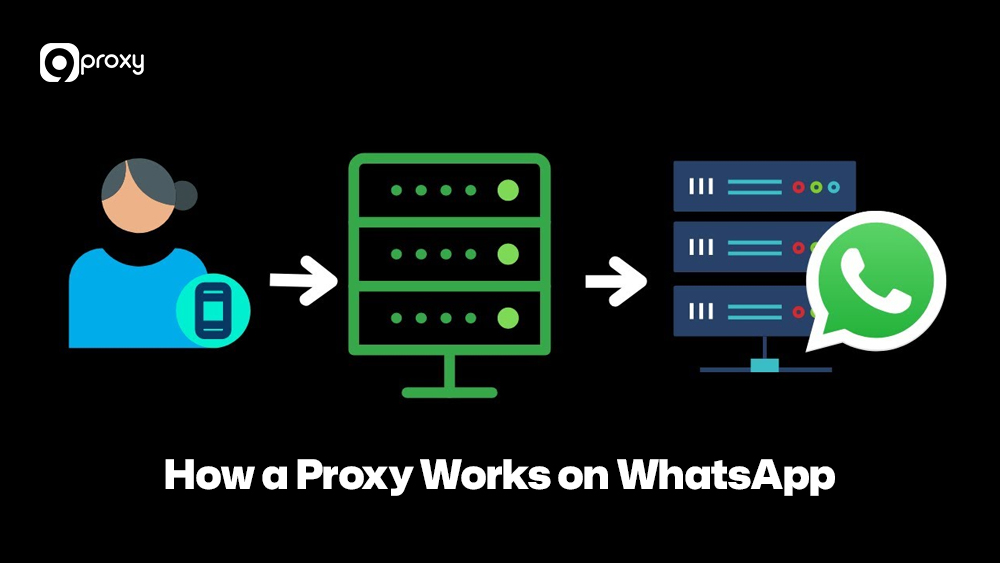
A proxy server for WhatsApp is a bridge between your device and the internet. Normally, your device sends messages directly to WhatsApp. When using a proxy, your connection follows this route: Device → Proxy Server → WhatsApp Server.
This setup hides your real IP address and helps you access WhatsApp even when it’s restricted or disabled in your area. The proxy makes it look like you’re connecting from another location, allowing you to pass over filters and continue messaging safely and privately.
Types of WhatsApp Proxies
Choosing the right proxy type is key to getting the best performance. Below are the main options that 9Proxy recommends, based on where their IP addresses come from and how they work.
| Proxy Type | IP Source | Best Use Case for WhatsApp |
| Residential Proxies | Real IP addresses from Internet Service Providers (ISPs) | Best for passing over geo-restrictions and avoiding detection, as these IPs appear like genuine users. |
| Datacenter Proxies | IPs from cloud-based or commercial servers | Ideal for high-speed operations like account management, though they’re easier to detect. |
| Mobile Proxies | IPs assigned by mobile network carriers | Useful for managing multiple WhatsApp accounts and simulating real mobile activity. |
| SOCKS5 Proxies | A flexible protocol often combined with other proxy types | Great for sending both text and media securely and passing over strict content filters. |
Each proxy type offers different levels of privacy, speed, and cost. Choosing the right one depends on your purpose, whether for personal use or business-scale WhatsApp management. Many users also use similar configurations for the best proxy server for PS4 setups, since proxy routing logic is nearly identical across different devices.
Why Do People Use a Proxy with WhatsApp?
People use a proxy server for WhatsApp for many reasons, from skipping restrictions to improving privacy or managing business accounts. WhatsApp added proxy support to help users in regions facing internet blackouts or censorship.
Skipping Restrictions and Censorship
A proxy lets you access WhatsApp even when it’s disabled in your country or network. This routing method is also widely used for platforms that enforce regional or network-level blocks. For example, users applying the same logic with an Omegle proxy rely on alternative IP routes to maintain access when direct connections are filtered or restricted.
Enhancing Privacy and Security
WhatsApp messages are already encrypted, but a proxy hides your real IP and location, adding an extra layer of privacy and protection from tracking or monitoring. This approach is commonly used across messaging and networking platforms and follows the same logic found in a social media proxy, where traffic is routed through clean IPs to reduce exposure and detection risks while communicating online.
Other Use Cases
- Individuals: Use a proxy to access WhatsApp when disabled or to stay private when sharing sensitive messages.
- Businesses: Businesses often manage WhatsApp alongside other platforms to keep communication channels consistent. For example, companies that already use a Facebook proxy for ad accounts or customer support pages can apply the same proxy strategy to WhatsApp to maintain stable connections and avoid account flags across Meta-owned services.
While free proxy server lists for WhatsApp exist, they can be slow or risky. A paid WhatsApp proxy server is faster, safer, and more reliable.
How a Proxy Works on WhatsApp?
The way a proxy server for WhatsApp works is quite simple, but it is very clever and effective. When you turn on the proxy setting in your app, you are basically telling your WhatsApp traffic to take a different road.
- You Start Talking: When you send a message, your WhatsApp app doesn’t send the data packet straight to the WhatsApp servers.
- Proxy Catches It: Instead, the data packet first travels to the proxy server you chose. The proxy sees your message, and it also sees your real IP address.
- Hiding Your IP: The proxy server removes your IP address and replaces it with its own address. Then, it sends the message forward to the official WhatsApp servers.
- The Reply Trip: WhatsApp’s server gets the request, sees the proxy’s IP, and sends the reply back to that proxy.
- Relay Back to You: Finally, the proxy server passes the WhatsApp reply to your device.
This process ensures that everyone sees the connection coming from the proxy’s location. This is how you can use a free proxy server for WhatsApp to connect, though paid options give you much better speed and safety. Learning about proxy server change IP methods can help you understand how to rotate or replace IPs dynamically for even more privacy.
Top 10 WhatsApp Proxy Servers 2025
For a stable, fast, and high-quality connection, you need to pick a good provider. We have listed some of the best proxy companies that work well with WhatsApp.
Here is a quick look at the top providers that offer good WhatsApp Proxy Server solutions, focusing on what matters most for you.
| Provider | Main Focus | Best Proxy Type for WhatsApp | Key Feature | Payment Style |
| 9Proxy | High-Quality Residential IPs | Residential & Mobile | Exclusive IPs, Unlimited Bandwidth | Pay-per-IP / Standalone IP |
| Oxylabs | Big Business Solutions | Residential & Datacenter | Huge Global Network, Very Reliable | Monthly Fee / Data Used |
| Smartproxy | Easy to Use | Residential & Datacenter | Good IP changing (Rotation), Simple Setup | Monthly Fee / Data Used |
| Bright Data | Industry Leader | All types (Residential, Mobile, etc.) | Super Reliability, Can choose the exact location | Data Used / Monthly Fee |
| Proxyrack | Many Proxy Types | Residential & Mobile | Many choices for different needs | Monthly Fee / Data Used |
| IPRoyal | Good Price, Good Value | Residential & Datacenter | Static Residential IPs, Great Prices | Standalone IP / Monthly Fee |
| Soax | Clean IPs, Flexible Targeting | Residential & Mobile | Can choose by City and Network | Data Used |
| Rayobyte | Ethical Sourcing | Datacenter & Residential | Focused on fair IP use | Monthly Fee / Large IP Pack |
| PrivateProxies | Dedicated and Fast | Datacenter | Dedicated (Only for you), Very Fast | Monthly Subscription |
| Webshare | Low Cost | Datacenter | Has a Free Tier available, Cheap | Monthly Fee / Free Tier |
When you look at this list, you’ll see options from super-fast Datacenter IPs to the very safe Residential and Mobile IPs, like those 9Proxy offers. For most users, a residential WhatsApp Proxy Server is the best choice because it helps you avoid being disabled and looks like a real user.
We suggest you choose companies with great uptime, good security, and quick customer support so your connection is always stable and safe. For enterprises, choosing abusiness proxy server also helps unify account management and automate messaging at scale.
How to Set Up a WhatsApp Proxy?
Setting up a WhatsApp Proxy Server is usually simple. The steps change a little depending on whether you use the mobile app or WhatsApp Web. We’ll show you exactly how to set up a proxy server for your WhatsApp.
For Web (WhatsApp Web)
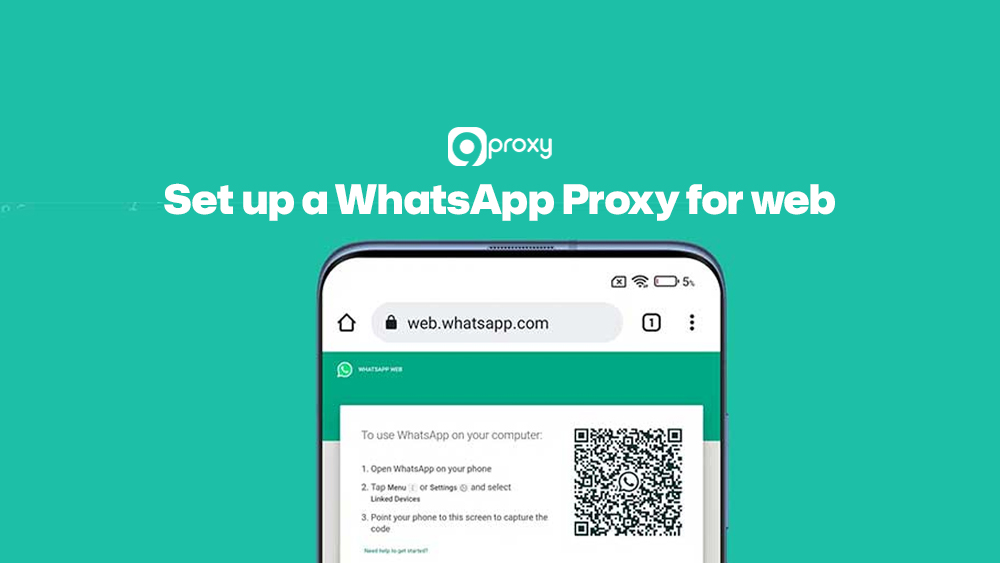
To use a proxy with WhatsApp Web, you usually set up the proxy in your web browser, since the web app itself doesn’t have a direct setting.
Browser Tool (Extension): The easiest way is to use a special browser extension (like FoxyProxy). Install the tool and enter the proxy details (IP address and port) given by your provider, like 9Proxy. Turn the tool on, then open WhatsApp Web.
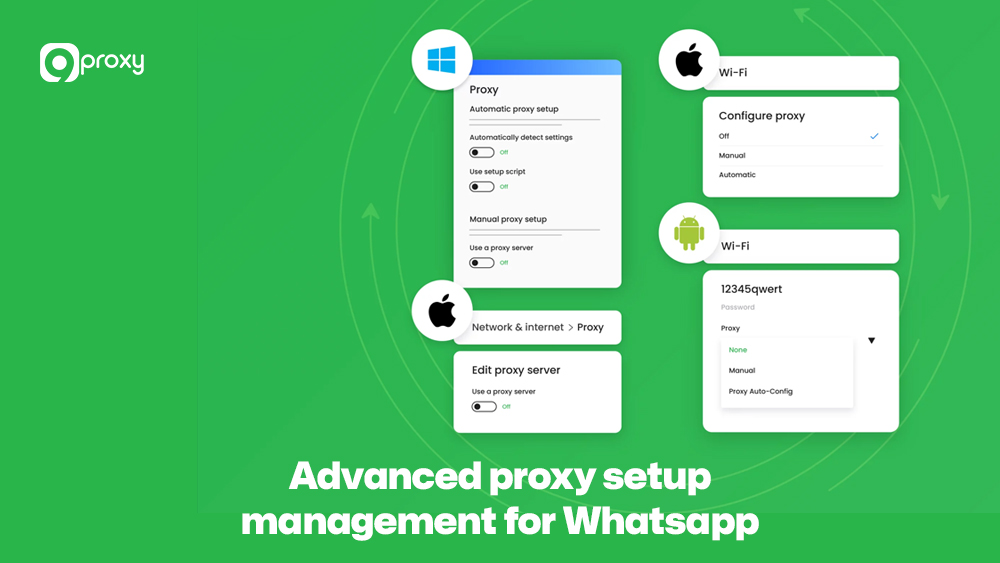
Manual PC Setup: You could also set up the proxy in your computer’s main settings (Windows or macOS). But this can be annoying because it affects all your browsing. The browser extension is better.
If you see a connection issue, try changing ports or servers. Always test with a reliable proxy to avoid disconnection.
For Android Devices
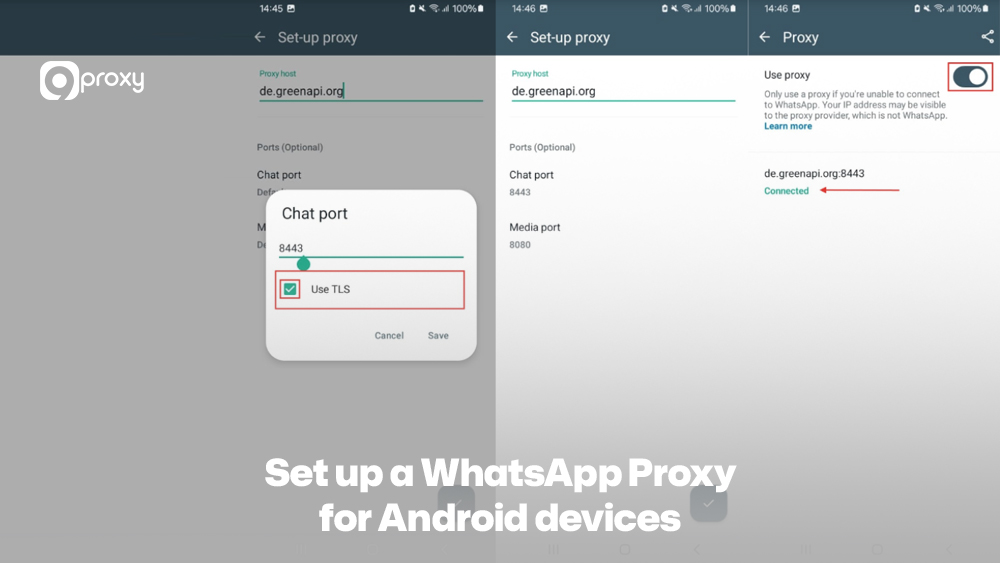
WhatsApp has a built-in function for proxy settings on Android, which makes it very simple.
- Step 1 – Update WhatsApp: Make sure you have the newest version of the app from the Google Play Store.
- Step 2 – Go to Settings: Open WhatsApp, tap the three dots (⋮) for the menu, and go to Settings.
- Step 3 – Find Proxy: Tap on Storage and Data, then scroll down to Proxy settings.
- Step 4 – Enter Details: Tap on Set Proxy and type in the proxy address (IP or name). Use the ports (80, 443, 5222) as they are usually correct.
- Step 5 – Connect: Tap Save. If it works, you will see a green checkmark.
For iPhone (iOS Devices)
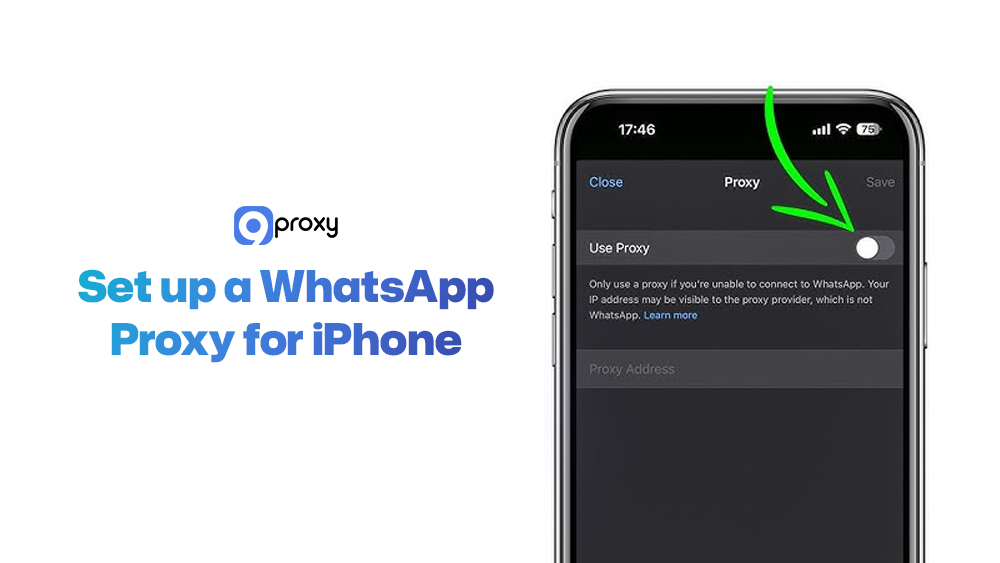
The steps on iPhone are almost the same as on Android, using the app’s own proxy support.
- Step 1 – Latest Version: Make sure your WhatsApp app is updated from the App Store.
- Step 2 – Go to Settings: Open WhatsApp and go to Settings (the gear icon) at the bottom.
- Step 3 – Proxy Settings: Tap on Storage and Data, and choose Proxy settings.
- Step 4 – Input and Connect: Tap Set Proxy and carefully type in the proxy host and port details from your service, like 9Proxy. Tap Save to connect.
Advanced Proxy Setup and Management
For teams running multi-channel campaigns, WhatsApp rarely works in isolation. Many businesses also operate on visual-first platforms, where similar proxy allocation rules apply. Using a dedicated Instagram proxy alongside WhatsApp proxies helps keep each account environment separated, reducing the chance of cross-platform restrictions when managing multiple brand profiles.
- For Businesses: Companies often use proxies for WhatsApp automation (like customer support bots). Each WhatsApp account should have its own special proxy (best to use residential or mobile IP) to look like a real person and avoid being disallowed.
- For Many Accounts: If you manage many accounts, setting up proxies by hand is too hard. Providers like 9Proxy have tools that help you quickly assign and rotate IPs to your software.
- IP Changing (Rotation): To stop WhatsApp from catching and forbidding you, you must use a service that changes your IP address often (IP rotation).
By following these best practices, enterprises can scale operations safely while keeping connections secure. This method is similar to how social media proxies are configured to manage multiple platforms securely and efficiently.
Troubleshooting: Common Errors and Fixes
Setting up a WhatsApp Proxy Server usually goes well, but sometimes you hit a wall. The table below lists the most common errors, explains why they happen, and gives simple steps to get your proxy working again.
| Common Problem | Why It Happens | How to Fix It |
| “Couldn’t connect to proxy” | Wrong IP/Port, or the proxy is currently broken (offline). | Check the proxy address and port number again. |
| Very Slow Speed | Too many people are using the same proxy, or you are using a bad free proxy server for WhatsApp. | Switch to a faster, dedicated proxy. Choose a provider that offers unlimited bandwidth. |
| Connection Stops Often | The proxy IP has been found and disabled by WhatsApp. | Quickly delete the disabled proxy address and use a new, clean IP. Use the IP rotation feature if you have one. |
| Messages Not Sending | Your network might be forbidding the needed ports (80, 443, 5222). | Check your router or firewall settings to make sure these ports are open. Try using a SOCKS5 proxy, which often works better. |
If connection issues persist even after changing ports or IPs, the problem may relate to IP reputation rather than configuration. Platforms that rely heavily on behavior analysis face similar challenges. This is why users managing high-volume activity on services like TikTok often rely on a TikTok proxy to maintain stable sessions and avoid repeated disconnections caused by flagged IP ranges.
9Proxy: Your Trusted Partner for WhatsApp Proxy Server Setup
At 9Proxy, we understand that you need a WhatsApp connection that’s fast, private, and always available. Our proxy solutions are designed to give you secure, nonstop service perfect for both personal users and large businesses.
We provide 100% real residential proxies with IPs from real users around the world. This makes your WhatsApp traffic look natural and helps you avoid detection. Our clean, private IP pool isn’t shared with others, reducing the chance of getting disabled, a key factor when managing multiple WhatsApp accounts.
Unlike many other providers, 9Proxy offers unlimited bandwidth for just ~$0.04 per IP, making it ideal for heavy use like calls, file sharing, or automation. With features such as the Proxy Replacement Policy and Today List, you get both flexibility and cost savings.
For businesses, 9Proxy’s proxy infrastructure ensures stable multi-account management and fast message delivery, which is ideal for marketing, automation, and customer support.

Conclusion
Understanding the WhatsApp Proxy Server may seem complex at first, but once you know how it works, it becomes a simple and powerful tool for privacy and freedom. We’ve explained what a proxy is, how to set up a WhatsApp proxy server easily, and why clean, high-quality IPs matter.
Whether you want to pass over restrictions, protect your privacy, or scale your business, choosing a trusted provider with reliable residential WhatsApp Proxy Server options is essential. Therefore, explore 9Proxy’s premium, secure, and unlimited bandwidth services now to keep your WhatsApp connection fast and safe.