The 9Proxy dashboard is your command center for manual precision, but when your operations reach a certain scale, manual isn't enough. The 9Proxy Public API hands full programmatic control of your proxy infrastructure directly to your systems, turning manual tasks into automated workflows.
This isn't a feature update. It's a different way of operating entirely.
What the Public API Actually Does
At its core, the 9Proxy Public API is a direct communication protocol with 9Proxy’s system. Authenticate with your API key, and every operation you’d normally perform through the dashboard becomes an API call you can trigger, schedule, or automate from anywhere – no intermediary tools required.
That includes:
- Account management– query your live balance, purchase history, and usage logs programmatically
- Sub-account operations– issue and manage sub-accounts at scale without touching the UI
- Share code management– generate and revoke share codes through your own workflows
- Wallet and billing– view transaction history directly from your systems
- Affiliate tracking– access commission data and affiliate performance without manual exports
- Real-time proxy stats– query live IP usage and bandwidth consumption as part of your own monitoring stack
In practice, this means your systems communicate directly with 9Proxy – no dashboard visits, no manual actions, no human in the loop.
9Proxy Public API Endpoints, Access, and Authentication
All API calls go through a single production base domain: api.9proxy.com – the live endpoint for real traffic and actual account operations. All API keys inherit the full set of permissions available to your account, giving you access to every supported endpoint from the moment your key is generated.
The 9Proxy Public API covers the following endpoint groups:
- Account API — balance, usage logs, account metadata
- Sub-Accounts API — create, manage, and monitor sub-accounts programmatically
- Share Code API — generate and revoke proxy share codes at scale
- User-Pass API — manage username/password authentication credentials
- Whitelist API — control IP whitelist entries without dashboard access
- Billing API — query wallet state and transaction history
- Affiliate API — retrieve commission tracking and referral data
- Proxy Connect Config API — create and manage proxy whitelist connection configurations programmatically
Full endpoint documentation for each group is available in the 9Proxy Public API Reference.
Who This Is Built For
The short answer: anyone who manages proxy usage at a scale where manual operations have become a bottleneck.
Developers building internal tooling. If your team runs its own proxy management UI- whether it’s a scraping orchestration platform, a custom admin panel for clients, or an internal ops dashboard- the Public API is what connects your front end to 9Proxy’s backend. Real-time balance visibility, usage breakdowns, sub-account provisioning: all of it piped directly into your interface through API calls.
Agencies managing multiple clients. Manually creating sub-accounts, distributing share codes, and pulling per-client usage reports doesn’t scale past a certain point. With API-driven sub-account management and share code generation, onboarding a new client or rotating credentials becomes a function call, not a workflow.
Automation engineers running large-scale scraping or data collection. When your proxy rotation logic, session management, and usage monitoring all live inside your own system, the last thing you want is a manual step in the middle of it. Integrating the 9Proxy API into your scraper orchestration means your infrastructure self-manages- you define the logic once and let it run.
Teams that need real-time visibility without dashboard dependency. Pulling live IP statistics and bandwidth consumption through the API means you can surface that data wherever you need it: Grafana, a custom Slack bot, a usage alert system, or anything else your monitoring stack uses. You’re not waiting on a browser tab to check if something’s running out.
How to Generate and Secure Your API Key
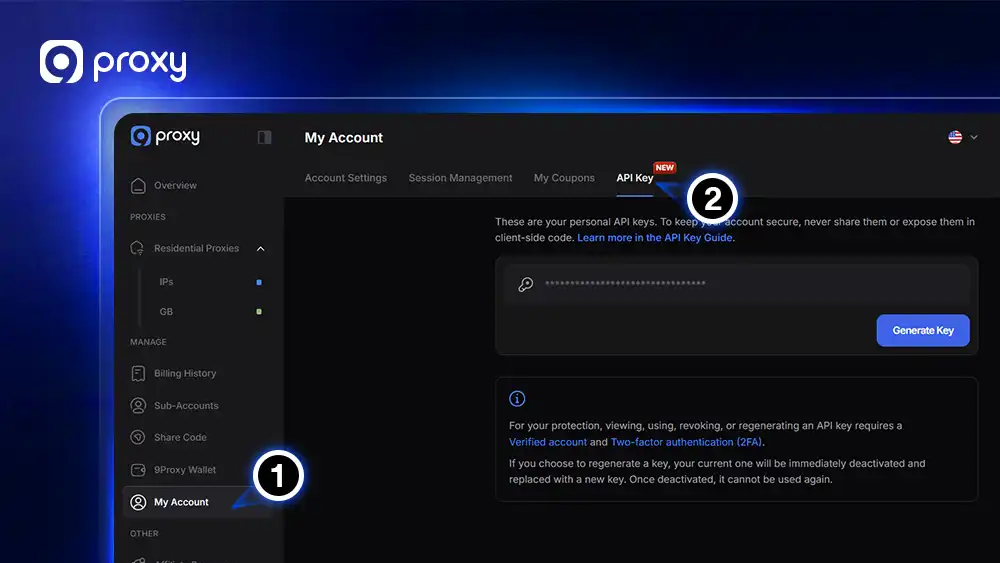
- Generate your API key: Go to My Account → API Key in your 9Proxy dashboard. You’ll need 2FA enabled and your account verified before the option appears.
- Secure Storage is Key: Click Generate Key, then copy it immediately and store it in a secure location (like a password manager). For maximum security, your API key is displayed only once. 9Proxy does not store your full key after generation. If you close the window before saving it, you will need to revoke and generate a new one.
- Choose your environment: Use api.9proxy.com for production once your integration is ready.
- Key Rotation & Security: If you suspect your key has been compromised, use the Revoke & Regenerate option.
For developers, be aware that regenerating a key will immediately invalidate the old one. Any active scripts, tools, or production integrations using the previous key will fail instantly until updated with the new credentials. Plan your rotations during maintenance windows to avoid service disruption.
For full details on key generation and rotation, see the Generate Your API Key guide. Got questions about key visibility, permissions, or what happens when you regenerate? The FAQ section covers the most common ones.
The Operational Shift
The real value of a proxy management API isn’t any single endpoint. It’s the shift from reactive to automated operations.
Without API access, managing proxy infrastructure at scale means constant manual intervention: checking balances before campaigns run, creating sub-accounts one by one, pulling usage data by hand, revoking share codes through the UI. Each action is small. Collectively, they’re a meaningful drag on the people doing them.
With the Public API, those actions become part of your system’s logic. Sub-accounts get provisioned when a new client is onboarded. Balance alerts fire when thresholds are crossed. Usage reports generate on schedule and land wherever they’re needed. Share codes rotate on a timer you control.
The infrastructure doesn’t change. The overhead does.