Available on Windows
Most proxy setups start with the same assumption: the application you're working with has to support proxy configuration. You go into the network settings, enter the proxy address and port, and the app handles the rest. Simple enough - when it works.
The problem is that assumption fails more often than it should. Plenty of software doesn't have proxy settings at all. Some apps have them buried deep enough that configuring them per workflow becomes its own time sink. Others actively detect proxy usage and respond to it - serving different content, triggering additional verification, or blocking the session entirely. And for teams managing a diverse set of tools across different workflows, the inconsistency alone is a headache: each application handling proxy configuration differently, each one a potential point of failure.
The 9Proxy Proxy Program is built around a different model entirely.

What Is a Transparent Proxy and How Does It Work?
The Proxy Program routes an application’s network traffic through a proxy at the system level – without configuring anything inside the application itself, and without the application knowing it’s happening.
This is what makes it a transparent proxy. The application sends traffic the way it always does. The system intercepts that traffic at the network layer and redirects it through the proxy port you’ve defined. From the application’s perspective, nothing has changed. It has no visibility into the fact that its network flow has been altered at all.
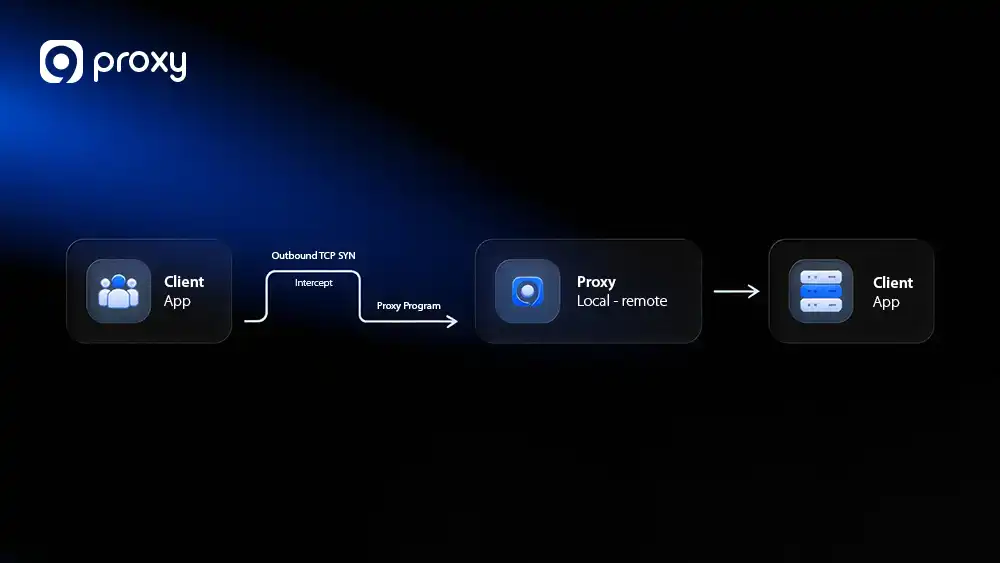
No proxy settings inside the app. No third-party tools. No OS-wide redirect that catches everything indiscriminately. You create rules that target specific applications, define the protocol and routing behavior, and the system does the rest.
Why Transparent Proxy Routing Changes the Equation
The immediate benefit is obvious: applications that don’t support proxy settings can now be proxied. Desktop clients, legacy software, proprietary tools, game launchers, niche data utilities – if it runs on Windows and makes network requests, the Proxy Program can route it.
But the less obvious benefit matters just as much. For applications that do have proxy support, transparent routing removes the detection risk entirely. There’s no proxy configuration for the platform to find because, from where the application is looking, there isn’t one. The traffic looks native. The session behaves naturally. That’s a meaningful advantage in environments where proxy detection is actively working against you.
There’s also the consistency argument. When proxy behavior is defined at the system level rather than inside each individual application, it’s uniform. Same routing logic, same proxy, same behavior – regardless of how different applications handle network settings internally. For teams running multiple tools in parallel, that predictability has real operational value.
Granular Steering: Proxy Only What Matters
For power users, the real value of the Proxy Program lies in its surgical precision. Rather than a blunt “all-or-nothing” approach for an entire application, the Target Hosts and Target Ports features allow for sophisticated traffic steering within a single process.
- Optimized Resource Management: You can configure a rule so that only sensitive destinations (like specific social platforms or restricted internal IPs) hit your residential proxy pool, while high-bandwidth traffic, like a background YouTube stream, continues to run through your local ISP. This prevents unnecessary data consumption without the need to toggle settings.
- Protocol-Level Isolation: By defining specific Target Ports, you can isolate proxy usage to certain services. For instance, you could route only HTTPS traffic through the proxy while letting other background pings connect directly, further reducing the “footprint” of your proxied session.
- Multi-Destination Workflows: Because these rules support specific IP ranges and semicolon-separated lists, you can build a single rule that handles an entire ecosystem of related microservices, ensuring identity consistency across all relevant nodes while keeping the rest of your system’s traffic native.
Who Benefits Most from Transparent Proxy Routing
Transparent proxy routing solves problems that conventional proxy configuration simply can’t. Here’s where it makes the biggest difference:
Operators running tools without native proxy support. If part of your workflow relies on software that simply doesn’t have proxy settings, this is the direct solution. No workarounds, no VPN-level redirects affecting your whole machine – just a targeted rule that routes that specific application through the proxy you choose.
Anyone working in proxy-aware environments. Platforms that flag or restrict proxied traffic are a persistent challenge. Transparent system-level routing removes the signal those platforms are looking for, letting your sessions run without triggering detection logic built to catch conventional proxy configurations.
Teams managing diverse application stacks. When you’re proxying across several different tools simultaneously, centralizing that routing logic in one place – with rules you can enable, disable, and adjust individually – is cleaner than maintaining separate proxy configurations inside each application.
Automation engineers and power users. Scheduled tasks, background processes, and automated pipelines don’t always lend themselves to manual proxy configuration. The Proxy Program handles routing without requiring any interaction with the application itself, which means it fits naturally into automated workflows.
What to Know Before You Get Started
The Proxy Program requires a proxy to be forwarded to a local port before any rules are created – this is what gives it a local address to route traffic through. If you haven’t set that up yet, the port forwarding guide covers the process before you get started.
Rules are application-specific, so you have full control over what gets routed and what doesn’t. You can run multiple rules simultaneously for different applications, toggle them on and off independently, and adjust them without affecting anything else running on your system.
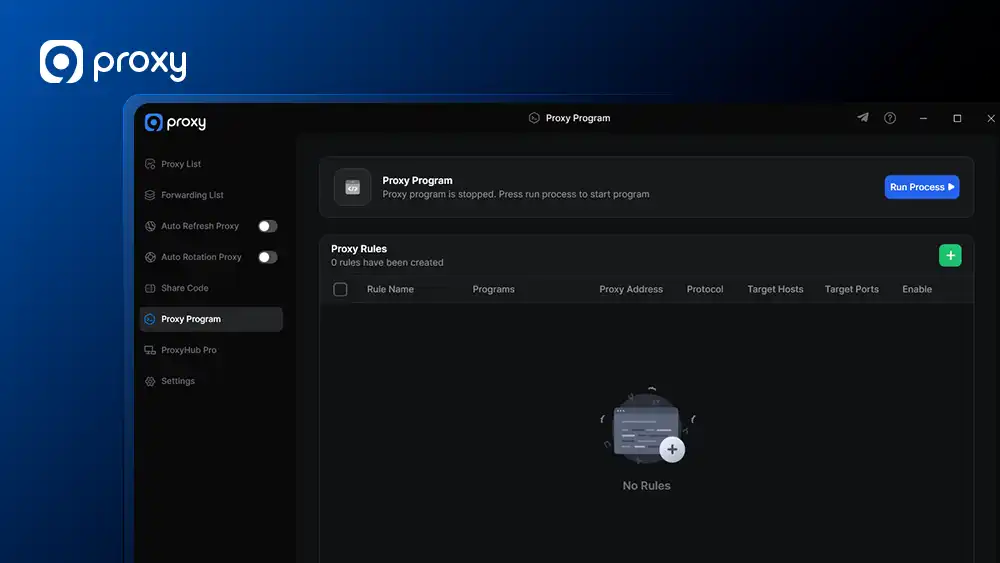
On protocol selection, make sure the protocol you configure in a rule (TCP, UDP, or both) actually matches what the target application uses. This is the most common reason traffic doesn’t route as expected, and it’s an easy thing to overlook.
Finally, the feature is currently Windows only, and is not yet available on x86 or ARM architectures – support for both is on the roadmap.
How to Set Up the 9Proxy Proxy Program on Windows
Full setup instructions – including how to create and configure proxy rules, apply mode options, and troubleshooting steps – are in the Proxy Program guide.
Questions? Feel free to reach the 9Proxy team at [email protected], via live chat at 9proxy.com, or on Telegram at @Official9Proxy. We are available 24/7 for any inquiry you have!