A Gaming Proxy Server is one of the best tools to reduce lag, access geo-limited servers, and keep your online sessions secure. 9Proxy understands the challenges gamers face with unstable ping, regional restrictions, and DDoS attacks. This blog will help competitive players, streamers, and multi-account users find the most reliable proxy solution for gaming, learn how proxies improve connection speed, enhance privacy, and unlock exclusive game content while maintaining stable performance.
Besides, it also introduces the top 12 gaming proxy providers, detailed setup instructions for PC, console, and mobile, along with useful safety and optimization tips to help you enjoy faster, safer, and smoother gameplay.

Understand Proxy Server for Gaming
A Gaming Proxy Server is a special type of server that connects your gaming device to the game’s main server through a faster and safer route. It helps reduce ping, increase speed, and keep your IP address private. By sending your traffic through a different network path, it can also avoid congestion and improve stability during gameplay.
Unlike a VPN, which encrypts all data and can slow down your connection, a gaming proxy server focuses on speed and low latency. Many players use it on PC, console, mobile, and cloud gaming platforms to access limited games, stay anonymous, and prevent DDoS attacks. Console users, for example, can refer to the proxy server ps4 guide to learn how proxy routing works specifically for PlayStation devices.
12 Best Proxy Providers for Gaming in 2025
Selecting the right provider is just as important as choosing the right proxy type. For 2025, we have compiled a list of the 12 leading proxy providers that offer specialized features, excellent speeds, and reliability tailored for online gaming.
9Proxy
As your trusted provider, 9Proxy focuses on delivering highly stable and fast residential IPs. Our standout feature is a vast pool of rotating and static residential proxies that are perfect for multi-account management and maintaining a low-ping connection to any game server globally. We offer competitive pricing (from just ~$0.04/IP) with a strong emphasis on connection quality, though our mobile proxy selection may be narrower than some competitors.
- Pros: Fast, reliable, DDoS protection, affordable.
- Cons: Limited free trials (5IP)

NodeMaven
NodeMaven is known for its reliable and rotating residential proxies, making it an excellent choice for multiplayer or cloud gaming. Its intelligent rotation system ensures stable connections and uninterrupted gameplay, even during high-traffic hours.
- Pros: Great uptime, quick rotation options, solid dashboard.
- Cons: Pricing slightly above market average.
Proxyrack
Proxyrack is a well-established proxy provider that offers both datacenter and residential proxy servers for gaming. Its massive IP pool and flexible pricing plans make it suitable for individual players and teams who need scalability. The platform is also great for testing and automation, giving users control over how their connections are routed.
- Pros: Large IP pool, flexible plans, great for testing.
- Cons: Speed can fluctuate under high load.

Webshare
Webshare is a versatile proxy provider offering both free and paid gaming proxy servers, making it perfect for beginners. Users can easily start with its free plan to test connection quality before upgrading to premium packages. Its simple dashboard and reliable datacenter IPs help maintain stable gaming sessions across different regions.
- Pros: Free tier available, simple dashboard, reliable datacenter IPs.
- Cons: Free proxies have limited bandwidth and locations.

ProxyElite
ProxyElite is a premium provider that focuses on anonymous proxy solutions for users who value privacy and performance. It offers global coverage with advanced filters, allowing gamers to choose IPs by country or region. Its servers deliver fast response times and complete anonymity, which is ideal for secure online gaming.
- Pros: 100% anonymity, fast authentication.
- Cons: No mobile proxies yet.
Proxy-Seller
Proxy-Seller provides both SOCKS5 and HTTP proxies tailored for gaming. Its proxies are optimized for console users, especially those playing on PS5 and Xbox. For detailed console setup, you can also learn how to use proxy server ps4 to get started easily. With flexible payment options and a responsive support team, it’s a practical choice for casual gamers and professionals who value customization.
- Pros: Supports console gaming, flexible payment terms.
- Cons: Smaller proxy pool compared to top providers.

PingProxies
PingProxies was created specifically for gamers who demand low-latency connections and stable ping performance. Its infrastructure is designed to deliver smooth gameplay with minimal lag, even during peak hours. The company focuses on gaming optimization, ensuring that players always have a consistent experience.
- Pros: Specialized for gamers, high reliability.
- Cons: No free trial.

MarsProxies
MarsProxies specializes in mobile and residential proxy connections, giving users authentic IPs from real devices. This makes it perfect for mobile gamers and users accessing geo-restricted content. Its efficient rotation system maintains privacy and reduces detection risks, ensuring uninterrupted gaming sessions.
- Pros: Diverse IPs, good rotation system.
- Cons: Slightly higher latency in certain regions.

SOAX
SOAX is known for providing clean, ethically sourced proxies that deliver high accuracy and reliability. With precise geo-targeting and flexible session management, SOAX is ideal for gamers who need location-specific access or want full control over proxy behavior. Its performance is consistent across desktop and mobile gaming platforms.
- Pros: Accurate geo-targeting, flexible session controls.
- Cons: Steeper learning curve for new users.

Infatica
Infatica is a powerful proxy provider built for AI, gaming, and automation use cases. It offers a large global proxy network that ensures stability and speed. Developers and gamers appreciate its detailed API support, which allows integration with third-party tools for enhanced gaming performance.
- Pros: Great global coverage, stable connection.
- Cons: Requires API integration knowledge.

ProxyEmpire
ProxyEmpire is designed for users who spend long hours gaming or testing applications. Its residential proxy network provides consistent uptime, making it great for uninterrupted gameplay. With strong security measures and reliable IP rotation, ProxyEmpire helps users stay safe from bans or throttling.
- Pros: Strong security, no IP bans.
- Cons: Limited refund policy.

Smartproxy
Smartproxy is one of the most recognized brands in the proxy industry. It’s known for its fast, secure, and easy-to-use proxy solutions that fit both beginners and professionals. With 24/7 customer support and global IP coverage, Smartproxy is a reliable choice for anyone who wants consistent performance during long gaming sessions.
- Pros: Easy setup, fast response, trusted by developers.
- Cons: Plans start at a higher price.

Why Should You Use a Gaming Proxy Server?
The benefits of using a gaming proxy server are huge. It can turn a slow, laggy connection into a fast and stable gaming experience. 9Proxy believes every serious gamer should know how these advantages can make a real difference in performance.
- Reduce Lag and Ping: Proxies route your traffic through the nearest and fastest servers to minimize latency.
- Access region-limited content: Play region-restricted games, join exclusive servers, and participate in events unavailable in your area.
- Get past IP-based limitations: Avoid connection issues or restrictions tied to a specific IP, especially for multi-account users.
- DDoS & Privacy Protection: Safeguard your network from DDoS attacks and prevent doxing or IP leaks.
- Multi-Account Management: Ideal for gamers managing several accounts on the same platform without triggering bans.
For players who may have received an unfair IP ban or game server restriction, a new IP from a proxy allows them to re-enter the game. This is especially common in sandbox and multiplayer titles, where regional rules and IP-based limits are strict, such as when using a Minecraft proxy server to manage multiple accounts or connect to overseas servers without lag. Gamers involved in activities like gold farming or account selling also rely on proxies to operate safely without raising suspicion.

Types of Proxy Servers for Gaming
Choosing the right type of proxy is essential for getting the best gaming experience. Below, we’ve listed the most common proxy types for gaming and explained how each one works. The table shows a quick comparison, including their descriptions, main pros, and possible cons.
|
Type |
Description |
Pros |
Cons |
|
Datacenter Proxy |
Hosted on high-speed data centres. |
Lightning-fast speeds, affordable. |
Easier to detect; may be blocked. |
|
Residential Proxy |
Uses real IPs from ISPs. |
Harder to detect, better anonymity. |
More expensive, slower speeds. |
|
Mobile Proxy |
Connects through 4G/5G networks. |
Best for mobile gaming and avoiding bans. |
Limited data, higher cost. |
|
SOCKS5 Proxy |
Advanced protocol supporting all traffic types. |
Excellent speed, supports TCP/UDP. |
Slightly complex setup. |
For low-latency competitive gaming, a Datacenter or SOCKS5 proxy might be preferred for speed, while Residential or Mobile proxies offer the highest level of anonymity and access to restricted content.
Choose The Right Proxy Server for Gaming
When choosing a proxy server for gaming, focus on your connection goals, region, and device type. The right provider depends on what matters most to your gaming setup, whether that’s speed, privacy, or multi-account access.
For most gamers, 9Proxy is the best proxy server for gaming, offering residential, mobile, and datacenter proxies with optimized routing and strong protection.
For competitive players who want to reduce latency and ping, choose providers that specialize in high-speed datacenter or SOCKS5 proxies, such as PingProxies.
For players managing multiple accounts or unlocking geo-restricted games, select a residential proxy provider like 9Proxy, known for high anonymity and reliable IP rotation.
If you’re exploring proxies for broader applications such as marketing or e-commerce, you can even buy things cheaper with proxies to save on regional pricing differences.
If budget is your main concern, Webshare or Proxy-Seller are good, affordable options.
For maximum privacy and security, go with trusted names like SOAX or Smartproxy.
Some gamers also use proxies beyond gameplay, especially when switching between regions for entertainment or content access. For example, a proxy can help unblock YouTube streams that are restricted in certain countries, making it easier to watch game guides, live streams, or esports content without interruptions.

How to Use a Proxy Server for Gaming (Step-by-Step Guide)
Setting up a proxy server is easier than you might think, but the method changes based on your device. Here, we provide clear, step-by-step instructions for the main gaming platforms, ensuring you can quickly get your gaming proxy server up and running for a smoother experience.
For PC games (Windows / macOS)
Setting up a proxy for PC games can be done manually through your operating system’s network settings or via a provider’s custom software. If you’re using your computer for work or other applications, check out the proxy server for business guide to learn how proxies can boost both productivity and security
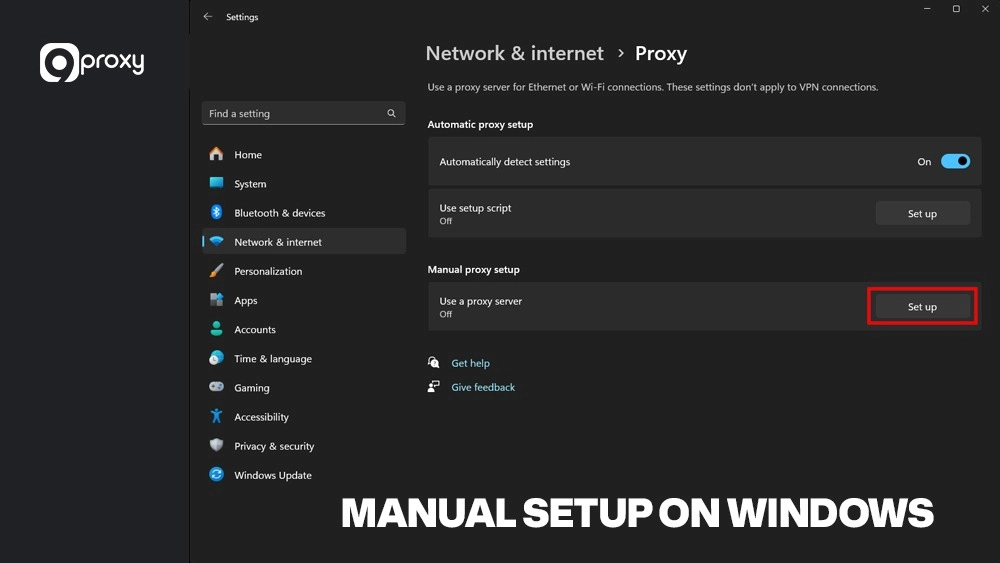
Manual Setup (Windows Example):
- Get Proxy Details: Obtain the proxy IP address and port number from your chosen provider (e.g., 9Proxy).
- Open Settings: Go to Windows Settings > Network & Internet > Proxy.
- Configure Manual Proxy Setup: Turn on “Use a proxy server” under the Manual proxy setup section.
- Enter Details: Input the IP Address and Port provided by your service.
- Save: Click Save. Note that this applies the proxy to all internet traffic on your PC.
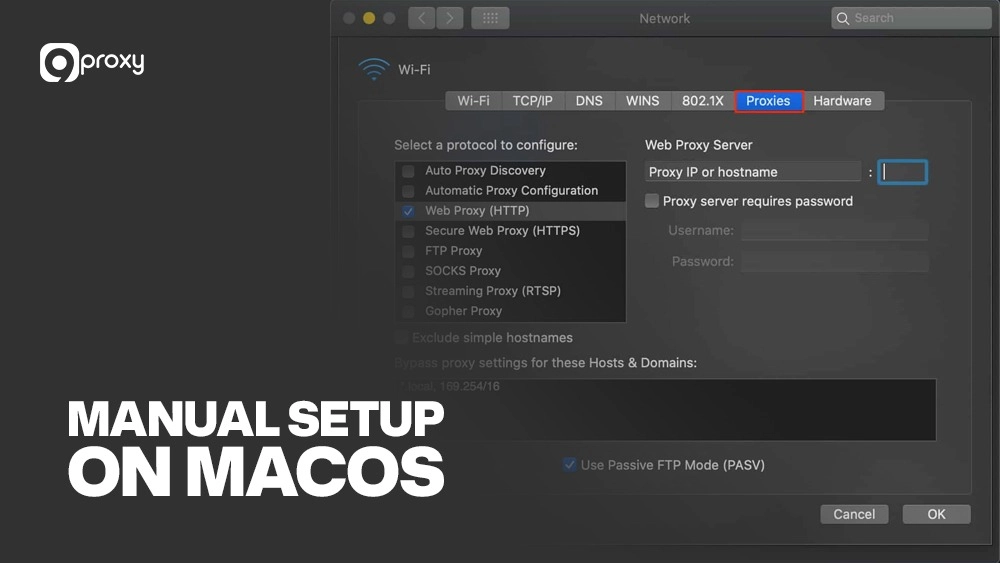
Manual Setup (macOS Example):
- Get Proxy Details: Obtain your proxy IP and port number from your provider (such as 9Proxy).
- Open System Settings: Go to System Settings > Network > Wi-Fi (or Ethernet) > Details.
- Select the Proxies Tab: In the left menu, click Proxies.
- Enable Proxy Type: Check SOCKS Proxy or HTTP Proxy, depending on your provider’s instructions.
- Enter Proxy Information: Add the IP address and port number, then click OK and Apply.
- Your macOS system will now route network traffic through the proxy server.
Recommendation: Many premium providers, including some on our list, offer Proxy Client Software. This is often the superior choice, as it allows you to select which specific applications (like your game client) use the proxy, keeping the rest of your system on your normal connection.
For console games (PS5)
Consoles typically don’t have per-game proxy settings, so the setup is usually managed at the network level, either on the console itself or via your home router.
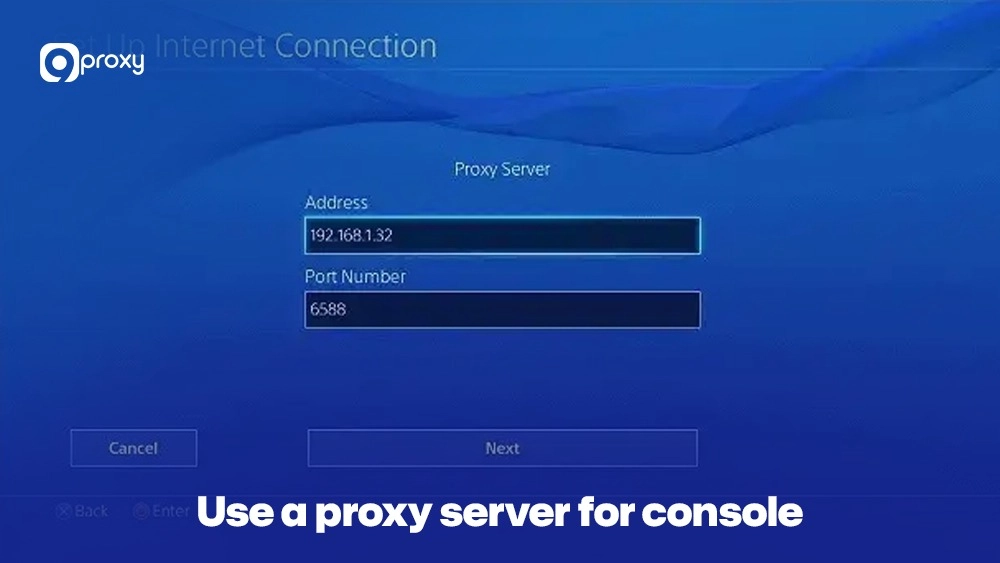
Console-Level Setup (PS5 Example):
- Get Proxy Details: Obtain the proxy IP and Port.
- Network Settings: Go to Settings > Network > Settings > Set Up Internet Connection.
- Use Current Connection: Select your current connection (Wi-Fi or LAN).
- Configure Proxy: When prompted for Proxy Server, select Use.
- Enter Details: Enter the Address and Port, and click Done.
Console-level proxy configuration works well for older and current-generation devices. Many players first experiment with proxy routing on PlayStation consoles by following a PS4 proxy server setup, as the steps are nearly identical across PlayStation systems. This method helps reduce latency, bypass IP-based limits, and stabilize online sessions during competitive play.
Router-Level Proxy Configuration: For a more comprehensive solution, you can set the proxy directly on your router. This routes all traffic from every connected device (including your console) through the proxy. Check your router’s administration page (usually accessed via 192.168.1.1 in a browser) for the “Proxy” or “WAN Settings” options.
Smart DNS Options: While not a proxy, Smart DNS is an alternative often used by console gamers primarily for geographic access, enabling streaming services, and sometimes for simple geo-restricted game access without the full protection of a proxy.
Modern consoles support proxy configuration directly through network settings. A PS5 proxy server setup allows players to reroute game traffic through optimized servers, which helps improve ping, access region-locked titles, and protect against DDoS attacks during online matches.
For mobile games (Android / iOS)
For gamers on the go, setting up a proxy for mobile gaming is straightforward through the device’s Wi-Fi network settings.
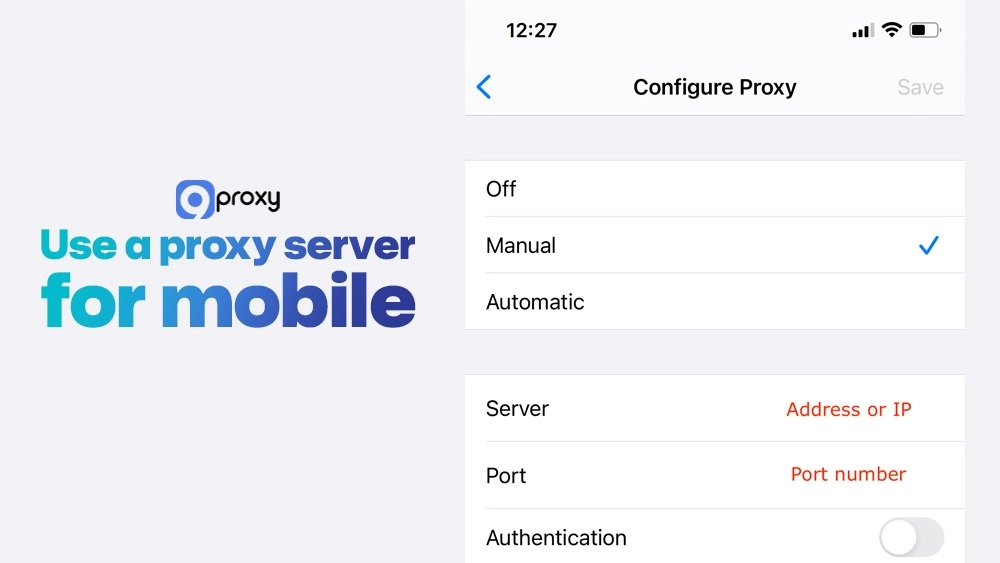
Android/iOS Proxy Settings (Wi-Fi):
- Get Proxy Details: Obtain the proxy IP and Port.
- Open Wi-Fi Settings: Go to Settings > Wi-Fi.
- Modify Network: Tap and hold (Android) or tap the “i” icon (iOS) on your connected network.
- Proxy Configuration: Select Modify network (Android) or scroll to HTTP Proxy (iOS).
- Enter Details: Select Manual, then enter the Server/Hostname (IP) and Port.
- Save/Connect: Save the settings.
Use a proxy server for mobile
App-Based Solutions: For more advanced control, some third-party apps or the proxy provider’s mobile client can route specific game traffic through the proxy while leaving other apps (like your browser) on the local connection. This is often the preferred method for managing multiple mobile gaming accounts.
FAQ
Will a proxy server always improve my gaming experience?
No, a proxy server won’t always improve your gaming experience. Its effectiveness depends entirely on the quality of the proxy, its proximity to the game server, and the route it takes. If the proxy server is of low quality or located further away than your direct connection, it could potentially increase your latency.
How does a gaming proxy differ from a VPN?
The main difference is encryption and scope. A VPN encrypts all your internet traffic for maximum privacy, but often introduces more latency due to the encryption process. A gaming proxy server, especially a SOCKS5, primarily focuses on routing your game data without mandatory encryption, aiming for the lowest possible latency specifically for gaming.
Can using a proxy server help in reducing ping?
Yes, a properly chosen and configured gaming proxy server can help in reducing ping. By routing your connection through a server that has a better, more direct, or less congested path to the game server, the total round-trip time for data (ping) can be lowered significantly.
How do proxy servers affect multiplayer gaming?
Proxy servers can positively affect multiplayer gaming by providing a more stable and faster connection, minimizing lag spikes, and potentially granting access to international servers you couldn’t reach before. This leads to a smoother, more competitive, and overall better gaming session.
Conclusion
Using a gaming proxy server can be one of the best upgrades for your online gaming. It can greatly improve your speed, security, and access to game servers around the world. We’ve explained why a proxy is often better than a direct connection, reviewed the top 12 providers (including the fast and reliable options from 9Proxy), and shared a simple setup guide for every device. The key is to choose the best proxy server for gaming based on your main goal.
Pick Datacenter or SOCKS5 proxies if you need maximum speed, or Residential and Mobile proxies if you want better anonymity and access to geo-restricted games. If you also use streaming services, the spotify proxy server guide can help you enjoy faster and more secure connections for your music as well.
Ready to reduce lag and explore new servers? Try 9Proxy’s proxy plans today.