

Transparent Proxy vs Explicit Proxy may sound like a small technical topic, but it has a big impact on how your network controls traffic, protects privacy, and manages users. If you run a business network, operate a SaaS platform, secure a school system, or build tools that rely on proxies, understanding these two proxy types helps you avoid setup mistakes and weak security rules.
After reading this blog from 9Proxy, you will know where transparent vs explicit proxy fits best, how each impacts security and performance, and which model makes more sense for your company or personal projects.
What is a Transparent Proxy?
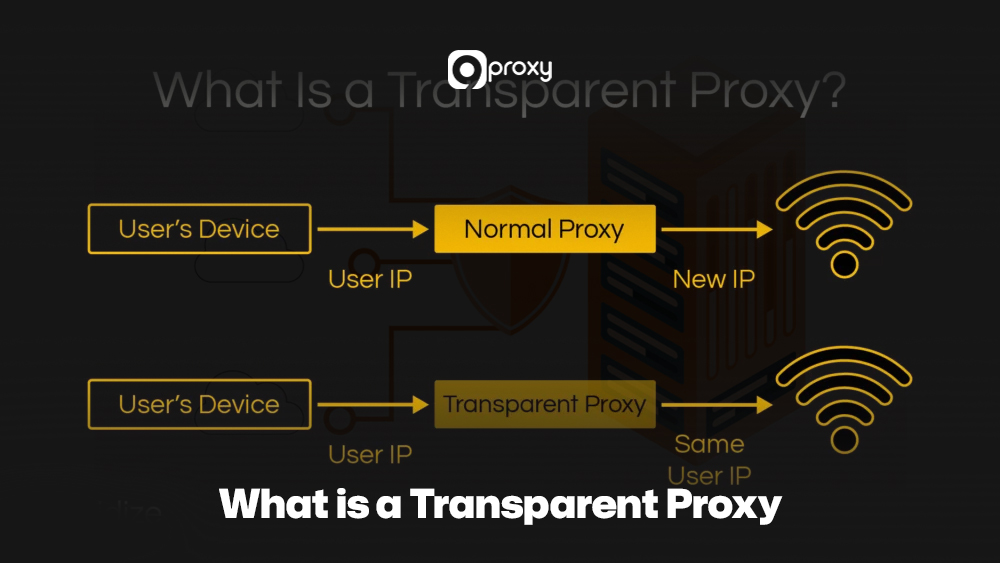
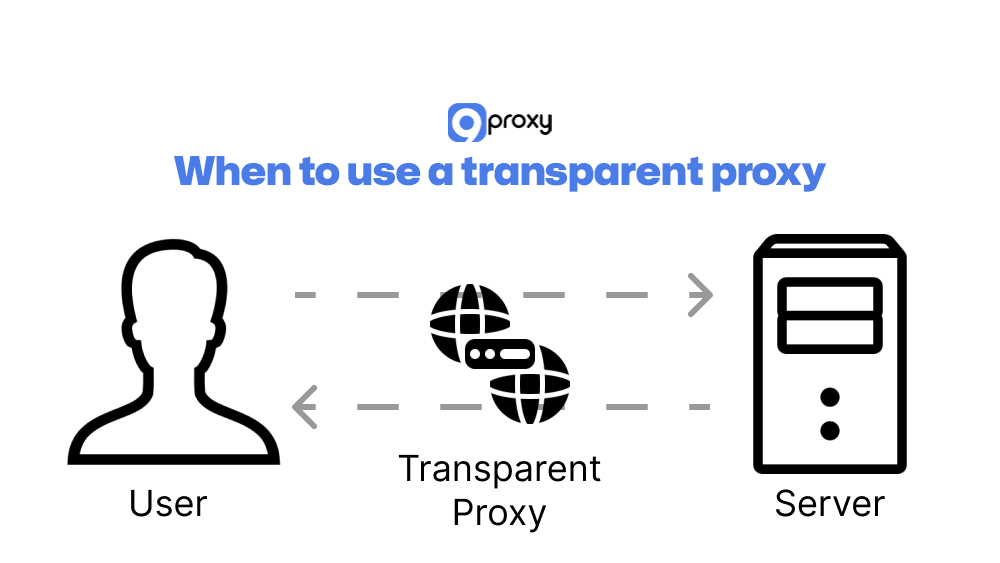
A transparent proxy is an intermediary server that intercepts your internet traffic without needing any setup on your device. You don’t change your browser, app, or system settings; the network’s router or firewall automatically redirects your requests through the proxy. Because it works in line with the traffic path and does not modify your request headers, the connection still appears direct to the destination server.
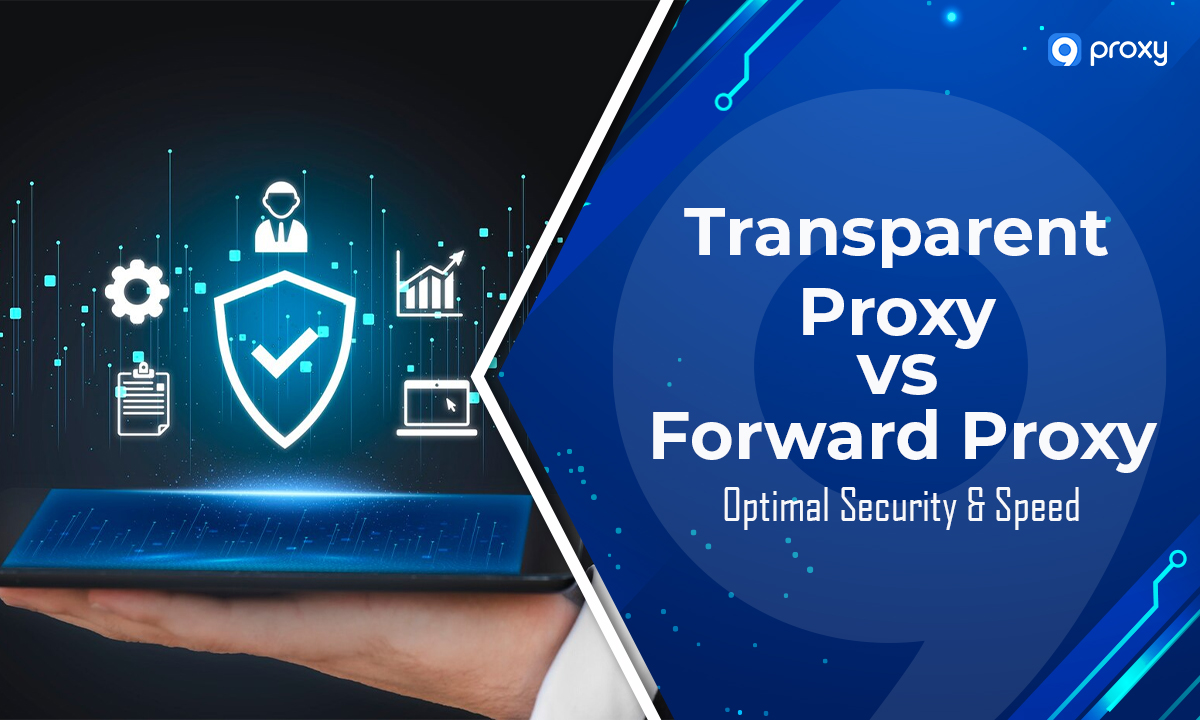
This “invisible” design lets administrators filter content, cache data, monitor usage, or optimise performance without involving users. Transparent proxies are widely used in schools, public Wi-Fi, cafés, and ISP networks where simple, large-scale monitoring is needed. In broader network architecture discussions, transparent proxies are often compared with forward models, especially in analyses such as transparent proxy vs forward proxy, where visibility and routing control are evaluated side by side.
What is an Explicit Proxy?
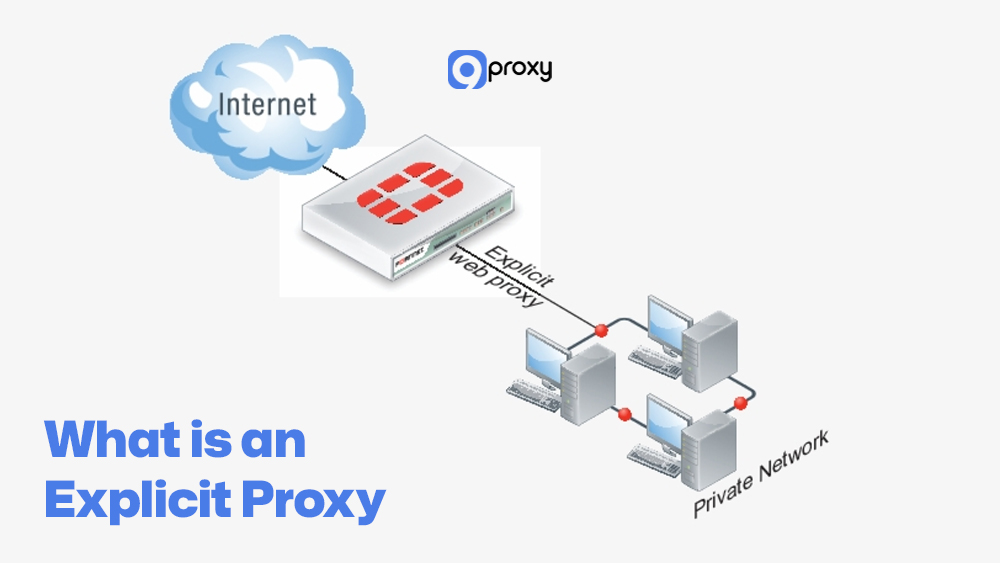
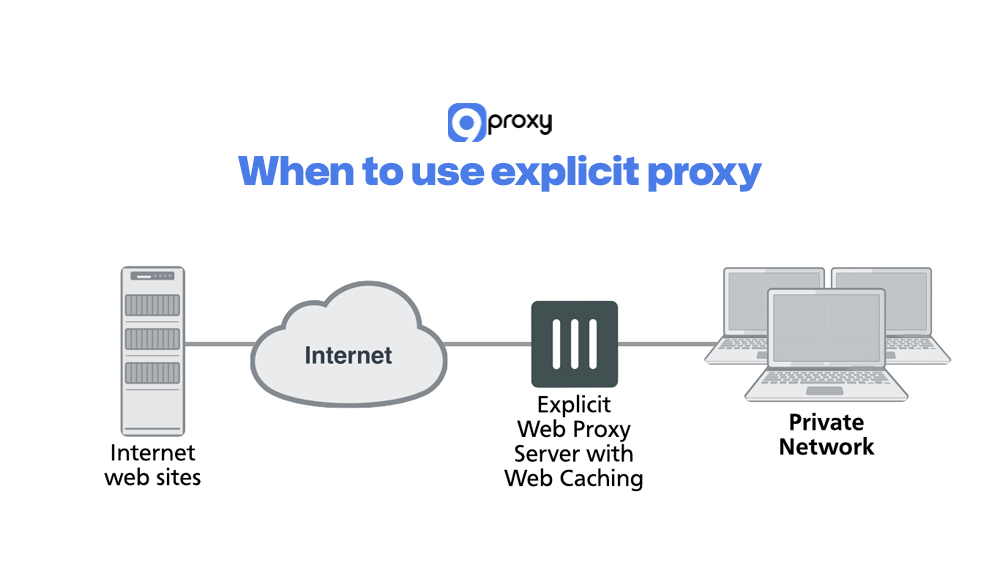
An explicit proxy is a proxy server that users or IT teams configure intentionally on a device. You manually enter the proxy’s IP address, port, and sometimes authentication details in your browser, operating system, or PAC file. Once set, your traffic is sent directly to the explicit proxy, which applies its rules before forwarding the request to the destination server.
Because only configured devices use it, administrators gain clear control over who connects, what is filtered, and how activity is logged. This makes an explicit proxy a strong choice for corporate networks, remote work setups, and security-focused environments where precise policy enforcement and detailed reporting matter most. It also plays an important role when comparing broader technologies like proxy server vs reverse proxy or when understanding how an internal reverse proxy differs from a client-side control mechanism.
Explicit Proxies vs Transparent Proxies: Benefits & Drawbacks
Transparent Proxy vs Explicit Proxy is not about which is “good” or “bad” in general. Each type has strengths and weaknesses depending on what you want: simplicity, control, or deep security enforcement.
Below is a quick table showing typical benefits, drawbacks, and common use cases for each type. This table compares the main pros and cons of transparent and explicit proxies, and when each option tends to work best in real-world networks.
| Benefit | Drawback | Use case |
| No client configuration (transparent) | Users are unaware of consent and privacy issues | Guest Wi-Fi, cafés, ISP traffic shaping |
| Easy mass deployment (transparent) | Harder to apply user-based policies | Schools that simply log and filter traffic |
| Simple user experience (transparent) | Limited authentication and fine-grained controls | Basic web caching and bandwidth optimisation |
| Strong policy control (explicit) | Needs manual or scripted configuration on clients | Corporate networks with clear security policies |
| User- or group-based rules (explicit) | Higher risk of misconfiguration per device | Enterprises, regulated industries, secure remote access |
| Better auth & logging (explicit) | Slightly more overhead and management effort | Security gateways, DLP, CASB, and detailed compliance reporting |
| Flexible per-app or per-device routing | More complex to support unmanaged BYOD environments | Zero-trust networks and advanced explicit vs transparent proxy setups |
Both models can even co-exist in one organization. You can use one type for simple, everyday traffic and the other for sensitive or high-risk areas. This layered approach is frequently discussed alongside enterprise controls like secure web gateway vs proxy, where traffic inspection, filtering, and threat prevention are evaluated in more advanced deployments.
7 Key Differences Between Transparent and Explicit Proxy
To choose correctly between a transparent proxy vs explicit proxy, you need to understand their key technical and operational differences. These distinctions affect how your network performs, how secure it is, and how much time your team will spend managing it.
Side-by-Side Comparison Table
To give you a clear and quick overview of the key distinctions, we’ve prepared a side-by-side comparison of both proxy types. This table shows how transparent and explicit proxies differ across technical and functional categories, an approach commonly used when comparing systems like nat vs proxy at the network level.
| Feature / Aspect | Transparent Proxy | Explicit Proxy |
| User awareness | Users often do not know a proxy is present | Users or admins configure proxy settings intentionally |
| Client configuration | No changes needed on endpoints | Browser/OS/PAC config required |
| Traffic routing | Interception via router, switch, or firewall rules | Direct connection from client to proxy IP/port |
| Typical ports/protocols | Often HTTP/HTTPS via redirection | Specific proxy ports (e.g. 3128, 8080) are defined on the client |
| SSL/TLS interception | More complex; may need certificate injection | Easier to manage with controlled clients |
| Authentication support | Limited or network-based auth | Strong per-user or per-group authentication |
| Logging & monitoring | Session logs often IP-based | Detailed logs per user or device |
| Performance impact | Can be very fast but hard to tune under heavy load | Slight overhead but easier to scale with clear control points |
| Policy enforcement | Broad, network-wide rules | Granular policies per user, group, or app |
| Best fit | Environments needing silent, simple monitoring | Environments needing strict control and auditable security |
In summary, the main difference between the two comes from how they are configured, which then creates clear changes in user awareness and how much control administrators have.
User Awareness
The most basic difference between the two is how aware the user is of the proxy.
Transparent proxies work without you knowing. Your device thinks it’s connecting directly to the website, while the proxy silently intercepts the traffic in the network. Example: Your ISP or school filters websites automatically, and you never change any settings.
Explicit proxies require user awareness. You must manually enter the proxy’s IP and port into your browser or system settings, so it’s clear that all your traffic will go through that proxy.
Configuration
The setup process is another difference in the explicit vs transparent proxy comparison.
Transparent Proxies only need to be configured on network devices like routers or firewalls so they can redirect traffic automatically.
Setup: Everything happens in the background, and the end-user does nothing. This makes transparent proxies ideal for large networks where setting up every device manually would take too much time.
Explicit Proxies must be configured on every individual device, whether it’s a browser, operating system, or specific application.
Setup: You manually enter the proxy’s IP address and port number. This gives administrators more control over policies but also increases the time required for setup.
Traffic Routing
How traffic reaches the proxy server is also a key factor separating the two. This difference becomes even more important in modern architectures that compare technologies likeapi gateway vs reverse proxy for service routing.
Transparent Proxies rely on routing techniques like Network Address Translation (NAT) or Web Cache Communication Protocol (WCCP) to force traffic through the proxy. The proxy quietly intercepts the request in the middle of the connection.
Explicit Proxies get the traffic because the client device is intentionally configured to send the request directly to the proxy’s IP and port. The request includes the full destination address.
Technical Differences
On the technical side, explicit vs transparent proxy introduces differences in protocol handling, ports, and security features.
Protocols and Ports:
Transparent proxies usually intercept standard HTTP on port 80 and can work with HTTPS, but only if complex SSL interception is set up. Explicit proxies can use the HTTP CONNECT method on ports like 8080 or 3128 to tunnel secure traffic with better accuracy.
SSL Interception Capabilities:
Transparent proxies need a full Man-in-the-Middle (MITM) setup to inspect HTTPS traffic, including installing a root certificate on user devices. Explicit proxies handle encrypted connections more smoothly through CONNECT tunneling, without needing full interception.
Authentication Support:
Explicit proxies support user- or group-based authentication, giving administrators fine control over who accesses what. Transparent proxies provide limited authentication because users do not directly interact with them.
Scalability Considerations:
Scaling explicit proxies is easier since all traffic is intentionally sent to a known proxy endpoint, which works well with load balancers. Transparent proxy scaling involves more complex routing and infrastructure work to spread the redirected traffic.
Logging and Monitoring
Logging detail varies significantly between transparent and explicit proxies.
Transparent Proxies log intercepted packets at the network level. This works for general traffic monitoring but usually lacks detailed user information.
Explicit Proxies produce detailed, user-specific logs because traffic is intentionally sent through them. This makes it easier to track exactly who accessed what content, which is essential for audits or compliance.
Performance
Performance depends on hardware, network design, and traffic volume, but the models behave differently.
Transparent Proxies may add noticeable delay if traffic redirection or packet inspection is not optimized, especially under heavy network load. Deep inspection can also slow performance.
Explicit Proxies generally deliver more consistent performance. Although sending traffic to the proxy first adds a small step, their improved caching and load balancing usually create a stable and fast browsing experience overall.
Security Implications
Security is often the main driver when people evaluate Transparent Proxy vs Explicit Proxy.
Transparent Proxies and MITM risks:
Because transparent proxies intercept traffic silently, they can introduce Man-in-the-Middle risks if they aren’t properly secured, allowing attackers to intercept or manipulate data.
Explicit Proxies enable better policy enforcement:
Since they require configuration, explicit proxies serve as a controlled security gateway. Administrators can apply strict rules, review traffic, and prevent unauthorized access or data leaks.
Use of HTTPS with each type:
Explicit proxies handle HTTPS more naturally through secure tunnels. Transparent proxies need deeper SSL inspection to analyse HTTPS traffic, which raises both technical challenges and privacy concerns.
When you compare transparent proxy vs explicit proxy for security, explicit models generally give you more controlled power, while transparent models need extra care to avoid silent misuse.
Which Proxy Type Is the Best Fit for Your Company?
Your ideal choice between a transparent proxy vs explicit proxy depends on who is using your network, how much control you need, and how many devices you must manage.
If you manage a guest network, school, café, or a simple office setup and only need basic logging, filtering, or caching, a transparent proxy is usually enough. It reduces setup time and works well with unmanaged or bring-your-own-device (BYOD) environments.
If your organization handles sensitive data or needs strict compliance logging, an explicit proxy is the better option. Many organizations combine both, and in some infrastructures, they integrate proxy layers with tools discussed on Blog 9Proxy to build stronger network visibility and control strategies.
When to Use a Transparent Proxy?
A Transparent Proxy is the best choice when you want simplicity and wide network monitoring, especially in places with many non-technical users. It works well for organizations, network administrators, schools, or businesses that only need basic tracking and filtering.
- Educational Institutions: Schools and universities can apply basic content filtering for all students and staff automatically. A transparent proxy removes the need to configure each device, saving time and preventing easy bypass attempts.
- Large Public Wi-Fi Networks: Cafés, airports, and malls handle many users at once. A transparent proxy caches common resources, so pages load faster and overall bandwidth use decreases.
- Internet Service Providers (ISPs): ISPs cache popular sites and redirect certain traffic to improve speed and balance network load. This reduces congestion and helps maintain stable performance during peak hours.
- Simple Network Monitoring: Organizations can monitor general traffic patterns without tracking individual users. A transparent proxy gives a clear view of overall activity for basic security and bandwidth planning.
When to Use Explicit Proxy?
An Explicit Proxy is the better option when you need detailed, user-level control, stronger security, and complete logging. It is also a good fit for individuals who want better privacy or want to customize their browsing experience.
- Enterprise Security: In corporate networks, an explicit proxy strengthens control by requiring users to authenticate before going online. This lets IT teams enforce strict access rules, disable risky sites, and monitor activity in detail. It also helps prevent data leaks and unauthorized access, making it ideal for companies handling sensitive information.
- Development/Testing: Developers and QA teams can use an explicit proxy to switch quickly between different proxy settings when testing apps. This makes it easier to simulate regions, view geo-restricted content, and study network performance without changing device settings or network hardware.
- Advanced Web Scraping: Large-scale scraping often relies on rotating residential or datacenter proxies, which may also involve choosing between static vs rotating proxies depending on the data extraction method. This setup helps scraping tools pass over anti-bot systems, reduce blocks, and gather data more efficiently for tasks like price tracking or market analysis.
- Remote Work Security: For remote employees, an explicit proxy ensures all traffic passes through a secure, company-managed server. This keeps security policies consistent, protects data even on public Wi-Fi, and maintains the same level of network control as in the office.
Tips for Optimizing Proxy Performance
To help you get the best speed and stability from your proxy setup, 9Proxy recommends following these best practices for both transparent and explicit proxies:
Optimize Caching Mechanisms
Review and fine-tune your cache settings regularly so the proxy stores frequently accessed content. This lowers latency and reduces the number of external requests your network must make.
Implement Load Balancing
In high-traffic networks, use multiple proxy servers and add a load balancer to split incoming connections evenly. This prevents any single server from becoming overloaded.
Regularly Update and Patch
Keep your proxy software and operating system updated with the latest patches. This ensures better performance, enhanced security, and proper support for new protocols.
Use High-Performance Hardware
Run your proxy servers on modern, powerful hardware with fast CPUs, enough RAM, and high-speed SSDs. Strong hardware helps your proxy handle many simultaneous connections smoothly and process data more efficiently.
FAQ
Can I use both transparent and explicit proxies?
Yes. Many networks combine them. For example, you might use a transparent proxy for guest Wi-Fi where you cannot manage devices, and an explicit proxy for employees with laptops that you control. This hybrid approach lets you tune convenience and security per group.
How do users know if they are behind a proxy?
With an explicit proxy, users can see proxy details in their browser or system settings, or they may be prompted for proxy credentials. With a transparent proxy, it is less obvious; users might notice different error pages, captive portals, or IP-check results that show a gateway they do not control.
Are there legal considerations with using proxies?
Yes. When you log or inspect user traffic, you must consider privacy laws, data protection rules, and internal policies. Make sure users are informed where required, especially if you intercept HTTPS or inspect content. Always check local regulations and consult legal counsel if in doubt. For more details, see is it legal to use proxy for a full explanation of legal factors.
Conclusion
Choosing between Transparent Proxy vs Explicit Proxy comes down to finding the right balance of control, convenience, and security for your network. Transparent proxies are great for large or unmanaged environments because they work automatically, while explicit proxies offer stronger policy control, user authentication, and detailed logging.
We at 9Proxy encourage you to review your security needs and management requirements carefully, so you can select the proxy approach that fits your goals and keeps your network operating smoothly and safely. Check out 9Proxy for more practical guides about proxies!