

The internet works thanks to the Domain Name System (DNS), which acts like a digital phonebook. It matches website names to their IP addresses so your browser knows where to go. A regular DNS server simply handles this translation.
However, a Proxy Server DNS goes a step further. It acts as a middleman that not only resolves domain names but also helps improve speed, protect your data, and unlock access to region-restricted content. It can also help reduce costs. This blog from 9Proxy will walk you through what a DNS proxy is, how it works, and how it can upgrade your network’s performance and security. If you're serious about making your internet faster and safer, this article is for you.

What Is a DNS Proxy Server?
A DNS Proxy Server is a networking device or software that acts as an intermediary between your device (the client) and the DNS servers on the wider internet. Its primary function remains the translation of domain names into IP addresses, similar to a standard DNS server.
However, a DNS Proxy adds significant value by:
- Optimizing Speed: Primarily through caching, which stores previously resolved IP addresses to provide faster responses and reduce latency.
- Enhancing Security and Management: It can filter or redirect DNS queries, simplifying network management and protecting users by preventing access to known malicious domains.
Types of DNS Proxy Servers
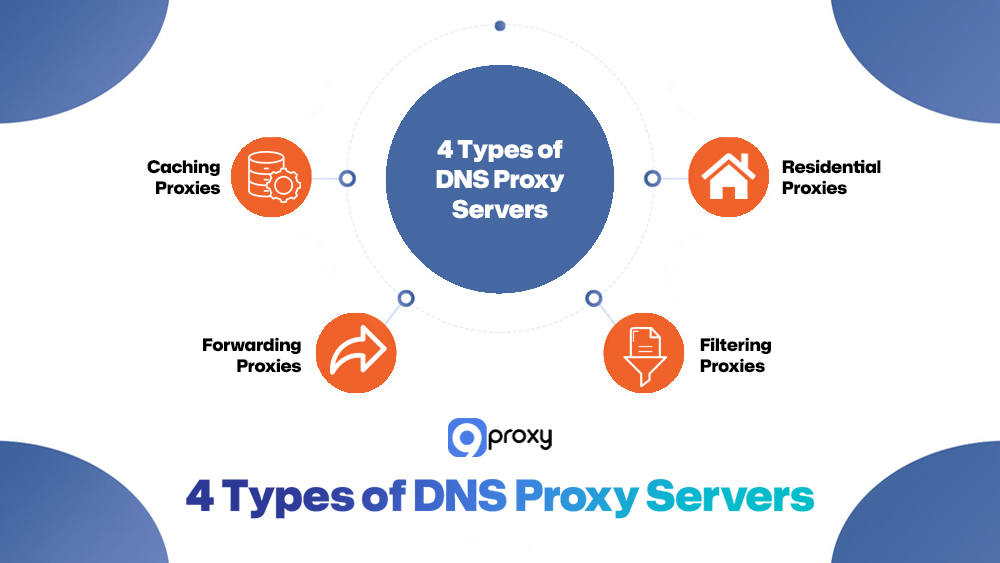
DNS proxy servers can be set up in different ways depending on your needs for speed, security, or control. Below are the main types you may come across:
Caching Proxies:
This is the most common type. They save the results of recent DNS lookups, so when the same website is requested again, the response is much faster. This helps reduce delay and lowers the amount of traffic sent across the network. In practice, this behavior is similar to how a cache proxy server reduces repeated requests by storing frequently accessed data closer to the user.
Forwarding Proxies:
Often used in businesses, these DNS proxy servers send all DNS requests from inside the network to a specific external DNS server. This makes it easier to manage settings and apply consistent security rules.
Filtering Proxies (Security Proxies):
These proxies come with built-in security features. They prevent access to dangerous or unwanted websites using preset rules or threat databases. This type is great for keeping networks safe and is commonly used alongside advanced solutions like secure web gateway vs proxy setups to apply deeper traffic inspection, enforce security policies, and improve centralized control.
Residential Proxies:
These use real home IP addresses to mask user activity. Behind the scenes, they may also use a DNS proxy to make it look like DNS requests are coming from a real residential user. This adds privacy and helps access region-locked content.
Benefits of DNS Proxy Servers
Using a proxy server DNS is a smart way to boost your network’s speed, safety, and simplicity. Here are the main reasons why it’s so useful for personal and business users:
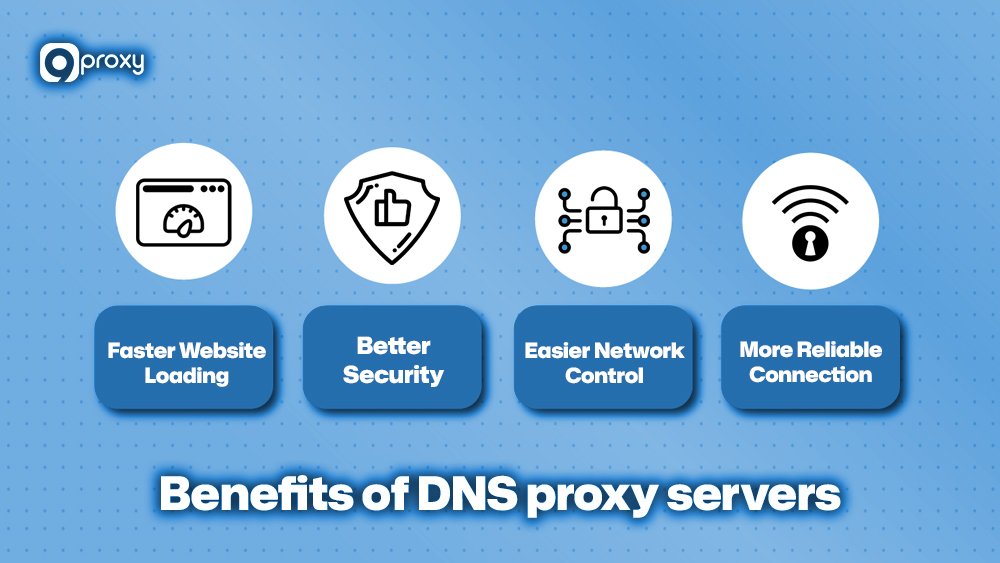
Faster Website Loading: A DNS proxy saves the results of websites you’ve visited before (this is called caching). So when you visit them again, they load much faster, and your network runs more smoothly with less latency.
Better Security: A proxy DNS server helps prevent dangerous websites before your device connects to them. It protects you from online threats like fake websites and DNS spoofing. When combined with additional controls such as a proxy firewall, DNS filtering adds another layer of protection by stopping malicious domains at the resolution stage.
Easier Network Control: When all DNS traffic goes through one place, it’s easier for your IT team to manage settings and apply rules across the network.
More Reliable Connection: If the main DNS server goes down, the proxy can still provide website info from its cache. This keeps things working for your users without interruption.
For even stronger privacy and performance, organizations sometimes combine DNS proxies with dolphin anty browser management tools to mask device fingerprints and improve multi-account safety online.
How Does a Proxy DNS Server Work?
Proxy DNS servers are used by many organizations to make DNS lookups faster and more efficient. These servers sit in the middle between user devices (called DNS clients) and the recursive DNS servers that fetch the actual IP addresses. By forwarding requests and sending back answers, the proxy helps reduce latency and improve overall performance.
A major advantage of DNS proxies is their ability to cache past query results. This means if someone requests the same website again, the proxy can respond immediately without asking the DNS server again. This speeds up DNS resolution, especially when proxy servers are placed in different parts of the world.
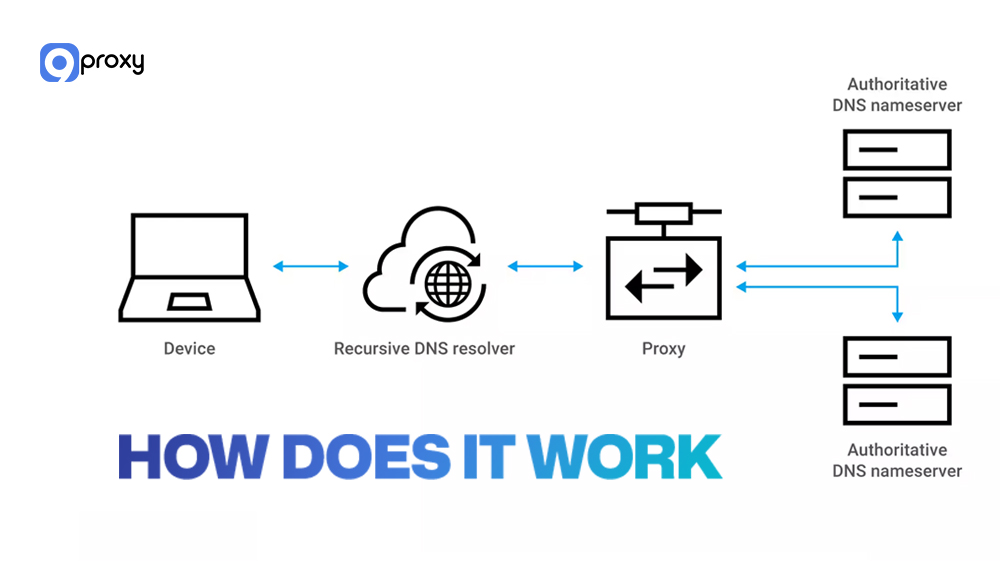
Besides improving speed, proxy DNS servers also help manage the network better and boost DNS security. They can hide where the original request came from and check that each response is valid before passing it on, which makes the network more secure and reliable. This approach is often adopted in large-scale environments where DNS proxies support centralized traffic handling similar to an enterprise proxy server architecture.
Top 5 DNS Proxy Server Providers
When choosing a DNS and proxy server service, it’s important to consider three main things: speed, security, and reliability. The table below gives you a quick comparison of the five top DNS proxy and security providers, showing their main features and which types of users they’re best suited for.
| Provider | Primary Focus | Key Feature(s) | Target User |
| Cloudflare (1.1.1.1) | Privacy & Speed | DNS-over-HTTPS/TLS, Zero-logging | Consumers, Small Businesses |
| Google Public DNS | Speed & Security | High-speed resolution, DNSSEC validation | Consumers, Developers |
| Cisco Umbrella | Enterprise Security | Global threat intelligence, Layer 7 visibility | Large Enterprises, Managed Services |
| OpenDNS (Cisco) | Content Filtering | Customizable content filtering, Phishing protection | Families, Small to Mid-sized Businesses |
| Akamai Edge DNS | Performance & Resilience | High availability, DDoS mitigation | Global Enterprises, High-traffic Websites |
These top providers show the variety of services you can choose from; some focus on fast and private public DNS, while others offer full enterprise security solutions. The best choice depends on what matters most to you: simple speed for personal use, strong security for businesses, or advanced content filtering features.
Setting DNS Proxy Server: Beginner’s Guide
Setting up a DNS proxy can be done manually or automatically, depending on your needs. Whether you’re configuring it on Windows, macOS, or a router, or using a Smart DNS service like 9Proxy, this guide walks you through each step clearly and efficiently.
Manual Setup (Windows/macOS/Router)
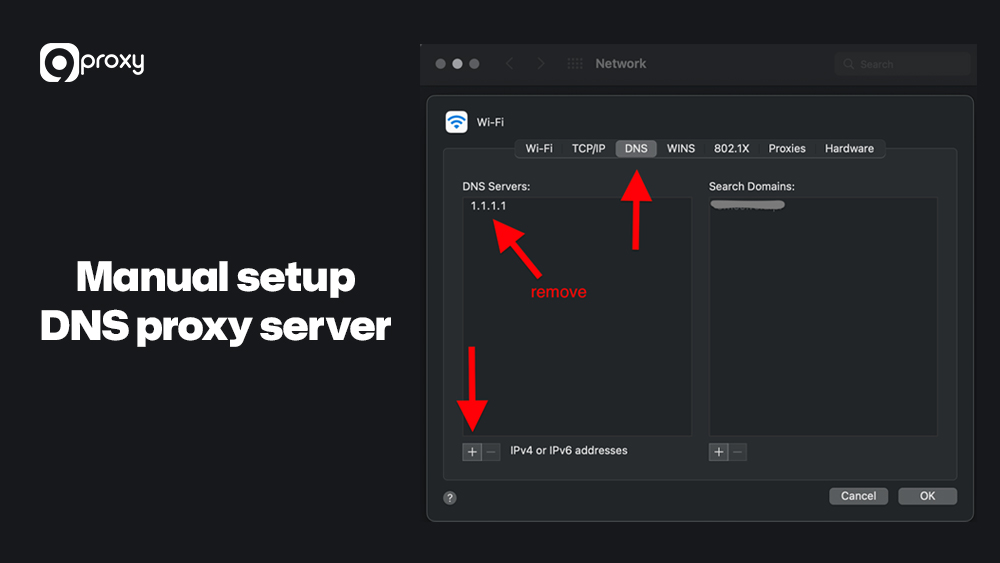
Follow these simple steps to manually set up a DNS proxy on your device. It takes just a few minutes for all set up.
Step 1: Open Network Settings → choose your active connection.
Step 2: Select DNS configuration → input your preferred DNS proxy address.
Step 3: Save settings and restart your browser.
Step 4: Test your connection using a DNS leak test site.
If you prefer a simple browser-level configuration, you can check how to set up a proxy server on Chrome, which provides DNS proxy support directly from the browser interface.
Automatic Setup (Smart DNS Service)
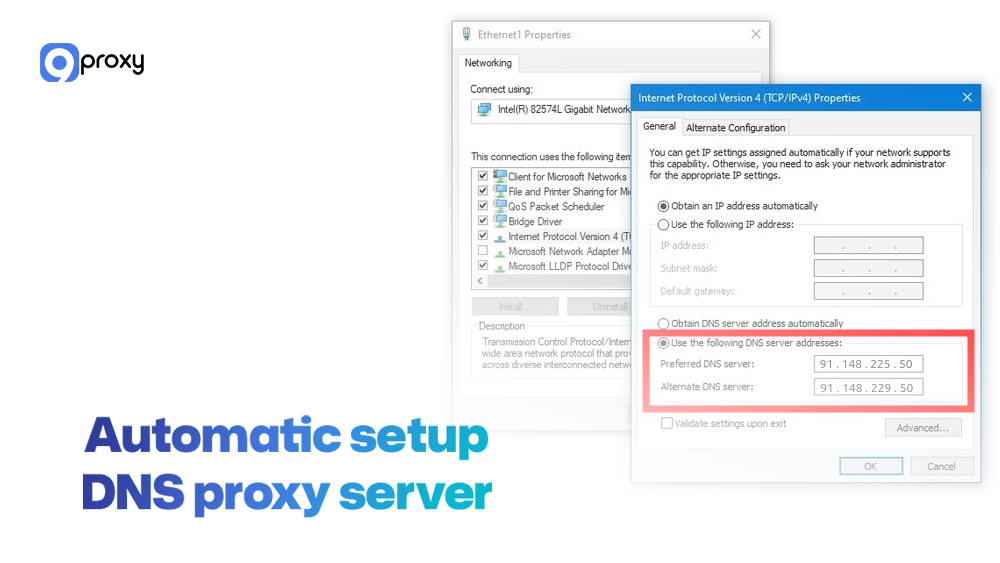
For a quick and hassle-free setup, use a Smart DNS service. Just sign up, activate your IP, apply the settings, and restart your network to get started.
Step 1: Sign up with a Smart DNS provider.
Step 2: Verify your IP and activate the service.
Step 3: Apply the DNS configuration on your device or router.
Step 4: Restart your network to apply changes.
Enterprise Considerations
For large organizations, using a DNS proxy involves more than just changing an IP address. To ensure top performance and protection at scale, consider the following key points (especially when deploying solutions like Akamai Shield NS53):
- Placement: Set up proxy servers in smart locations across the network to reduce latency for all users.
- Caching Policies: Adjust Time-to-Live (TTL) settings to keep a balance between updated data and fast performance from caching.
- Security Policies: Connect the proxy with firewalls and IDS/IPS systems to apply advanced filters and defend against threats.
- Monitoring: Use strong tools to watch DNS traffic closely. This helps detect unusual activity and keeps the network secure and running smoothly.
Companies using datacenter-level networks often integrate datacenter proxies alongside DNS proxies to handle large traffic volumes and balance global request loads effectively.

Deal with Common Errors
Setting up your DNS proxy server is usually simple, but sometimes small issues can affect your network’s performance or security. To help you fix these quickly, we’ve put together a short guide to troubleshoot the most common problems.
| Common Error | Possible Cause(s) | Solution |
| “DNS Server Not Responding” | Firewall is preventing DNS traffic (Port 53), and an incorrect DNS IP address was entered. | Check firewall settings to ensure port 53 is open. Double-check the DNS IP addresses for typos. |
| DNS Leak | The VPN/Proxy client is not properly configured to route DNS traffic through its own tunnel. | Test for leaks using a specialized tool (see below). Use a VPN/Proxy that enforces DNS over its connection. |
| Slow Resolution | Proxy cache is small or unconfigured, geographic distance to the proxy server is too far. | Increase cache size (if possible). Switch to a DNS proxy server geographically closer to you. |
| Geographical limitations Content Access Fails | Smart DNS service requires IP address registration, or the service is down. | Ensure your current public IP address is registered in the Smart DNS service settings. |
Fixing these common setup problems will help your DNS proxy work properly, giving you the speed and security it’s meant to provide. Always check that your firewall rules aren’t preventing DNS traffic on Port 53, which is essential for DNS communication.
DNS Proxy vs Firewall: What’s the Difference?
While both a DNS proxy server and a firewall play an important role in protecting your network, they work in different ways. Understanding the difference helps you build a stronger, more effective network setup.
| Feature | DNS Proxy Server | Firewall |
| Primary Function | Converts domain names to IP addresses, stores results (caching), and prevents harmful DNS queries. | Monitors and controls all network traffic using security rules. |
| Network Scope | Handles only DNS traffic (usually on UDP/TCP port 53 and secure DNS ports). | Covers all types of traffic like HTTP, FTP, and SSH across all ports. |
| Layer of Operation | Works mainly at the Application Layer (Layer 7) and Transport Layer (Layer 4). | Operates at the Network Layer (Layer 3) and Transport Layer (Layer 4). |
| Security Mechanism | Uses domain blacklists, DNSSEC, and hides real IP addresses. | Uses packet filtering, stateful inspection, and application proxies. |
A DNS proxy prevents access to malicious domains before your device even tries to connect. A firewall adds a second layer of protection by checking all the data being sent and received. To fully protect your network, it’s best to use both a strong DNS proxy and a properly set-up firewall.
Security & Privacy Concerns
Even with the best proxy server DNS solution, it’s important to be aware of the security and privacy risks that can still exist. Your protection is only as strong as the weakest part of your setup.
DNS Leaks
A DNS leak happens when your DNS requests accidentally skip the proxy, VPN, or any other protection you’re using and go straight to your ISP’s DNS servers. This means your browsing activity could be seen by your ISP or hackers. If you’re using a privacy-focused DNS proxy, a leak like this defeats the whole purpose.
Logging Policies
Not every DNS proxy provider protects your data the same way. You should always check their logging policy. If the provider stores a record of the websites you visit, your privacy is at risk. Many users choose a private proxy setup or no-log DNS services to limit data exposure and keep browsing activity confidential.
How to Test Your DNS Proxy Setup
After setting up your DNS proxy, it’s a good idea to use a DNS leak test tool online. These tools show whether your DNS requests are being sent through the proxy as expected. If the test shows your ISP’s DNS or an unknown IP, your setup may need adjustments.
FAQ
Who should use a proxy DNS server?
A proxy server DNS is great for companies and users who want faster internet and better security. It’s especially useful for ISPs, large networks, and anyone who wants better control over DNS traffic and privacy.
How does a proxy DNS server handle DNS cache poisoning attacks?
A DNS proxy server protects against DNS cache poisoning by using DNSSEC (DNS Security Extensions). This system checks that each DNS response is valid using digital signatures, making sure fake records don’t get stored or served to users.
How does a proxy DNS server work with other network security tools?
A DNS proxy can work alongside tools like firewalls, intrusion detection systems (IDS), and intrusion prevention systems (IPS). This setup helps analyze DNS traffic in real time and adds more layers of protection to your network.
Conclusion
On the whole, a Proxy Server DNS does more than just translate website names to IP addresses. It’s caching speeds up browsing, while its security features protect your network from threats like spoofing and cache poisoning. Acting as a smart middleman, it improves both performance and protection.
To get the full benefits of speed and safety, don’t just rely on default settings. Explore reliable paid proxy options that offer zero-logging and strong threat protection, like the residential proxy solutions we provide at 9Proxy.