ChatGPT Proxy lets you send your ChatGPT traffic through another server so your real IP and location stay hidden. A ChatGPT proxy acts as an intermediary that routes your requests through a different IP address, helping you pass over geographic restrictions, protect privacy, and manage access more efficiently.
Many users search for “ChatGPT Proxy” to overcome geo-blocks, reduce tracking, or support large-scale usage and API traffic, while others need a safe and reliable option for business or research environments. Therefore, this article from 9Proxy will help you understand why proxies are used, how they work in real scenarios, and the best setup methods for every device you rely on.

What Is a ChatGPT Proxy?
A ChatGPT Proxy is an intermediary server that sits between your device and the ChatGPT service. Instead of connecting directly, your request is sent to the proxy first, which then forwards it to ChatGPT using the proxy server’s IP address. This rerouting hides your real IP and location, giving you IP masking, geolocation flexibility, and more stable traffic management.
A ChatGPT proxy is often used to pass over regional restrictions, protect privacy when handling sensitive topics, support businesses that need multiple users without hitting rate limits, and help developers distribute API requests more efficiently. A single proxy can serve many devices, making it a practical tool for both individual users and large teams.
How a ChatGPT Proxy Works?
The technical flow of a ChatGPT Proxy is simple: your device sends a request to the proxy, the proxy forwards it to ChatGPT, and the response returns through the proxy. This setup explains why proxies are effective and when they’re useful.
IP masking happens at the network layer. The proxy replaces your real IP with its own, so OpenAI only sees the proxy’s IP. This substitution allows you to control how your traffic appears externally, which is the same mechanism used when people want to change IP with a proxy for privacy, testing, or regional access purposes.
Using a proxy adds one extra step—device → proxy → OpenAI; often through a server placed in an allowed region. Many providers offer multiple countries, so you can choose the most suitable location.
Configuring a ChatGPT proxy is similar across devices: enter the proxy server, port, and credentials in system network settings on Windows, macOS, Linux, or mobile. Browsers can use extensions for browser-only routing, while API setups define the proxy endpoint in the client library.
Benefits of Using a ChatGPT Proxy
Using a ChatGPT Proxy can bring several practical advantages, especially for users who need more flexible access, stronger privacy controls, or smoother performance when interacting with ChatGPT across different networks and devices:
- Pass over regional restrictions: If ChatGPT or specific features are unavailable in your region or limited by your network, a proxy located in an allowed country can provide indirect access.
- Improved access under rate limits: Teams and apps generating lots of prompts may hit rate limits from a single IP. Multiple high-quality proxy IPs can help distribute traffic more smoothly.
- Enhanced security and privacy: A proxy can prevent your real IP address and network details from appearing in server logs, which is helpful for privacy-conscious individuals and organizations.
- Customization and control: You can choose specific countries, ISPs, or IP types (residential, mobile, datacenter) and apply your own routing rules, monitoring, and authentication for your ChatGPT usage.
How to Set Up a ChatGPT Proxy?
Setting up a ChatGPT proxy means getting the proxy details from your provider, entering them into your device or app, and then testing to make sure everything works. Each platform has its own steps, but the overall process stays the same.
Browser method (Chrome/Firefox extension)
If you mostly use ChatGPT in your web browser, setting up a ChatGPT Proxy directly in the browser is a simple and convenient option. It limits the proxy to your ChatGPT tabs only, so the rest of your apps stay unchanged, and you can turn the proxy on or off whenever you want.
Most modern browsers already support proxy configuration, and Chrome users can either rely on extensions or configure settings manually through the browser itself. If you prefer a native approach, you can also review detailed Chrome proxy settings to understand how traffic is routed at the browser level and how it affects tools like ChatGPT.
You can use built-in settings or a proxy extension:
- Get your proxy details from your provider: server address or hostname, port, protocol (HTTP/HTTPS or SOCKS5), and login credentials if needed.
- Install a proxy extension such as “Proxy SwitchyOmega” on Chrome or a similar add-on on Firefox.
- Open the extension’s Options and create a new profile.
- Enter the server, port, and choose the correct protocol.
- If your provider uses username/password, enable authentication and fill in your credentials.
- Save the profile and activate it when you want to use ChatGPT through the proxy.
- Visit an IP check site in a new tab to confirm the visible IP and location have changed, then log in to ChatGPT as usual.
This method is ideal when you want only browser traffic, especially ChatGPT tabs, to use the proxy while keeping the rest of your system on a normal connection.

Operating-system method (Windows, macOS, Linux)
If multiple apps use ChatGPT (for example, desktop apps, command-line tools, or local AI helpers), configuring the proxy at the OS level is more efficient.
On Windows:
- Step 1: Open Settings → Network & Internet → Proxy.
- Step 2: In Manual proxy setup, toggle it on.
- Step 3: Enter the proxy server IP/hostname and port.
- Step 4: Save and close. When you next open a browser or app, Windows routes HTTP/HTTPS traffic through the proxy. If authentication is required, you’ll be prompted in the app.
On macOS:
- Step 1: Go to System Settings → Network → (Your connection) → Details → Proxies.
- Step 2: Enable HTTP or SOCKS5 proxy.
- Step 3: Add server, port, and credentials, then apply the changes.

On Linux (desktop):
Use system network settings, or configure environment variables like http_proxy and https_proxy for terminal-based tools. This approach is especially useful when working with command-line applications or automation scripts that interact with APIs, similar to setups commonly used with tools like wget proxy configurations for controlled outbound requests.
With OS-level configuration, all applications that respect system proxy settings will reach ChatGPT through your ChatGPT Proxy automatically.
Mobile method (Android, iOS)
Many of you use AI while moving between places, and mobile devices support ChatGPT Proxy routing as well. However, the setup options can differ depending on whether you’re connected to Wi-Fi or using mobile data.
On Android (Wi-Fi network):
- Step 1: Open Settings → Network & Internet → Wi-Fi.
- Step 2: Long-press your network and tap Modify network.
- Step 3: Expand Advanced options and change Proxy to Manual.
- Step 4: Enter proxy hostname and port, save settings, then reopen your ChatGPT app or browser.
On iOS (Wi-Fi network):
- Step 1: Go to Settings → Wi-Fi and tap the info icon next to your network.
- Step 2: Scroll to HTTP Proxy and choose Manual.
- Step 3: Add server, port, and authentication credentials.
If you want more detailed guidance or visual steps, reviewing iPhone proxy settings can help you fine-tune how iOS handles proxy traffic, especially when switching between different Wi-Fi networks.

If you want more detailed guidance or visual steps, reviewing iPhone proxy settings can help you fine-tune how iOS handles proxy traffic, especially when switching between different Wi-Fi networks.
API integration example
For developers who use ChatGPT through the OpenAI API, setting up a ChatGPT Proxy is done directly in the code instead of in system settings. This makes it easy to assign different proxies to different API calls and automatically switch to another proxy if one fails.
In Python with the OpenAI library, you simply import the required modules and add your proxy settings when creating the API client:
python
import openai
import os
openai.api_key = os.getenv(“OPENAI_API_KEY”)
# Configure proxy settings
proxy_url = “http://username:password@proxy_ip:port”
# For the requests library used by OpenAI
import requests
session = requests.Session()
session.proxies = {
“http”: proxy_url,
“https”: proxy_url
}
# Create API request through proxy
response = openai.ChatCompletion.create(
model=”gpt-3.5-turbo”,
messages=[{“role”: “user”, “content”: “Hello”}],
proxy=proxy_url # Specify proxy directly
)
For JavaScript/Node.js applications, you can set up a ChatGPT Proxy by installing the http-proxy-agent and https-proxy-agent packages, then applying them when you create your API client. When using proxies, rate limiting is important. Spread your requests across several proxy IPs so no single proxy handles too many calls at once, which helps reduce the chance of identification or limiting.
Deal with common issues
Even a strong ChatGPT Proxy setup can run into problems, and understanding the common issues makes them much easier to fix.
Slow connections or high latency
This issue often comes from distance or network congestion. To fix it, you can try switching to a proxy endpoint closer to your region, reducing the number of simultaneous requests, or checking whether your firewall or antivirus software is slowing down HTTPS traffic.
Blocked IPs or “unusual activity” warnings
If you see disabled IPs or “unusual activity” warnings, rotate to fresh IPs, preferably residential ones, and avoid heavy automation that may violate platform rules. If certain IP ranges keep getting disabled, reaching out to your provider’s support team can help identify the cause.
Session time-outs
Session time-outs or repeated logouts usually happen when your IP changes too often. Make sure your connection stays stable, turn off aggressive auto-rotation during active conversations, and clear cookies before reconnecting with the new proxy IP.
With a reliable provider and simple configurations, most ChatGPT Proxy issues can be handled quickly and kept under control.

Choose the Right Proxy for ChatGPT
Selecting the right ChatGPT Proxy means looking at key factors like speed, latency, uptime, available locations, provider reputation, pricing, and support quality. The table below compares proxy types across these points.
Before you review it, think about what you need most. Real-time tasks may prefer fast datacenter proxies, while privacy-focused users often choose residential proxies because they look more natural. Developers handling large API workloads may need providers with unlimited bandwidth and strong uptime guarantees, even if the price is higher.
| Criteria | Why it Matters for ChatGPT | What to Aim For |
| Speed / Latency | Affects response time and chat smoothness | Low ping to OpenAI regions, consistent throughput |
| Uptime & Stability | Ensures sessions don’t drop mid-conversation | 99.9%+ uptime, monitored infrastructure |
| IP Location Options | Required for bypassing geo-blocks or local testing | Multiple countries, city-level targeting if possible |
| Proxy Type | Impacts trust level and block rates | Residential or mobile over a generic datacenter when possible |
| Provider Reputation | Directly affects privacy and reliability | Clear policies, good reviews, transparent support |
| Cost & Billing | Long-term usage can get expensive | Simple pricing, no forced bandwidth limits, fair trial or refund |
| Support & Tools | You’ll need help when something breaks | 24/7 support, dashboard, API, logs, and basic troubleshooting tools |
In short, a great provider combines fast, diverse IPs with honest pricing and responsive support rather than just big marketing claims.
Different proxy types for ChatGPT
For ChatGPT access, choosing the right proxy type makes a big difference in both stability and success rate.
Residential proxies use IP addresses provided by real ISPs and households, so they appear as genuine everyday users. This makes them far harder for ChatGPT to prohibit, which is why we strongly recommend them for consistent, reliable access.
Datacenter proxies are typically faster and more affordable, but they come from well-known cloud networks that many automated tools also use. Because of this, they’re more likely to hit rate limits, trigger CAPTCHA challenges, or get flagged by detection systems.
Mobile proxies send traffic through real cellular networks. They offer excellent trust and blend with normal user behaviour, but they usually cost more than other proxy types.
For long-term, low-friction ChatGPT usage, residential proxies remain the safest and most dependable choice.
Cost & Pricing Considerations
When you start planning a budget for a ChatGPT Proxy, it helps to understand the common pricing models and how they affect your total cost. Providers usually offer three main options.
- Per IP: You pay for each unique IP address you use, such as a single residential IP. This option is ideal when you need a stable and predictable identity for each account, browser profile, or port, because the same IP remains assigned to you as long as you keep it active.
- Per GB: You’re charged based on the amount of data you consume. This model is common for rotating residential or mobile proxy pools, where IPs change frequently and usage varies. It works well if your traffic is unpredictable or if you only need proxies occasionally.
- Flat monthly plans: You pay a fixed monthly fee for a set bundle of IPs, bandwidth, or unlimited usage. This option is best for teams or heavy users who want consistent access and predictable costs without tracking individual IPs or data consumption.

Besides, be aware of possible hidden costs. Some providers charge extra for high-demand countries or cities, add fees for faster rotation or sticky sessions, or apply expensive overage charges when you exceed bandwidth or request limits.
A simple cost-benefit approach can guide your choice:
- For personal or light usage, just one or a few stable IPs may be enough.
- For teams, automation, or API-heavy projects, investing in clean residential IPs with unlimited bandwidth often saves time by reducing prohibitions and troubleshooting.
If the cost seems high, compare it with the value of steady access and fewer interruptions; it’s often worth the investment.
Risks & Best Practices
Security risks with a ChatGPT Proxy mostly happen when you use unreliable providers. A bad proxy can leak your real IP, expose your login details, or send your traffic outside the secure tunnel. Free proxies are the riskiest because many record your activity, sell your data, or even install malware.
Security risks
Some free or unknown proxies may record your activity, inject ads, or capture your login details. If the ChatGPT Proxy is set up incorrectly, it can also reveal your real IP.
Performance risks
When proxy servers are overloaded, you may experience slow responses, dropped connections, or repeated errors. If the proxy rotates IPs too quickly, platforms may trigger extra security checks.
Compliance and policy risks
Using a ChatGPT Proxy to pass over regional or organizational rules can violate terms of service or local laws. Poor handling of logs can also lead to privacy issues under data-protection regulations.

Best practices to reduce risk
- Choose a reputable provider with clear policies and documented infrastructure.
- Prefer residential or mobile IPs from clean, private pools rather than suspicious free services.
- Use authentication (username/password or IP allow-listing) and keep credentials secret.
- Rotate IPs sensibly, enough to avoid blocks, but not so frequently that sessions become unstable.
- Monitor performance and error rates, and keep proxies disabled when you don’t need them.
- Always respect OpenAI’s usage policies and your local laws.
When you’re unsure about using a ChatGPT Proxy, you can choose safer options like official regional access or a VPN managed by your organization. These alternatives keep your connection stable and reduce security or compliance risks.
Use Cases for ChatGPT Proxies
Not everyone needs a ChatGPT Proxy, but in many situations, it can become a highly effective tool that improves access, stability, and privacy when working with ChatGPT, especially if you face limits or restrictions that interfere with your workflow:
Businesses and teams
If you run multiple seats or internal tools around ChatGPT, proxies can help spread traffic over several IPs, reduce rate-limit headaches, and centralize routing and monitoring.
Security-conscious users
Some of you prefer to keep personal IPs private when exploring sensitive topics or working from locations with strict internet surveillance. A well-secured proxy adds an extra network layer before your traffic reaches external services.
Content creators and automation workflows
Agencies and creators who generate large volumes of AI-supported content may benefit from stable, clean IPs so scheduling tools, scripts, or CMS integrations can call ChatGPT reliably.

9Proxy – Trusted Proxy Provider for ChatGPT
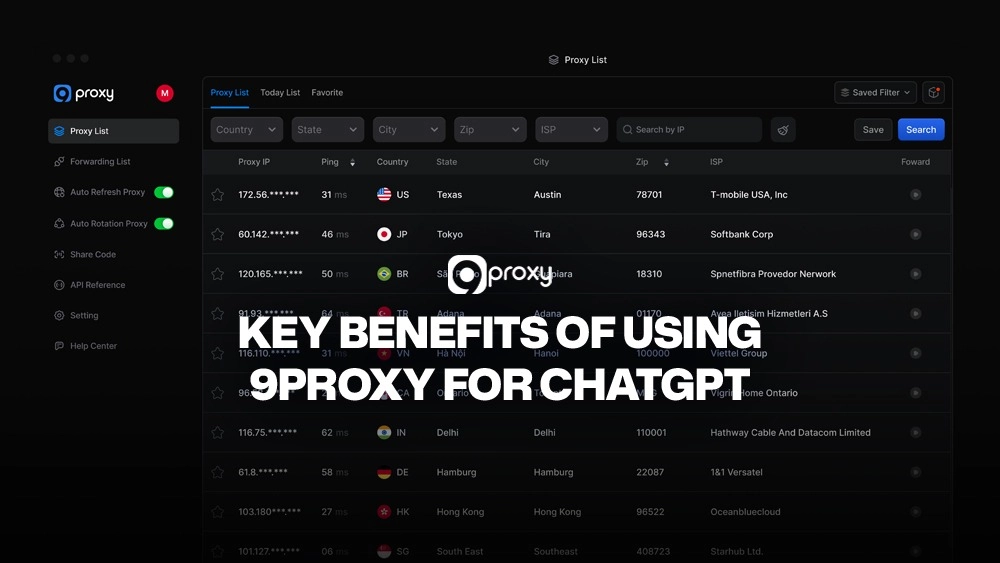
9Proxy offers a reliable ChatGPT Proxy service for users who need stable access, strong privacy, and clean IPs that work smoothly with ChatGPT. Our network uses 100% real residential IPs from verified ISPs, helping you reduce blocks, reduce rate limits, and keep your connection steady.
Key benefits of using 9Proxy for ChatGPT:
- 100% real residential proxies from home networks in more than 90 countries
- Clean and private IP pool that reduces the chance of blocks or CAPTCHA
- Unlimited bandwidth per IP, perfect for heavy ChatGPT or API use
- Affordable pricing starting around 0.04 USD per IP with no hidden fees
- Crypto payment bonus that adds 5% extra IPs at no additional cost
- Today’s List feature lets you reuse active IPs within 24 hours for free
With 9Proxy, you get a safe, simple, and cost-effective proxy solution that makes your ChatGPT experience faster, more private, and more reliable.
Conclusion
A ChatGPT Proxy gives you an easy way to protect your IP, go around restrictions, and scale ChatGPT usage for teams or API workloads. The setup works the same on every platform by routing your traffic through an intermediary server, but the specific steps vary between browsers, operating systems, and API integrations.
Choosing the right proxy type matters, and residential proxies are the safest option for ChatGPT because they look like real users and avoid detection better than datacenter IPs. Free or low-quality proxies should be avoided due to security and performance risks.
If you want stable, long-term access with minimal problems, contact 9Proxy for clean residential IPs, unlimited bandwidth per IP, and simple tools that make your ChatGPT Proxy setup secure and reliable.