Minecraft proxy server setups are becoming more popular among players and server owners who want better control, stronger privacy, and smoother connections. A Minecraft proxy server acts as a digital middleman between your device and the game server, helping manage traffic, hide your real connection details, and improve connection stability.
This article is written for casual players, advanced users, and server admins. By reading on, you will learn what a Minecraft proxy server is, why it matters, how to set it up, and how to optimize your network for a safer and smoother gaming experience.
What Is a Minecraft Proxy Server?
A Minecraft proxy server is a server that sits between your game client and the Minecraft server you want to join. Instead of connecting directly, your game traffic goes through the proxy first, so the Minecraft server sees the proxy’s IP address instead of your real one. Players use a proxy for Minecraft to protect their IP address, improve connection routing, and reduce common network issues.
By masking your real location and identity, the proxy helps keep gaming sessions private and protected from direct attacks. For server owners, a Minecraft proxy server can also manage traffic and connect multiple game servers into one network, making gameplay smoother and more stable for everyone.

Why Use a Proxy Server for Minecraft?
A proxy server helps Minecraft players and server owners get a more stable and reliable connection while also protecting their IP address. Instead of connecting directly to a game server, your traffic is routed through another server first.
Key reasons to use a Minecraft proxy server include:
- Lower lag and smoother routing when joining servers that are far from your location
- IP protection that helps reduce the risk of DDoS attacks and unwanted targeting
- Access to region-limited servers when permitted by the server’s rules
- Cleaner multi-account setups by separating traffic for each session
- Better server management during peak hours or maintenance periods
When used in a responsible way, a proxy server can make Minecraft gameplay more stable, smoother, and more enjoyable for both players and server administrators. These benefits are not limited to Minecraft alone, as similar advantages apply across different platforms.
For players interested in console gaming, the same principles of connection stability and IP protection extend to other environments like a proxy server ps4 or proxy server ps5 setup, where routing and security remain equally important.

Types of Minecraft Proxies Explained
There are several types of Minecraft proxies, and each one is designed for a specific purpose. Knowing the differences helps you choose the right option and avoid common setup mistakes.
Below is a comparison of common Minecraft proxy options, showing how they differ in speed, setup difficulty, and who they are best suited for.
|
Proxy Type |
Use Case |
Speed |
Setup Difficulty |
Best For |
|
SOCKS5 Proxy |
Game traffic routing |
High |
Medium |
Players |
|
HTTP(S) Proxy |
Basic routing |
Medium |
Easy |
Casual users |
|
Reverse Proxy |
Server protection |
Very High |
High |
Admins |
|
Proxy Clients |
Server networks |
Very High |
Medium |
Admins |
Selecting the right proxy type is important for achieving your goals. SOCKS5 is often the best option among Minecraft proxies for players because it handles game traffic smoothly and efficiently. On the other hand, a reverse proxy Minecraft server, such as NGINX, is commonly used by server owners who want to protect their backend servers from direct exposure and external threats.
How to Set Up a Proxy for Minecraft (Step-by-Step Guide)
We have simplified the setup process into clear, step-by-step instructions for each major platform. Whether you play on a computer or a mobile device, setting up your connection is easy to follow.
Prepare What You Need Before Setting Up a Minecraft Proxy
Before you begin, taking time to prepare can help you avoid errors and save time during setup. First, decide which proxy type best fits your needs, such as a datacenter proxy for speed or a residential proxy for better trust and stability.
Make sure you have the following information ready:
- Proxy IP address or hostname
- Port number
- Username and password, if authentication is required
- Confirmation that the Minecraft server allows proxy connections
Having these details prepared in advance makes the setup process smoother and helps prevent connection problems.
Set Up a Proxy for Minecraft on Windows
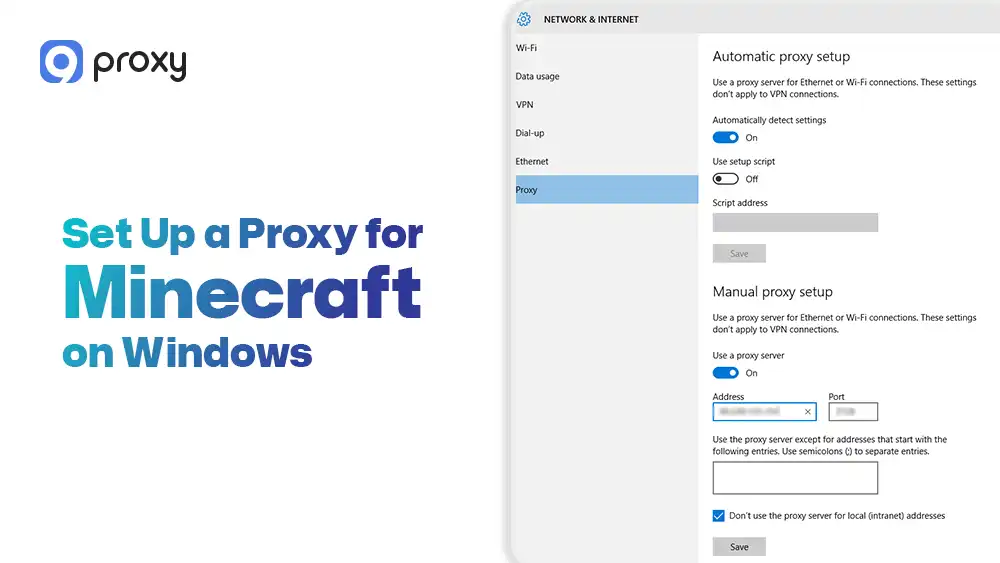
Minecraft on Windows uses system-level proxy settings, which means the proxy configuration applies automatically to the game. Once the proxy is set at the system level, Minecraft will follow those settings without extra changes. Follow these steps:
- Open Windows Settings and go to Network & Internet > Proxy
- Turn on Manual proxy setup
- Enter the proxy server address and port provided by your proxy service
- Save the settings before launching Minecraft
After the proxy is enabled, Minecraft will automatically route its traffic through the proxy when you start the game. For players who prefer browser-based configuration or need quick switching between different proxy locations, tools like a chrome proxy server extension can provide convenient alternatives alongside system-level setup.
Set Up a Proxy for Minecraft on macOS
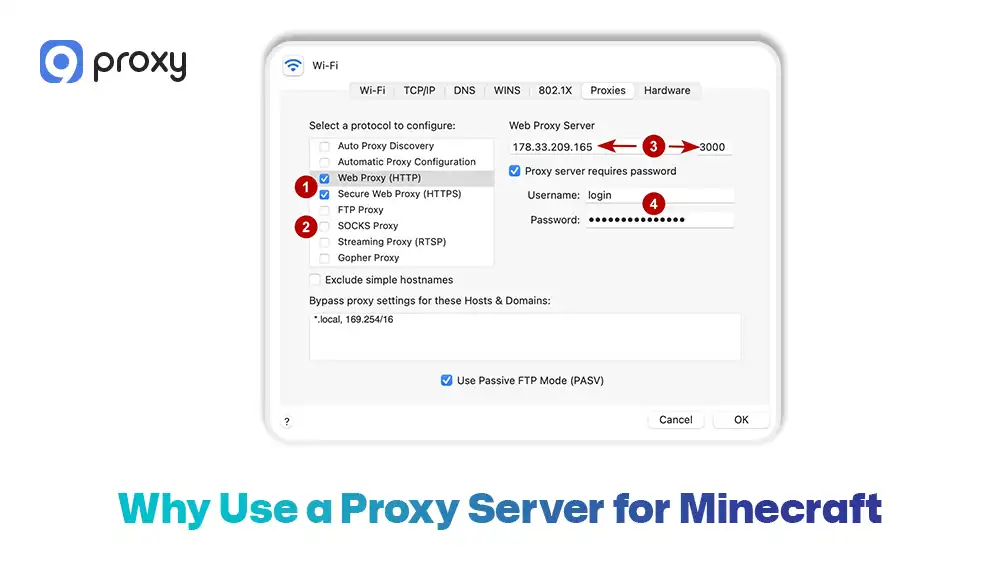
macOS allows you to set up a proxy through its network settings, giving you direct control over how your connection is routed. However, choosing the correct proxy protocol is very important to ensure everything works as expected. Follow these steps:
- Open System Settings > Network on your Mac
- Select the network you are currently connected to, such as Wi-Fi or Ethernet
- Click Advanced, then open the Proxies tab
- Choose the correct protocol, such as HTTP or SOCKS, depending on the proxy you are using
- Enter the proxy server address, port, and any required authentication details
macOS generally works smoothly with proxy connections, but selecting the wrong protocol or entering incorrect details can cause connection errors or stop Minecraft from connecting properly.
Set Up a Proxy for Minecraft on Android
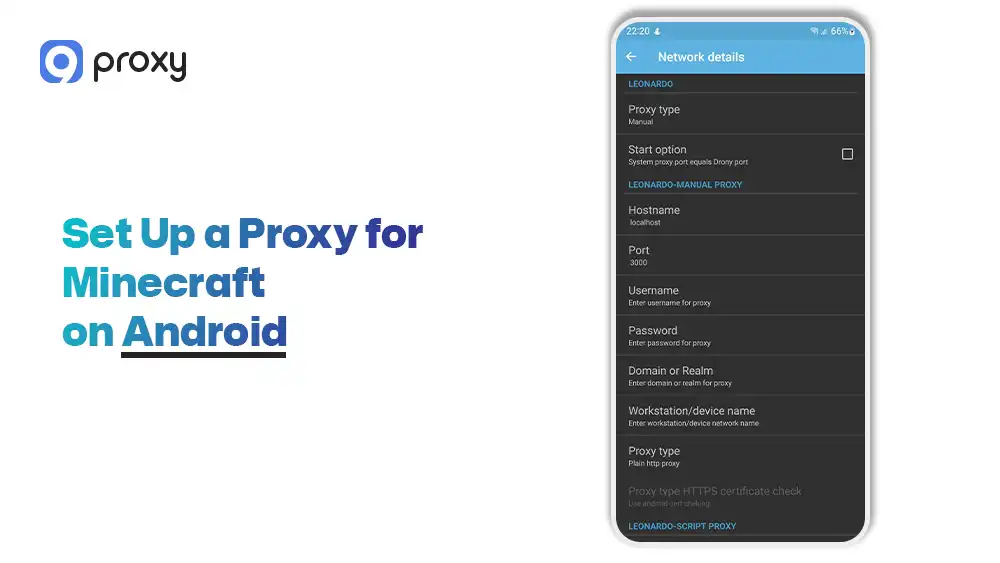
Android allows proxy configuration on Wi-Fi networks, making it possible to route Minecraft traffic through a proxy when you are connected to wireless internet. To configure the proxy:
- Open Wi-Fi settings on your Android device and select the connected network
- Change the proxy setting to Manual
- Enter the proxy host and port provided by your proxy service
- Save the changes and then launch Minecraft
Keep in mind that this setup only works when using Wi-Fi. Proxy settings do not apply to mobile data, so advanced routing may require third-party apps.
Set Up a Proxy for Minecraft on iOS (iPhone & iPad)
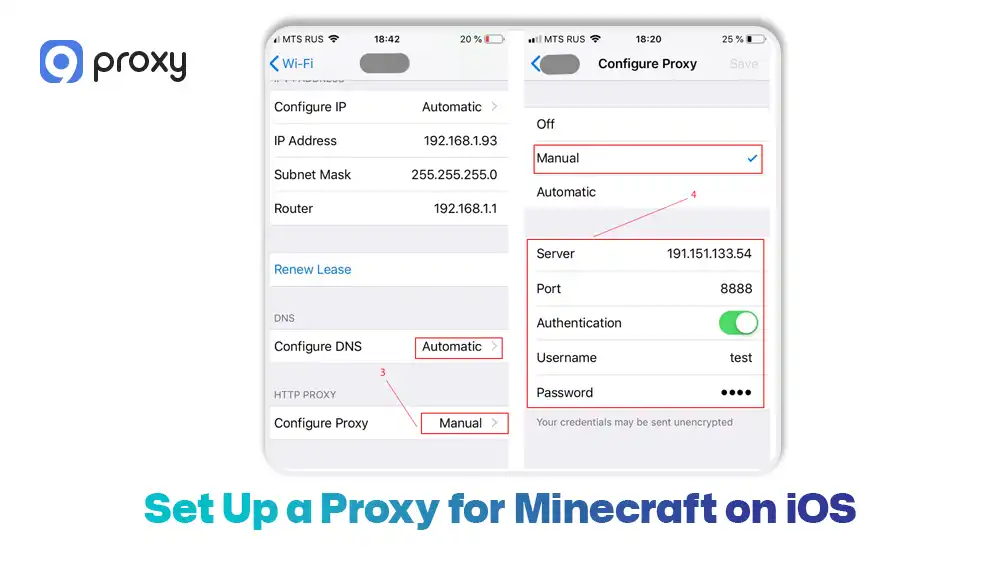
iOS applies proxy settings on a per-Wi-Fi network basis and supports HTTP proxies only, which means proxy configuration is more limited compared to desktop operating systems. Each Wi-Fi network must be configured separately if you switch connections. Follow these steps:
- Open Settings > Wi-Fi on your iPhone or iPad
- Tap the Wi-Fi network you are currently connected to
- Scroll down and select Configure HTTP Proxy, then choose Manual
- Enter the proxy server address, port, and any required authentication details
iOS does not natively support SOCKS proxies, so compatibility depends on the proxy type you use. If the proxy is not compatible, Minecraft may fail to connect or ignore the proxy settings entirely.
Turn Off the Proxy Safely After Playing
We recommend turning off your proxy settings once you are finished with your gaming session. This restores your normal internet speed for other apps and prevents issues with banking or streaming services. Simply go back to your network settings and switch the proxy toggle to “Off” or “None.”
Test If the Minecraft Proxy Is Working Correctly
After completing the setup, we recommend checking your new connection before joining a competitive match. Doing this early helps prevent sudden disconnects or connection issues during gameplay.
- Check your IP: Use an online IP checker to confirm that your location now matches the proxy’s location, not your real one. Understanding how a proxy server change ip process works can help you verify that your identity is properly masked and your connection is routing through the intended location.
- Join a test server: Log in to a public Minecraft server and confirm that your what is my Minecraft server IP information shows the proxy’s details to other players.
- Monitor ping: Pay attention to your ping level. If the lag feels high, switching to a proxy server closer to your real location can improve performance and stability.
Common Minecraft Proxy Issues and How to Fix Them
If you run into problems, there is no need to worry. Most Minecraft proxy server issues are common and easy to fix. Below are the problems players face most often and how to solve them.
- Proxy blocks login: Make sure you are using a SOCKS5 proxy. Some HTTP proxies do not support Minecraft launcher login traffic and can block access.
- Connection timeout: Check that your firewall or antivirus software is not blocking the port used by your proxy. A blocked port can stop the connection completely.
- IP still exposed: This usually means DNS traffic is leaking outside the proxy. Try using a Minecraft proxy client or a browser extension that forces DNS requests through the proxy.
- Slow speeds: If performance feels slow, switch from a datacenter IP to a residential IP. Residential proxies often provide better stability and lower detection during gameplay.
Choosing the Right Proxy Server for Minecraft
Finding the right balance between speed and security is important for a smooth and enjoyable gaming experience. We recommend choosing providers that offer high uptime and clean IP pools to avoid lag and connection issues.
The table below highlights the features that matter most, helping you evaluate options based on your specific playstyle and gaming needs.
|
Feature |
Importance |
Why It Matters |
|
Residential IPs |
Very High |
Helps avoid “proxy detected” bans on large Minecraft servers by appearing as a real home user. |
|
No-Log Policy |
High |
Keeps your gaming activity private and ensures your data is not stored. |
|
Low Latency |
Critical |
Prevents lag spikes during combat, building, or fast movement. |
|
Uptime |
High |
Ensures you stay connected and do not get kicked in the middle of a game. |
For the best results, we strongly recommend avoiding “free” proxy lists found online. These IPs are often overused, already blacklisted, and can put your Minecraft account at risk.
Whether you are setting up proxies for Minecraft or exploring broader applications, choosing a reliable gaming proxy server solution helps ensure consistent performance across different games and platforms.
High-Trust Residential Proxies from 9Proxy for Minecraft
9Proxy delivers reliable and high-quality proxy solutions designed for smooth and secure Minecraft gameplay. We offer residential and mobile proxies with stable uptime, built for players who need consistent performance during long gaming sessions.
Key advantages of 9Proxy include:
- 100% real residential proxies: IPs come from real users in over 90 countries, helping you avoid bans and detection on large servers.
- Clean and private IP pool: Our IPs are not shared with hundreds of other users, which lowers the risk of blacklists and blocks.
- Unlimited bandwidth per IP with IP-Based Packages: Perfect for long play sessions and data-heavy gameplay without slowdowns.
- Affordable pricing: Plans start at around $0.04 per IP, with no hidden bandwidth limits.
- Crypto payment perks: Pay with cryptocurrency and receive a 5% bonus in extra IPs.
With 9Proxy, you get a balance of speed, privacy, and reliability that fits serious Minecraft players.

FAQs
Can I get banned for using a proxy server in Minecraft?
It depends on the rules of the server you are playing on. Using a proxy is not against Minecraft’s official EULA, but some individual servers choose to block proxy connections. Using a high-quality residential proxy can greatly reduce the chance of being detected or blocked.
Do I need a separate Minecraft account to use a proxy server?
No, you do not need a new account. A proxy only changes how your device connects to the internet. Your Minecraft account, login details, and progress stay exactly the same.
Can I use a Minecraft proxy server to manage multiple game modes?
Yes. If you are a server admin, proxies like BungeeCord or Velocity are commonly used to connect multiple servers into one network. This lets players switch between game modes smoothly.
Are there risks when using a Minecraft proxy server?
The biggest risk comes from using untrusted or free proxies. These services often reuse IPs heavily or log user activity, which can expose your data or cause connection problems. To stay safe while gaming, we always recommend choosing a reputable paid provider with clean IP pools.
Conclusion
Setting up a Minecraft proxy server is a smart choice for players who want better privacy and a more stable connection. By following our guides for PC and mobile, you can easily hide your IP address and reduce common issues like lag or sudden disconnects.
Choosing high-trust residential proxies is especially important, as they help you stay undetected and maintain smooth gameplay. We hope this blog helps you play, build, and explore with greater confidence and peace of mind. For more insights and guides on proxy setup and gaming solutions, visit Blog9Proxy to explore comprehensive tutorials and best practices.
With 9Proxy, you get a reliable Minecraft proxy server solution that lets you focus on enjoying the game, not worrying about your connection anymore.