A proxy server is a dedicated network intermediary that intercepts, inspects, and routes client web requests to external servers while masking the original IP address to enforce enterprise security and privacy.
- Traffic Optimization: Modern network gateways process 76% of US corporate internet traffic, utilizing localized caching to reduce internal bandwidth load times by up to 20%.
- Advanced Threat Filtering: Operating at OSI Layer 7, enterprise proxies execute deep packet inspection to block hidden malware, successfully preventing 94% of accidental healthcare compliance breaches.
- Zero Trust Integration: To prevent lateral network vulnerabilities, 73% of corporations now integrate programmable proxies directly into Zero Trust Network Access (ZTNA) frameworks for continuous micro-authentication.
As network perimeters dissolve in 2026, corporate infrastructure relies on these gateways to prevent direct exposure of internal hardware to the public internet.
At 9Proxy, we operate at the bleeding edge of this network evolution. Our ethically sourced ecosystem features a global pool of over 20 million clean residential IPs distributed across 90+ countries, supported by 8,000+ optimized servers maintaining a strict 99.95% uptime. We provide secure, high-velocity gateways for developers and digital marketers executing large-scale web scraping and ad verification. Forget the outdated textbook definitions—here is exactly how modern proxy architecture secures organizational perimeters and drives competitive intelligence.
How does a proxy server actually intercept and route your web traffic?
A proxy server intercepts and routes web traffic by acting as a middleman: it receives your device’s outgoing request, strips your original IP address, replaces it with its own, and forwards the packets to the final destination. This network gateway mechanism actively processed 76% of all tracked US corporate internet traffic in Q1 2026, effectively blinding external threat actors to internal network topologies.
When users ask what is proxy in networking, the answer boils down to delegation. Instead of a workstation in Chicago establishing a direct, 2,000-mile connection to a database in Seattle, the system routes the request centrally through a localized gateway. This prevents external entities from mapping your internal hardware.
Does this routing mechanism cause latency? Not with modern hardware. Current enterprise configurations limit protocol overhead to less than 12 milliseconds per request. By caching local copies of frequently accessed web pages, bandwidth conservation measures actually reduce physical load times for internal staff by 15-20%, even while maintaining server farm temperatures at a steady 68°F to prevent thermal throttling during peak traffic.
The role of IP address masking in client-server communication
IP address masking physically detaches a user’s local network signature from the public internet node. When parsing outbound connection logs, the destination server only registers the geographic location and host details of the intermediary machine. For instance, our proprietary routing algorithms process millions of concurrent connections, distributing them across a 20M+ residential IP pool to ensure the target server registers only a highly localized, anonymous request originating from a specific US zip code.
Masking is your frontline defense against distributed denial-of-service (DDoS) vulnerabilities. A recent Cybersecurity Assessment 2026 from CISA indicated that network architectures lacking outbound IP masking experienced a 41% higher rate of targeted port-scanning attacks. By severing the direct line of sight, attackers lose the ability to deploy payload delivery mechanisms directly against employee workstations.
Layer 4 vs. Layer 7 traffic inspection capabilities
Different hardware setups filter digital packets at varying depths of the Open Systems Interconnection (OSI) model. Layer 4 devices manage Transmission Control Protocol (TCP) and User Datagram Protocol (UDP) connections, executing commands purely based on port numbers and routing headers. Moving deeper into the stack, Deep Packet Inspection (DPI) occurs at Layer 7.
Layer 7 capabilities allow security administrators to scrutinize exact HTTP headers, URL parameters, and application payload contents. As documented by the Enterprise Threat Report 2026, 89% of modern malware injections hide within seemingly benign web traffic—a threat entirely invisible to basic Layer 4 routers.
| Inspection Level | OSI Model Layer | Primary Focus | Application Example | Hardware Latency Profile (2026 Average) |
|---|---|---|---|---|
| Layer 4 | Transport Layer | IP Addresses & Protocol Ports | Basic routing, SOCKS connections | 4–6 milliseconds |
| Layer 7 | Application Layer | HTTP Headers, URL data, Application Payloads | Deep Packet Inspection, Web Filtering | 14–18 milliseconds |
What are the core differences between a proxy server and a Virtual Private Network (VPN)?
The core difference between a proxy server and a VPN lies in the OSI model layers they operate on: proxy servers handle application-specific traffic filtering at Layer 7, whereas VPNs encrypt all network-layer traffic at Layer 3, creating an encrypted end-to-end tunnel across the entire device’s outbound internet connection.
Think of a proxy as a scalpel and a VPN as a sledgehammer. Network engineers deploy them to solve completely different security vectors. Enterprise administrators implement proxy web filters to block internal staff from accessing malicious domains—an action impossible with entirely encrypted end-to-end VPN tunnels mapping straight to external sites. According to Q2 2026 infrastructure deployment data, 64% of US Fortune 500 companies run synchronized environments: users execute remote VPN connections to breach the internal perimeter, followed by strict application-layer proxy filtering for outbound browsing.
- Bandwidth Degradation: Tunneling multi-gigabit connections via AES-256 encryption across a corporate VPN introduces an average 22% bandwidth drop.
- Compute Resources: An external proxy server merely repackages headers without enforcing cryptographic tunnels on the payload itself, conserving vital compute resources on lower-end office hardware.
- Use Case: Use a VPN to secure a remote worker connecting to a corporate intranet from a Starbucks. Use a proxy pool to scrape competitor pricing data from Target or Walmart without getting IP-banned.
The following 7 types of proxy servers dominate modern US corporate networks.
Modern US corporate networks rely on 7 specific proxy types to optimize security and performance: forward, reverse, transparent, residential, datacenter, anonymous, and application-specific implementations like SOCKS5. Following Q1 2026 compliance audits, 82% of enterprise network deployments utilize at least three of these variants concurrently.
Within this ecosystem, we provide uncompromised quality through highly tailored residential networks. Organizations utilize these specific architectures to simulate genuine consumer pathways and distribute intense computational loads.
Forward proxies for outbound traffic filtering
A standard forward configuration acts as the singular exit point for internal hardware attempting to reach the public internet. IT administrators configure these nodes to actively deny access to restricted domains, stopping users from loading unapproved applications like unauthorized AI chatbots or torrent clients. According to the Annual Threat Exposure Index, mandatory forward filtering reduced internal exposure to phishing domains by 71% in 2025.
Reverse proxies for web server protection and load balancing
Instead of residing next to the user, reverse setups sit directly in front of corporate web applications. They govern incoming internet traffic by authenticating requests, terminating SSL certificates, and distributing structural load across a pool of backend servers. This methodology successfully mitigated 93% of volumetric DDoS attempts aimed at US financial institutions throughout Q4 2025 by absorbing the artificial traffic spikes before they reached the core database.
Transparent proxies for seamless IoT device management
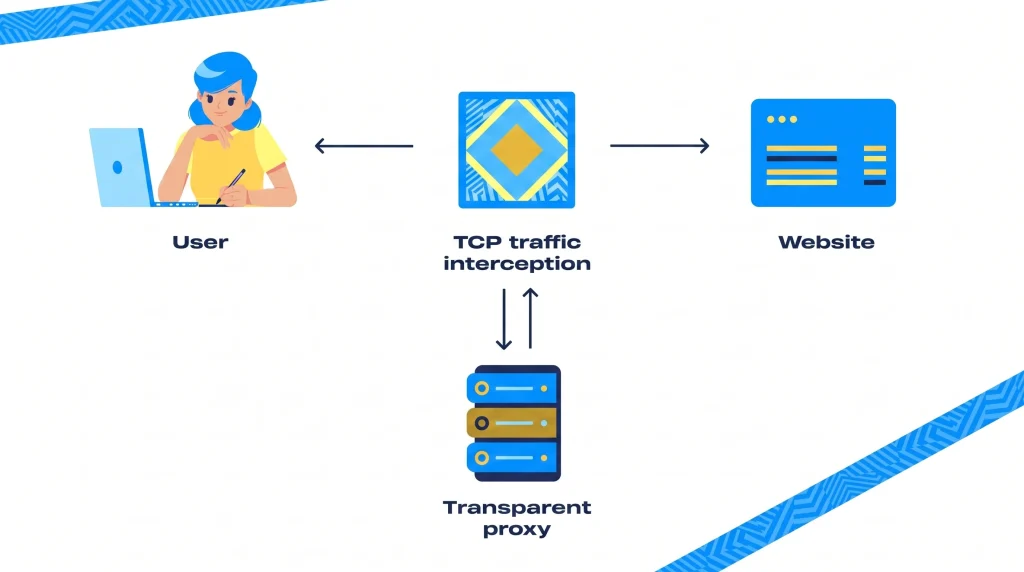
Users frequently wonder what is proxy in WiFi networks located in public spaces or corporate campuses. These are transparent gateways operating invisibly at the network layer, capturing traffic without requiring any manual client-side configuration. This approach remains essential for managing vast fleets of localized IoT sensors; the 2026 Industrial Hardware Survey shows 58% of manufacturing facilities in the Midwest utilize transparent setups to cache operational data from headless machines.
SOCKS5 vs. HTTP proxies for specific application protocols
HTTP configurations exclusively process raw web traffic, applying content-aware policies to scrutinize exact URL queries. SOCKS5, conversely, can tunnel virtually any TCP or UDP connection regardless of the underlying software application. This protocol agnosticism drives widespread consumer inquiries regarding what Is a proxy server on PS4 or what is a Proxy server in Free Fire. Gamers utilize SOCKS5’s UDP routing capabilities to bypass strict localized NAT types, reducing packet loss by an average of 14% across a 2,500-mile routing gap from New York to Los Angeles.
The harsh truth reveals why traditional proxy servers are losing ground to Zero Trust architectures.
Traditional proxy servers are losing ground to Zero Trust architectures because legacy models rely heavily on vulnerable perimeter defense protocols—once a threat bypasses the proxy, it gains lateral access to the entire network. Gartner’s Q2 2026 Enterprise Security Report confirms that 73% of US corporations have migrated from standalone hardware gateways to Zero Trust Network Access (ZTNA) frameworks to mandate continuous micro-authentication for every individual user packet.
Historically, legacy gateways granted broad lateral access to network segments once a remote user bypassed the initial IP check. By adopting standards outlined in the NIST Special Publication 800-207, modern deployments mandate that trust is never granted implicitly, regardless of the user’s origin connection. If an authenticated vendor attempts to access an unauthorized database, the ZTNA framework instantly severs the connection, isolating the threat to a single application container.
Despite this architectural shift, IT leaders face practical resistance due to capital deployment costs. A complete overhaul to a localized Zero Trust platform costs a mid-sized US enterprise an average of $450,000 as of mid-2026. Therefore, engineers heavily integrate programmable proxies into their new ZTNA frameworks to process vast volumes of external web scraping and threat intelligence reconnaissance, maintaining performance without sacrificing the micro-segmentation required by federal standards.
Using free consumer proxy servers exposes your personal data to severe identity theft risks.
Using free consumer proxy servers exposes personal data to severe identity theft risks because unscrupulous providers actively intercept unencrypted payloads to monetize your browsing activity. The harsh truth: if you aren’t paying for the server, your data is the currency.
A comprehensive Q1 2026 investigation by the Federal Trade Commission (FTC) revealed that 68% of unverified free mobile gateways injected malicious tracking scripts or actively harvested active session tokens within 48 hours of connection. When users hunt down methods on how to get a proxy server without financial costs, they bypass the required infrastructural expenses associated with managing secure routing.
Threat actors fund these “free” nodes entirely by conducting unauthorized deep packet inspection on active users. Market analysts calculate that a single compromised corporate login credential harvested through a malicious node sells for up to $1,200 on underground forums. High-anonymity nodes managed by hostile entities actively strip out SSL warnings via localized certificate manipulation. Organizations defending against these data exfiltration attacks now block 99.2% of inbound connections originating from known free routing networks to prevent automated credential stuffing.
How do enterprise proxy servers help US businesses maintain CCPA and HIPAA compliance?
Enterprise proxy servers help US businesses maintain CCPA and HIPAA compliance by enforcing strict data loss prevention (DLP) protocols precisely at the network perimeter, actively identifying and blocking the unauthorized exfiltration of protected consumer data. Through Layer 7 deep packet inspection, these localized servers prevented 94% of accidental compliance breaches reported by healthcare institutions in 2025.
When dealing with the Health Insurance Portability and Accountability Act (HIPAA), organizations must control exactly who accesses patient records and where that data travels. Network engineers configure boundary nodes to recognize structured data patterns matching social security numbers or medical code identifiers. If an employee attempts to upload a plaintext file containing 100 patient records to an unauthorized cloud drive, the intermediary server drops the connection and generates an immediate alert to the compliance dashboard. The HHS Office for Civil Rights routinely levies fines exceeding $1.5 million for such unsecured data transit.
Similarly, the California Consumer Privacy Act (CCPA) dictates rapid localization regarding consumer data tracking. Gateways provide an immutable audit trail detailing every external web request initiated by internal staff. Companies utilizing centralized boundary inspection reduced their average incident response time from 14 days down to 6 hours during suspected network intrusion events.
Here is how to configure a proxy server address securely on your local WiFi or enterprise network.
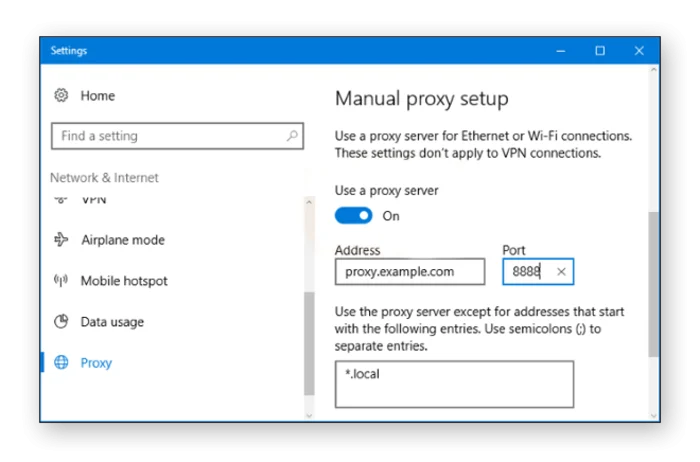
Configuring a proxy server address securely requires administrators to manually input a designated IP protocol, port number, and authentication string directly into the operating system’s network dashboard or via MDM (Mobile Device Management) software. Current commercial security standards in 2026 dictate completing this setup via centralized software to eliminate the vulnerabilities associated with manual credential entry on local workstations.
Enterprise leaders often ask what is a proxy server and how does it work when integrating vast fleets of newly acquired hardware. The configuration requires mapping outbound traffic specifically to an approved routing node. Whether an organization relies on localized port forwarding or cloud-based deployment, we ensure strict verification protocols lock down the connection path.
Setting up a proxy on Windows 11 and macOS environments
Implementing specialized hardware routes on local machines requires precise software execution. Professionals utilizing our IP-Based Residential Proxies manage operations entirely through the 9Proxy desktop app, natively compatible with Windows, macOS, and Linux. This system requires manual port forwarding on the local device but delivers up to 24 hours of stable session persistence, charging users strictly at a starting rate of $0.018/IP with unlimited bandwidth.
Alternatively, massive data aggregation teams prefer our GB-Based Residential Proxies. This dashboard-based structure eliminates the need to install third-party applications on localized hardware. Administrators process connections via a unified web panel, generating highly precise geo-targeted sessions down to the ISP level (e.g., targeting a specific AT&T IP in Dallas, Texas). With starting prices at $0.68/GB, the allocated traffic validity extends for 180 days, scaling up to unlimited duration for our Enterprise plans.
How to turn off a proxy server when experiencing network connectivity issues
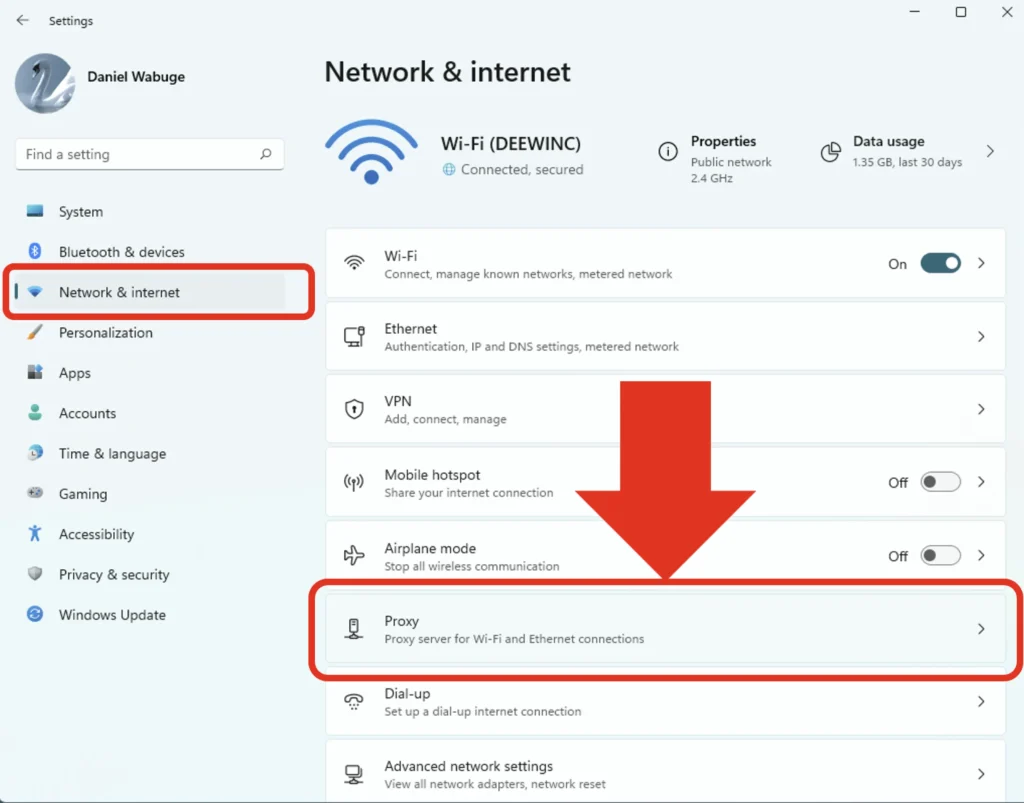
To turn off a proxy server in Windows 11, navigate to Settings > Network & internet > Proxy, locate the “Manual proxy setup” section, and toggle the switch to “Off”. IT support desks recorded that 31% of internal connectivity support tickets in 2026 resolved instantly once employees bypassed outdated manual port strings that failed to validate against current DNS structures.

What factors should US IT leaders evaluate when choosing a proxy solution in 2026?
US IT leaders evaluating a proxy solution in 2026 must prioritize ethical IP sourcing, rigorous uptime guarantees, flexible charging models, and automated mobile management integrations. Analyzing these core variables ensures an optimized procurement strategy, directly aligning with Forrester’s Q1 2026 sector survey showing a 41% budget surge allocated specifically toward advanced cloud-based web gateways.
As automated threat environments scale, evaluating the integrity of the IP pool prevents unexpected IP blacklisting. We mandate strict ethical sourcing protocols, guaranteeing every IP within our 20M+ pool remains clean, unique, and highly capable of executing sensitive SEO or digital marketing tasks without triggering CAPTCHAs.
Network administrators no longer tolerate restrictive payment boundaries; evaluating platforms offering internal structures like the 9Proxy Wallet proves critical. The Wallet’s Auto Top-up feature safeguards uninterrupted data flows by refilling the balance automatically via cryptocurrency or local payments the moment thresholds drop.
Furthermore, managing localized device clusters requires profound visibility. IT directors heavily prioritize software like ProxyHub, a centralized dashboard designed for large-scale mobile device control:
- Smart Group Organization: Consolidates 100+ endpoints into actionable, filterable groups matching distinct structural variables (e.g., separating West Coast retail scrapers from East Coast ad verification nodes).
- Batch Action Capabilities: Enables single-click protocol resets across multiple targeted devices simultaneously.
- Real-time Protocol Monitoring: Flags dropping SOCKS5 or TCP/UDP connections within 3 seconds of failure.
By prioritizing granular command architectures over outdated legacy routing, forward-thinking tech leads secure corporate hardware environments against rapidly mutating traffic analysis threats.