

A Blue Coat proxy server is commonly used by enterprises to control web access, inspect traffic, and protect users from online threats. These benefits are only achieved when the system is deployed and configured correctly. Many organizations choose Blue Coat when they require strict compliance, clear visibility into web activity, and consistent policies for large groups of users.
You will also see how forward and reverse proxy concepts apply in real environments and learn how to avoid unsafe configurations that can create security gaps. The content is written to be easy to follow while still practical for IT teams and decision-makers who need to understand the effort, cost, and value before investing.
What Is a Blue Coat Proxy Server?
A Blue Coat proxy server is a secure web gateway that sits between users and the internet, acting as a controlled checkpoint for all web traffic. Instead of letting devices connect directly to websites, every request passes through the proxy, where it is inspected, filtered, and managed according to security policies.
Besides, a Blue Coat proxy server is not a VPN and not a traditional firewall. VPNs focus on encrypted tunnels, and firewalls mainly block or allow traffic based on ports and IP addresses. Blue Coat operates at the web and application layer, which makes it useful for teams comparing secure web gateway vs proxy solutions for web filtering, traffic inspection, and access control.
How Does a Blue Coat Proxy Server Work?
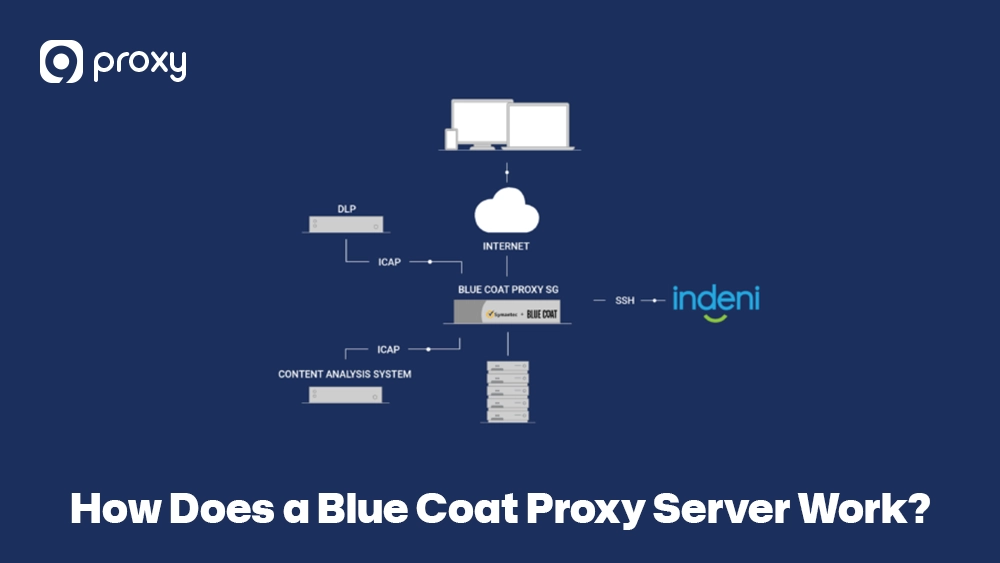
A Blue Coat proxy server works like a security checkpoint for web traffic. When a user tries to visit a website, the request goes to the proxy first instead of directly to the internet.
The proxy checks the request against policies set by administrators. These rules can allow, block, or limit access based on user identity, website category, or content type. For example, a school may block adult content, or a company may restrict social media during work hours.
If allowed, the proxy sends the request to the website, receives the response, and inspects it again before delivering it to the user. During this process, it can apply URL filtering, caching, and SSL inspection. This controlled flow helps enforce safe and acceptable internet use.
Core Features That Make Blue Coat Proxy Unique
Many organizations continue to use this solution because it offers strong and easy-to-manage security features. These capabilities are especially useful in environments with many users and heavy internet traffic:
- Granular Web Filtering: You can choose exactly which types of websites are allowed or blocked, such as social media or gambling, and apply different rules based on user groups or time schedules.
- SSL/TLS Decryption: The system can inspect encrypted HTTPS traffic to detect threats that normal web filters cannot see.
- Bandwidth Control: Important work tools, like video meetings or business apps, can be given priority over less important traffic, such as streaming or entertainment sites.
- Policy-Based Access: Different departments can have different access rules, giving each team only what they need.
- Malware Inspection: All downloaded files are checked against a constantly updated list of known threats.
- Real-Time Threat Analysis: The proxy uses live threat intelligence to quickly block new viruses and phishing websites as they appear.
Who Should Use Blue Coat Proxy and When
A Blue Coat proxy server is best suited for organizations with many users and high security demands. It is commonly used in situations like these:
- Large companies: Businesses that need to control internet access for thousands of employees across different locations.
- Schools and universities: Institutions that must block harmful content for students while still allowing access to educational resources.
- Government organizations: Groups that follow strict rules for data protection, compliance, and security.
- IT teams: Administrators who need detailed reports and logs to understand how the network is being used.
For smaller teams with limited budgets, an open source proxy server may be enough to handle basic filtering or caching needs. However, for organizations where security rules, compliance, and centralized policy enforcement are critical, an enterprise proxy server remains a more reliable choice for long-term web traffic control.

Blue Coat vs Other Proxy Servers (Like Squid, Zscaler, Fortinet)
When choosing the right solution, it is important to understand how it compares with other well-known options in the market. Some tools are free and open source, while others are built as managed or cloud-based services, such as an Azure proxy server designed for identity-driven access control.
The table below compares these popular solutions based on key metrics that matter to enterprise environments.
| Feature | Blue Coat Proxy | Squid
(Open Source) |
Zscaler (Cloud) | Fortinet (FortiGate) |
| Security Depth | Very High | Basic/Custom | High | High (UTM) |
| Deployment | On-prem / Hybrid | On-prem only | Cloud-only | Hardware/Virtual |
| Ease of Use | Moderate | Complex (CLI) | Very High | Moderate |
| Cost | Premium | Free (Software) | Subscription | Mid-to-High |
| Best For | Global Enterprise | Tech-savvy SMBs | Mobile Workforces | Branch Offices |
We see a Blue Coat proxy server as the better choice when you need full control over on-premise hardware and detailed local security policies. While Zscaler works well for cloud-first organizations, Blue Coat is often a stronger option for companies that still rely heavily on on-site infrastructure and want a flexible hybrid setup that combines local control with modern security features.
How to Deploy a Blue Coat Proxy Server: Setup Basics
Setting up a proxy Blue Coat environment works best when you follow clear, step-by-step actions. Below is a simplified approach that helps reduce mistakes and keeps the deployment under control. These steps are typical for many types of proxy server software used in enterprise networks.
- Choose deployment type: Decide whether to use a physical appliance, a virtual machine, or a hybrid cloud setup based on your infrastructure.
- Configure IP and routing: Assign a static IP address to the proxy and make sure network traffic is properly routed through it.
- Apply initial policies: Start with safe default rules, such as blocking known malicious websites and unclassified content.
- Integrate with Active Directory: Connect the proxy to your user directory so it can apply rules based on user identity.
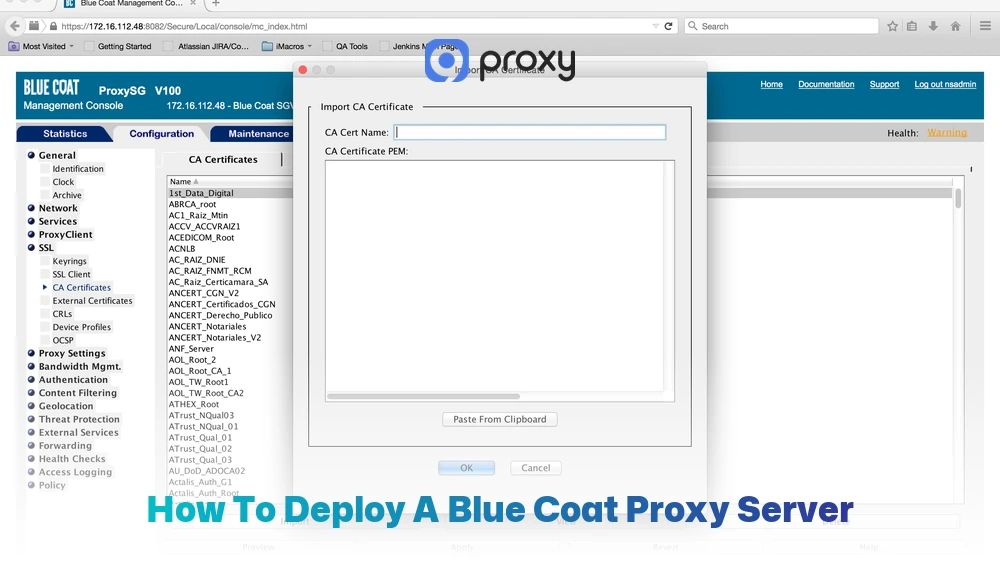
- Enable SSL inspection: Install the proxy’s security certificate on company devices so encrypted HTTPS traffic can be inspected safely.
Before rolling this out fully, test everything in a staging environment. Always back up your configuration before major changes, and monitor logs closely to understand how users are affected by new policies.
Troubleshooting Common Blue Coat Proxy Issues
Even the best systems have hiccups. If you encounter issues with your Blue Coat proxies, here is how to handle them:
- SSL Certificate Errors: Usually happens if the proxy’s certificate isn’t trusted by the user’s browser. Re-deploy the root certificate via Group Policy.
- Blocked Sites Misclassified: Sometimes a safe site is tagged wrongly. Use the management console to “Allow-list” the specific URL.
- Slow Internet: This is often caused by an overloaded cache or too many SSL inspection rules. Try reducing the number of sites that require deep inspection.
- AD Policy Sync Failures: Check the connection between the proxy and your Domain Controller; usually a firewall rule or password issue.
How Blue Coat Proxy Works with SIEM, CASB, and Other Security Tools
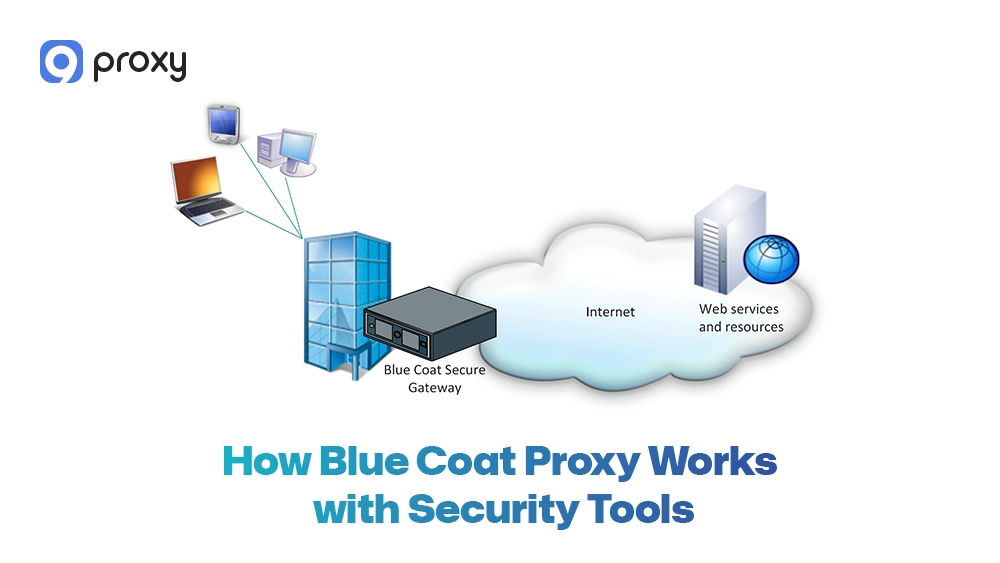
Modern security relies on systems working together. A Blue coat proxy server does not operate on its own; instead, it shares data and insights with the rest of your security tools to strengthen overall protection. This approach is often compared with a cloud proxy server model, but with deeper local control.
-
- SIEM Systems: It sends detailed web logs to tools like Splunk or Blue Coat firewall logic to help identify patterns of an ongoing attack.
- CASBs (Cloud Access Security Brokers): It helps monitor which cloud apps (like Dropbox or Google Drive) your employees are using, preventing “Shadow IT.”
- SASE Framework: It acts as the local edge for a Secure Access Service Edge architecture, ensuring remote and local users get the same protection.
- Secure Web Gateway (SWG): It provides the core engine for modern SWG solutions, giving you 360-degree visibility.
What Affects the Price of a Blue Coat Proxy Server?
The proxy server price for Blue Coat is not fixed and depends on your specific setup. Since it is an enterprise solution, pricing is usually provided through custom quotes rather than a public price list. Several factors affect the final cost:
- Hardware vs. virtual deployment: Physical appliances cost more upfront, while virtual versions reduce hardware costs but may require server hosting.
- User count: Licenses are often based on how many users the proxy will support, such as 500 or 1,000 users.
- Software modules: Extra features like advanced threat detection or data loss prevention (DLP) increase the price.
- Support level: Around-the-clock, mission-critical support costs more than standard business-hour support.
In most cases, you will need to request a quote from the vendor. For medium-sized organizations, costs can range from several thousand to tens of thousands of dollars, depending on scale and contract length.

FAQs
Can a Bluecoat Proxy Server be used in conjunction with a firewall?
Yes, and this is actually the recommended approach. A firewall focuses on network-level protection, such as controlling ports and IP addresses. A Bluecoat Proxy Server works at the application level, inspecting web content, URLs, and user behavior. When used with a proxy server firewall setup, it creates a layered defense strategy with stronger traffic filtering and policy control.
Does the Bluecoat Proxy Server support integration with other security solutions?
Yes. It is designed to work with other tools in your security stack. Bluecoat Proxy Server can integrate with SIEM systems, endpoint protection platforms, and identity providers like Okta or Azure AD. This integration helps create a unified view of security events and improves response times.
Is a Bluecoat Proxy Server scalable for different organizational sizes?
Yes. Organizations can start with a small virtual appliance for limited use and gradually scale up to large, load-balanced hardware clusters as user numbers and traffic increase.
Can a Bluecoat Proxy Server help organizations with remote or distributed workforces?
Yes. Through hybrid and cloud-based deployment models, it ensures that remote users follow the same security policies as users working inside the main office, helping maintain consistent protection everywhere.
Conclusion
A Blue Coat proxy server is a strong, secure web gateway designed for organizations that need high levels of control, visibility, and compliance. By understanding how it works, how it compares with other proxy and firewall solutions, and what influences the overall cost, you can make a more informed decision. Teams that want broader proxy education can also review practical resources from Blog9Proxy before choosing a deployment model.
If your organization requires enterprise-grade web security with deep traffic inspection and clear policy enforcement, a Blue Coat proxy server continues to be a reliable choice. For teams that also need residential proxy infrastructure for research, testing, or secure browsing workflows, 9Proxy provides proxy solutions that can support wider security and data access strategies.